Windows 7 Forums Search
Welcome to Windows 7 Forums. Our forum is dedicated to helping you find solutions with any problems, errors or issues you are experiencing with Windows 7. The Windows 7 forum also covers news and updates and has an extensive Windows 7 tutorial section that covers a wide range of tips and tricks.


Windows 7 - Can't Leave Homegroup...

 
09-04-2009   #1


Windows 7


Can't Leave Homegroup...

I can't figure out how to leave my homegroup... both homegroup services are running...

My System SpecsSystem Spec
09-04-2009   #2
LFB


Windows7 Enterprise SP1 x64 (Technet)


Welcome to Sevenforuns Jaxel.

Type homegroup on search and look for: leave the homegroup...
My System SpecsSystem Spec
09-04-2009   #3


Windows 7


All the threads I found said all I needed to do was start the HomeGroup Listener and HomeGroup Provider services running. I got them running and it still wouldn't let me leave.

I enabled the following services which I previously had disabled...

Base Filtering Engine
DNS Client
Function Discovery Provider Host
Function Discovery Resource Publication
HomeGroup Listener
HomeGroup Provider
Server
SSDP Discovery
UPnP Device Host
Windows Firewall

Last edited by Jaxel; 09-04-2009 at 03:29 PM..
My System SpecsSystem Spec
.


09-04-2009   #4


Windows 7


It seems like I have no control over my homegroup...

I can't change the password either, it just says "Windows cannot setup homegroup on this computer".

I can't change the settings either, the setting changes are just ignored. Can't turn on network discovery or anything.

*EDIT* I can turn on Network Discovery after enabling SSDP Discovery, but I still can't leave the homegroup or change the password.
My System SpecsSystem Spec
09-04-2009   #5


Windows 7 RC (Build 7100)


I have the same problem! Here is my thread with more detailed info on what I'm seeing. Homegroup Functionality Is Broken
My System SpecsSystem Spec
01-07-2010   #6


Try This

Go into homegroup and choose change advanced settings then scroll down to the bottom and check Use user accounts and passwords to connect to other computers. Follow on screen prompts then you should be able to join or create a Homegroup. Hope it helps.
My System SpecsSystem Spec
01-07-2010   #7


Windows 7 RTM X64


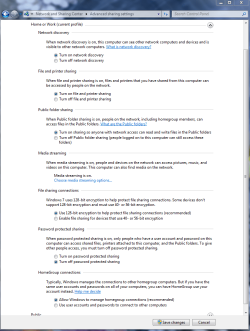
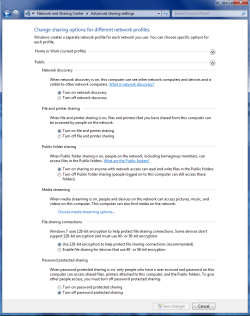
Try doing this first> Homegroup - Leave

Then make sure that all these settings look like this under Advanced Sharing Settings.
Attached Thumbnails
Can't Leave Homegroup...-home-work-homegroup-enable.png   Can't Leave Homegroup...-public-sharing-enabled-all.png  
My System SpecsSystem Spec
02-28-2010   #8


Windows 7 x64


Problem Solved!

Hi, I'm sure this will help many of you as I was getting exactly the same problems as a lot of you.

Firstly, I decided to address the problem when my computer was constantly resetting itself and the problem seemed to be getting more frequent.

So, I checked my event log (Computer(rightclick) > Manage > Event Viewer > Windows Logs > System). It showed me a whole bunch of errors containing two services. Either Peer Networking Grouping or Peer Name Resolution Protocol. I checked out Services (type services in the search bar on start) and found that I could not start these two services manually either. I disabled them which stopped my computer restarting itself and cleared the event log of any errors I was receiving before.

I now, however, couldn't see any other computers in my Homegroup and couldn't leave it, change what I was sharing or view the password, which are many of the symptoms you guys were receiving.

How I fixed the problem

Go to C:\Windows\ServiceProfiles\LocalService\AppData\Roaming\PeerNetworking and delete all of the files in this folder. Now restart the computer.

Go to Services again and you should be able to start 'Peer Networking Grouping' and 'Peer Name Resolution Protocol'. Restart the computer again.

When you log on this time, check the event log again, to ensure no errors concerning the two services are present and also check Services to ensure the two services concerned are running.

You should now have full functionality restored to your homegroup.

I hope this helps, let me know if it works.

Nick
My System SpecsSystem Spec
04-18-2010   #9


Windows 7


Hi Sonick26
Thanks for posting.
I had the same problem and what you said fixed my homegroup issues.
I just wanted to thank you
My System SpecsSystem Spec
04-18-2010   #10


Windows 7 RTM X64


Quote   Quote: Originally Posted by AALA View Post
Hi Sonick26
Thanks for posting.
I had the same problem and what you said fixed my homegroup issues.
I just wanted to thank you
Thanks for reporting in AALA, this is a well known work around that has been out for quite a while now.

Cannot leave Homegroup


You may need to go back into services and enable Peernetworking again after the fix. Don't forget to restart all machines after the fix.

Source, original Technet fix for this problem was well before the RTM.
http://social.answers.microsoft.com/...4-266bdfaddd37

http://social.technet.microsoft.com/...c-e9a2c1469bd7

Last edited by chev65; 04-18-2010 at 01:52 PM..
My System SpecsSystem Spec
Reply

 Can't Leave Homegroup... problems?


Thread Tools


Similar Threads for: Can't Leave Homegroup...
Thread Forum
Homegroup - Leave Tutorials
Solved Cannot leave Homegroup Network & Sharing
Leave Windows 7 Homegroup, Cannot leave homegroup from broken computer Network & Sharing
homegroup - cant see other hg computers, cant leave hg Network & Sharing
Can't leave unwanted Homegroup ? Network & Sharing


All times are GMT -5. The time now is 04:39 PM.


Windows 7 Forums is an independent web site and has not been authorized,
sponsored, or otherwise approved by Microsoft Corporation.
"Windows 7" and related materials are trademarks of Microsoft Corp.
© Designer Media Ltd
  

1 2 3 4 5 6 7 8 9 10 11 12 13 14 15 16 17 18 19 20 21 22 23 24 25 26 27 28 29 30