| Windows 7: WiFi limited access on startup |
25 Jun 2012
|
#1 | | Microsoft Windows 7 Home Premium 64-bit 7601 Multiprocessor Free Service Pack 1 |
WiFi limited access on startup Every time I start my laptop, I can't access the internet and get a "limited access" warning on my wireless network.
The "troubleshoot problems" option fixes the problem (usually by resetting the network adapter), but it's not a permanent solution, because as soon as I restart the laptop, it's the same story all over again.
I have a desktop (Windows 7) connected through ethernet and another desktop (XP Home) also connected over wifi, both working just fine.
OS: Microsoft Windows 7 Home Premium 64-bit 7601 Multiprocessor Free Service Pack 1
Network adapter: Ralink RT5390 802.11b/g/n WiFi Adapter
Signal strength: fair (starting my laptop right next to the router to get excellent strength doesn't help)
Modem/Router: B-Box2 (Sagem F@st 3464)
Firewall: Windows Firewall
Antivirus: AVG Free Edition | My System Specs |
| OS Microsoft Windows 7 Home Premium 64-bit 7601 Multiprocessor Free Service Pack 1 CPU Intel(R) Core(TM) i3-2330M CPU @ 2.20GHz Motherboard Hewlett-Packard 1670 Memory 4,00 GB Graphics Card (1) Intel(R) HD Graphics Family (2) Radeon (TM) HD 7450M Sound Card (1) IDT High Definition Audio CODEC (2) Intel(R) Display A Screen Resolution 1366 x 768 x 32 bits @ 60 Hz Hard Drives ST9500325AS |
25 Jun 2012
|
#2 | | Windows 7 Ult, Windows 8 Pro, San Diego |
Most likely this is because of a preinstalled wireless connection software which can be uninstalled by going to add/remove programs. In most cases it's best to use the Windows 7 connection wizard.
I would definitely get rid of the "free" AVG as this software causes connection problems all the time.
Let me know if those changes have any effect on the problem. | My System Specs | | System Manufacturer/Model Number Home built OS Windows 7 Ult, Windows 8 Pro, CPU Q9650-4.275GHz, E8600 4.5GHz, E6750-3.8GHz Motherboard Evga 780i FTW Memory G.Skill PC2 9600 1200Mhz 5 5 5 15 2T Graphics Card GTX480 Sound Card Asus Xonar D2 Monitor(s) Displays HannsG Screen Resolution 1680X1050 Keyboard Logitech G15 Mouse Logitech G9 PSU ThermalTake Toughpower 1000Watt modular Case ThermalTake XaserV Cooling Xigmatek S1283 Hard Drives GSkill Phoenix Pro 120GB SSD Internet Speed T1 |
26 Jun 2012
|
#3 | | Microsoft Windows 7 Home Premium 64-bit 7601 Multiprocessor Free Service Pack 1 |

Quote: Originally Posted by chev65 Most likely this is because of a preinstalled wireless connection software which can be uninstalled by going to add/remove programs. In most cases it's best to use the Windows 7 connection wizard. Nothing like that on this laptop Quote: I would definitely get rid of the "free" AVG as this software causes connection problems all the time. Yup, that did the trick.
What alternatives do you suggest to AVG? | My System Specs | | OS Microsoft Windows 7 Home Premium 64-bit 7601 Multiprocessor Free Service Pack 1 CPU Intel(R) Core(TM) i3-2330M CPU @ 2.20GHz Motherboard Hewlett-Packard 1670 Memory 4,00 GB Graphics Card (1) Intel(R) HD Graphics Family (2) Radeon (TM) HD 7450M Sound Card (1) IDT High Definition Audio CODEC (2) Intel(R) Display A Screen Resolution 1366 x 768 x 32 bits @ 60 Hz Hard Drives ST9500325AS |
26 Jun 2012
|
#4 | | Windows 7 Ult, Windows 8 Pro, San Diego |

Quote: Originally Posted by Andoria 
Quote: Originally Posted by chev65 Most likely this is because of a preinstalled wireless connection software which can be uninstalled by going to add/remove programs. In most cases it's best to use the Windows 7 connection wizard. Nothing like that on this laptop Quote: I would definitely get rid of the "free" AVG as this software causes connection problems all the time. Yup, that did the trick.
What alternatives do you suggest to AVG? You should try Malware bytes "MBAM" and Microsoft security essentials is also good. Malwarebytes : Free anti-malware, anti-virus and spyware removal download Spyware Protection | Free Spyware Protection | Microsoft Security Essentials
I'm not sure what's up with AVG but it seems to cause problems with wireless connections on a regular basis. I'll mark as solved. | My System Specs | | System Manufacturer/Model Number Home built OS Windows 7 Ult, Windows 8 Pro, CPU Q9650-4.275GHz, E8600 4.5GHz, E6750-3.8GHz Motherboard Evga 780i FTW Memory G.Skill PC2 9600 1200Mhz 5 5 5 15 2T Graphics Card GTX480 Sound Card Asus Xonar D2 Monitor(s) Displays HannsG Screen Resolution 1680X1050 Keyboard Logitech G15 Mouse Logitech G9 PSU ThermalTake Toughpower 1000Watt modular Case ThermalTake XaserV Cooling Xigmatek S1283 Hard Drives GSkill Phoenix Pro 120GB SSD Internet Speed T1 |
01 Jul 2012
|
#5 | | Microsoft Windows 7 Home Premium 64-bit 7601 Multiprocessor Free Service Pack 1 |
I'm reopening this thread because I've been having the same (or at least similar) problems last days...
I'm currently using Microsoft Security Essentials.
The wireless icon (bottom-right of screen) turns into an hourglass icon (the blue windows 7 circle) and keeps spinning indefinitely until I click "troubleshoot problems", which tells me the IP configuration is invalid. The problem gets solved automatically, except that it just happens again the next time I turn on my laptop. | My System Specs | | OS Microsoft Windows 7 Home Premium 64-bit 7601 Multiprocessor Free Service Pack 1 CPU Intel(R) Core(TM) i3-2330M CPU @ 2.20GHz Motherboard Hewlett-Packard 1670 Memory 4,00 GB Graphics Card (1) Intel(R) HD Graphics Family (2) Radeon (TM) HD 7450M Sound Card (1) IDT High Definition Audio CODEC (2) Intel(R) Display A Screen Resolution 1366 x 768 x 32 bits @ 60 Hz Hard Drives ST9500325AS |
01 Jul 2012
|
#6 | | Windows 7 Ult, Windows 8 Pro, San Diego |

Quote: Originally Posted by Andoria I'm reopening this thread because I've been having the same (or at least similar) problems last days...
I'm currently using Microsoft Security Essentials.
The wireless icon (bottom-right of screen) turns into an hourglass icon (the blue windows 7 circle) and keeps spinning indefinitely until I click "troubleshoot problems", which tells me the IP configuration is invalid. The problem gets solved automatically, except that it just happens again the next time I turn on my laptop. If you can post a screen shot of the ipconfig/all it would be most helpful. | My System Specs | | System Manufacturer/Model Number Home built OS Windows 7 Ult, Windows 8 Pro, CPU Q9650-4.275GHz, E8600 4.5GHz, E6750-3.8GHz Motherboard Evga 780i FTW Memory G.Skill PC2 9600 1200Mhz 5 5 5 15 2T Graphics Card GTX480 Sound Card Asus Xonar D2 Monitor(s) Displays HannsG Screen Resolution 1680X1050 Keyboard Logitech G15 Mouse Logitech G9 PSU ThermalTake Toughpower 1000Watt modular Case ThermalTake XaserV Cooling Xigmatek S1283 Hard Drives GSkill Phoenix Pro 120GB SSD Internet Speed T1 |
02 Jul 2012
|
#7 | | Microsoft Windows 7 Home Premium 64-bit 7601 Multiprocessor Free Service Pack 1 |
Small update: sometimes the troubleshooter doesn't work, and I have to disconnect/reconnect to the network manually. That usually solves the problem. When it doesn't, rerunning the troubleshooter does work.
I've attached the output of ipconfig /all in this post (both during "limited access" and when connected) | My System Specs | | OS Microsoft Windows 7 Home Premium 64-bit 7601 Multiprocessor Free Service Pack 1 CPU Intel(R) Core(TM) i3-2330M CPU @ 2.20GHz Motherboard Hewlett-Packard 1670 Memory 4,00 GB Graphics Card (1) Intel(R) HD Graphics Family (2) Radeon (TM) HD 7450M Sound Card (1) IDT High Definition Audio CODEC (2) Intel(R) Display A Screen Resolution 1366 x 768 x 32 bits @ 60 Hz Hard Drives ST9500325AS |
02 Jul 2012
|
#8 | | Windows 7 Ult, Windows 8 Pro, San Diego |

Quote: Originally Posted by Andoria Small update: sometimes the troubleshooter doesn't work, and I have to disconnect/reconnect to the network manually. That usually solves the problem. When it doesn't, rerunning the troubleshooter does work.
I've attached the output of ipconfig /all in this post (both during "limited access" and when connected) It's losing the connection to the router intermittently it looks like. This can occur for a couple of reasons, either channel overlap or weak connection, possibly the type of security and encryption being used isn't correct.
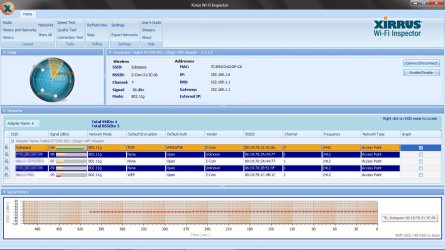
I need to see which channels are being used in your area and which security and encryption is being used, Xirrus wifi scanner is very useful for this. If you can download the program and post a screen shot of the read out it will be very helpful. Wi-Fi Inspector | Xirrus | My System Specs | | System Manufacturer/Model Number Home built OS Windows 7 Ult, Windows 8 Pro, CPU Q9650-4.275GHz, E8600 4.5GHz, E6750-3.8GHz Motherboard Evga 780i FTW Memory G.Skill PC2 9600 1200Mhz 5 5 5 15 2T Graphics Card GTX480 Sound Card Asus Xonar D2 Monitor(s) Displays HannsG Screen Resolution 1680X1050 Keyboard Logitech G15 Mouse Logitech G9 PSU ThermalTake Toughpower 1000Watt modular Case ThermalTake XaserV Cooling Xigmatek S1283 Hard Drives GSkill Phoenix Pro 120GB SSD Internet Speed T1 |
02 Jul 2012
|
#9 | | Microsoft Windows 7 Home Premium 64-bit 7601 Multiprocessor Free Service Pack 1 |
At my desk (where my laptop's usually located), the only available network is mine.
At other places, this is the readout:
I've checked my encryption settings* and they match my router's configuration.
My link is very reliable, I don't get any disconnects and my download speed is stable. I just get connection problems the first time I try connecting.
* I also have a MAC filter, but disabling it doesn't help. | My System Specs | | OS Microsoft Windows 7 Home Premium 64-bit 7601 Multiprocessor Free Service Pack 1 CPU Intel(R) Core(TM) i3-2330M CPU @ 2.20GHz Motherboard Hewlett-Packard 1670 Memory 4,00 GB Graphics Card (1) Intel(R) HD Graphics Family (2) Radeon (TM) HD 7450M Sound Card (1) IDT High Definition Audio CODEC (2) Intel(R) Display A Screen Resolution 1366 x 768 x 32 bits @ 60 Hz Hard Drives ST9500325AS |
02 Jul 2012
|
#10 | | Windows 7 Ult, Windows 8 Pro, San Diego |
The only possible problem I see here is the encryption. In many cases with Windows 7 drivers AES encryption seems to be more stable than using TKIP. In fact WPA2 security is made to work with AES encryption.
If you can try changing to AES encryption in your routers settings then edit the wireless profile to use AES encryption just to see how it works for now. | My System Specs | | System Manufacturer/Model Number Home built OS Windows 7 Ult, Windows 8 Pro, CPU Q9650-4.275GHz, E8600 4.5GHz, E6750-3.8GHz Motherboard Evga 780i FTW Memory G.Skill PC2 9600 1200Mhz 5 5 5 15 2T Graphics Card GTX480 Sound Card Asus Xonar D2 Monitor(s) Displays HannsG Screen Resolution 1680X1050 Keyboard Logitech G15 Mouse Logitech G9 PSU ThermalTake Toughpower 1000Watt modular Case ThermalTake XaserV Cooling Xigmatek S1283 Hard Drives GSkill Phoenix Pro 120GB SSD Internet Speed T1 WiFi limited access on startup problems? All times are GMT -5. The time now is 09:10 AM. | |