Windows 7 Forums


Windows 7: Network status window - how to configure what to display

11 Jul 2012  
Dertarr

Windows 7 Professional x64
2 posts
Minsk
 
 
Network status window - how to configure what to display

Hello!


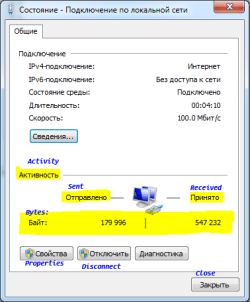
I'm testing ethernet hardware and need to know how many packets were sent and received through 100 Mbit ethernet card. There is a window that displays status of network connection. Sometimes it shows number of bytes that were sent/received, and sometimes - number of packets. Is there a way to configure that window always to show number of packets?

A picture is included to the post to make it clear what do I mean.
There is also a command "netstat -e" callable in command line, but It shows doubled number of packets in both directions


Paul.
Attached Thumbnails
Network status window - how to configure what to display-dh-dh-dh-dh-dh-dh-2.png  
My System SpecsSystem Spec

11 Jul 2012  
onesixski

Windows 7 Professional x64
84 posts
London, UK


I would definitely go with some network monitoring software, even Microsoft has its own program (Microsoft Network Monitor, how original lol). Trying to get reliable/accurate data from that window is like trying to claim your PC's power from the Windows Experience Index.
My System SpecsSystem Spec
11 Jul 2012  
onesixski

Windows 7 Professional x64
84 posts
London, UK


I recommend Colasoft Capsa and Wireshark as some nice 3rd-party analyzers/monitors
My System SpecsSystem Spec
.


11 Jul 2012  
solarmystic

Windows 7 x64 Professional SP1
2,173 posts
Geordieland, Tyne and Wear


Just for discussion's sake, I've had this question for the longest time too, and discovered the answer by accident.

I was having some trouble with the ethernet NIC adapter on my laptop, and decided to update the drivers to the latest ones.

Before I updated it, it showed the sent and received data as bytes. After I updated it, it showed the data as packets. Just to be sure it wasn't a fluke, I performed a rollback to the previous drivers, and it showed the data as bytes again.

This has led me to the conclusion that the network card's driver plays a role in the type of data that it displays in that box. (The drivers would report the data to windows as packets or bytes, which is then shown on your status box)
My System SpecsSystem Spec
11 Jul 2012  
Dertarr

Windows 7 Professional x64
2 posts
Minsk


solarmystic
Well, I've downloaded a fresh driver from Realtek website and installed it... and statistics window still shows bytes.

onesixski,
Wireshark is not good enough: it skips about half of all packets when traffic is intensive. Somehow it manages to collect all transferred bytes correctly, but only to show very weird results in it's own statistics window, like average "bytes per packet" parameter of 2500 or more. (In 100 Mbit network)
I'll check other recommended software. Thanks!
My System SpecsSystem Spec
Reply

 Network status window - how to configure what to display problems?


Thread Tools


Similar help and support threads for: Network status window - how to configure what to display
Thread Forum
Solved How do I get Explorer Status bar to display total file size? Customization
Network Connection Status Window Network & Sharing
Network Status Network & Sharing
Status window General Discussion
configure win 7 to allow vmware network adapters Network & Sharing


All times are GMT -5. The time now is 08:33 AM.


Windows 7 Forums is an independent web site and has not been authorized,
sponsored, or otherwise approved by Microsoft Corporation.
"Windows 7" and related materials are trademarks of Microsoft Corp.
© Designer Media Ltd