Windows 7 Forums


Windows 7: wired connection drops/ refreshes

31 Jul 2012   #1

win 7 pro 64bit
 
 
wired connection drops/ refreshes

Hello


My PC (Windows 7 pro 64) is connected to a superhub via a wire. over the past month or so i am suffering from intermittent loss of connection for about 5 seconds. this can happen every hour, sometimes more frequently.
the signs i see are:
loss of streaming data
no connection icon over the network icon
data in the application i run disappears and a few seconds later pops back up (to the eyes "like a webpage would refresh"

i have been with my internet provider over the phone on multiple occasion, had a technician visit and the problem will not go away

i have noticed that the problem did not occur on a laptop connected wirelessly, so today i connected that same laptop with a wire(disable wireless) for a test- no problem there

so, it seems there is something in my PC which causes all that
network adapters: (Realtek RTL8168D/8111D family) both updated

any idea where should i search?

thanks

My System SpecsSystem Spec

31 Jul 2012   #2

Windows 7 Ult, Windows 8 Pro,
San Diego


Quote   Quote: Originally Posted by ehud View Post
Hello


My PC (Windows 7 pro 64) is connected to a superhub via a wire. over the past month or so i am suffering from intermittent loss of connection for about 5 seconds. this can happen every hour, sometimes more frequently.
the signs i see are:
loss of streaming data
no connection icon over the network icon
data in the application i run disappears and a few seconds later pops back up (to the eyes "like a webpage would refresh"

i have been with my internet provider over the phone on multiple occasion, had a technician visit and the problem will not go away

i have noticed that the problem did not occur on a laptop connected wirelessly, so today i connected that same laptop with a wire(disable wireless) for a test- no problem there

so, it seems there is something in my PC which causes all that
network adapters: (Realtek RTL8168D/8111D family) both updated

any idea where should i search?

thanks
That problem doesn't sound typical or normal to me at all.

Have you tried running the sfc/scannow command to determine if there are any system file problems?
My System SpecsSystem Spec
31 Jul 2012   #3

win 7 pro 64bit
 
 
no, how do i do that?

thanks
My System SpecsSystem Spec
.


31 Jul 2012   #4

Windows 7 Ult, Windows 8 Pro,
San Diego


Quote   Quote: Originally Posted by ehud View Post
thanks
SFC /SCANNOW Command - System File Checker
My System SpecsSystem Spec
31 Jul 2012   #5

win 7 pro 64bit
 
 
thanks, just did

"Windows Resource Protection did not find any integrity violations"

any other ideas?

thanks again
My System SpecsSystem Spec
31 Jul 2012   #6

Windows 7 Ult, Windows 8 Pro,
San Diego


Quote   Quote: Originally Posted by ehud View Post
"Windows Resource Protection did not find any integrity violations"

any other ideas?

thanks again
It's good that it past the sfc test which narrows the problem down a bit. Do you have iTunes installed on this system?

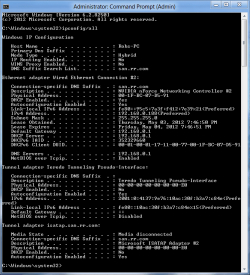
If you can post a screen shot of your ipconfig/all it may help me to spot other potential problems.

IP Address - Locate and Find for Your Computer

There is nothing really private showing up on the ipconfig as it only shows the LAN IP's not the WAN IP's.
Attached Thumbnails
wired connection drops/ refreshes-my-ipconfig.png  

Last edited by chev65; 31 Jul 2012 at 12:15 PM..
My System SpecsSystem Spec
31 Jul 2012   #7

win 7 pro 64bit
 
 
ok, here it is

will add soon

Last edited by ehud; 31 Jul 2012 at 12:09 PM.. Reason: private info on web, not very clever
My System SpecsSystem Spec
01 Aug 2012   #8

win 7 pro 64bit
 
 
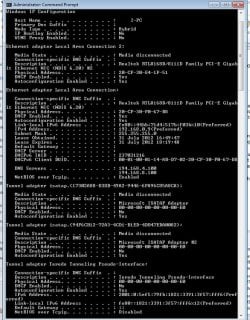
ipconfig is attached

anything?

thanks
Attached Thumbnails
wired connection drops/ refreshes-ipconfig.jpg  
My System SpecsSystem Spec
01 Aug 2012   #9

Windows 7 Ult, Windows 8 Pro,
San Diego


Quote   Quote: Originally Posted by ehud View Post
anything?

thanks
For some reason your not picking up the default gateway or DHCP server which is probably the same IP. I'm not sure what a super hub is?

You might try entering the default gateway manually into your IPv4 properties, it should be something like 192.168.0.1 though I can't say if this will fix the intermittent connection issue with the wireless connection.

There are other adjustments you can make to the Realtek connection under the advanced settings in Device Manager, it's hard to say which setting might have an effect but trial and error should help you find the problem.

Last edited by chev65; 01 Aug 2012 at 10:31 AM..
My System SpecsSystem Spec
01 Aug 2012   #10

win 7 pro 64bit
 
 
thanks those values were masked by me

wasn't aware it was a deafault, i do pick them up
My System SpecsSystem Spec
Reply

 wired connection drops/ refreshes problems?


Thread Tools


Similar help and support threads for: wired connection drops/ refreshes
Thread Forum
Internet Access Randomly Drops on Wired & Wireless Connection Network & Sharing
Windows 7 intermittently drops wired connection Network & Sharing
Random Drops of Wired connections Network & Sharing


All times are GMT -5. The time now is 01:29 AM.


Seven Forums Android App Seven Forums IOS App Follow us on Facebook

Windows 7 Forums is an independent web site and has not been authorized,
sponsored, or otherwise approved by Microsoft Corporation.
"Windows 7" and related materials are trademarks of Microsoft Corp.
© Designer Media Ltd
  

1 2 3 4 5 6 7 8 9 10 11 12 13 14 15 16 17 18 19 20 21 22 23 24 25 26 27 28 29 30 31 32