Windows 7 Forums Search
Welcome to Windows 7 Forums. Our forum is dedicated to helping you find solutions with any problems, errors or issues you are experiencing with Windows 7. The Windows 7 forum also covers news and updates and has an extensive Windows 7 tutorial section that covers a wide range of tips and tricks.


Windows 7 - How to edit the Hosts file in 7

 
09-12-2009   #1


Windows 7


How to edit the Hosts file in 7

Hi people

I need help here, I have some older applications that wont work unless i change their 'update ip', (dont know what its called), in the hosts file.

I have found numerous ideas on how to edit in the hosts file, but none of them has worked so far.

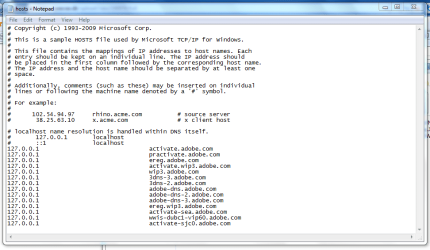
When I run Notepad as administrator, and from there > Open > Browse to 'C:\Windows\System32\drivers\etc\hosts' it only open a sample of the 'hosts' file. It wont let me open the real file for some reason. I am logged in as admin and additionally I run Notepad as admin too - Which should let me do what ever I want, - Right?


I have already read and tried these 'solutions' but none of them worked:

Edit hosts file in Windows 7 & Windows Vista | Windows Reference

How to: Edit Hosts File in Windows 7 | COMPUTELOGY - Tech, Tips n Reviews on Windows Linux Mac


Is there a work-around to this?

NB: I am using an OEM (dell) version of Windows 7

My System SpecsSystem Spec
09-12-2009   #2


You need to Take Ownership of the host file... See Brinks tutorial --==> Here

Also see this .... Hosts File : Use in Windows 7 / Vista

Last edited by Tews; 09-13-2010 at 09:21 AM..
My System SpecsSystem Spec
09-12-2009   #3


Windows 7 Enterprise x64 SP1 | Windows 8 build 7989


If you open the hosts file in the default location, and there is nothing in there....

then the instructions are lying to you and you need to find out where the IP is really being stored.

One thing - how long ago did the IP change? If recently, entering the command
Code:
ipconfig /flushdns
may help resolve this issue.
My System SpecsSystem Spec
.


09-12-2009   #4


Windows 7 (7600) x86


What I do, drag a copy of the host file to my desktop, edit that, then drag the copy back to the rightful location. Done deal.
My System SpecsSystem Spec
09-12-2009   #5


Windows 7 Enterprise x64 SP1 | Windows 8 build 7989


@Tews - I just edited my hosts file without taking ownership - only ran Notepad as admin just as the OP stated.
My System SpecsSystem Spec
09-12-2009   #6


Windows 7 Enterprise x64 SP1


Quote   Quote: Originally Posted by johngalt View Post
@Tews - I just edited my hosts file without taking ownership - only ran Notepad as admin just as the OP stated.

You must of changed something, by default you need to take ownership.
My System SpecsSystem Spec
09-12-2009   #7


Windows 7


Tews>
Just tried out the 'Take Ownership', but as you see in the link below, it didnt work:

peecee.dk | Vis upload sniped1.PNG

johngalt>
I got this Dell laptop only days ago and reinstalled this OEM of Windows 7 yesterday. The applications I want to use are really old, but I have some old files that I need to open with them. - I dont think I know exactly what you mean by 'how long ago did the IP change?' or what the command might do for me, - I still need to change the app 'update IP' to another, otherwise everytime I open the application it wont let me continue. :S I used to be able to do this in XP and Vista, but in 7 it seems the hosts file is totally locked somehow?

logicearth>
I've already tried that, but you see - the hosts file that I copy still only shows as a sample no matter where I take it. Editing the sample wont do me anything I'm afraid
My System SpecsSystem Spec
09-12-2009   #8


Windows 7


Tews>
Here's a bigger picture for you

peecee.dk | Vis upload sniped1.PNG
My System SpecsSystem Spec
09-12-2009   #9


Windows 7


Just did a search for more entries of a/the hosts file in 7, and this came up -

peecee.dk | Vis upload sniped2.PNG

Do you think that any of the 2 other instances are the 'right' hosts file?
My System SpecsSystem Spec
09-12-2009   #10


C:\Windows\System32\Drivers\ETC\Hosts should be the default & correct location for the host file

I've just copied the file to Documents and opened it directly from there, no admin privliges needed. You should be able to edit it, save it, then copy it back to it original home. You will need to confirm a UAC notification....
My System SpecsSystem Spec
Reply

 How to edit the Hosts file in 7 problems?


Thread Tools


Similar Threads for: How to edit the Hosts file in 7
Thread Forum
Solved Hosts file-S?? System Security
HOSTS File - Create a "Edit HOSTS file" Shortcut Tutorials
HOSTS file Network & Sharing
how to set etc/hosts file in windows 7 Network & Sharing


All times are GMT -5. The time now is 04:40 PM.


Windows 7 Forums is an independent web site and has not been authorized,
sponsored, or otherwise approved by Microsoft Corporation.
"Windows 7" and related materials are trademarks of Microsoft Corp.
© Designer Media Ltd
  

1 2 3 4 5 6 7 8 9 10 11 12 13 14 15 16 17 18 19 20 21 22 23 24 25 26 27 28 29 30