Solved connection speed drops after minutes connected

MATHOMAS

New member
I can connect to the internet and browse but after anywhere from a minute to ten minutes my connection speed drops or i get disconnected all together. I only have this problem at school in my dorm.
It works fine on my wifi at home and in other buildings on campus. I know nothing is wrong with my dorm building because my roommate who also uses windows 7 has no problems connecting and staying connected.
I have talked to the I T dept. at school and they didnt help much at all. I have run a Malwarebytes full scan and it didnt find anything. I have disabled McAfee and the problem still persists. I have also changed all settings on my wifi card to the most aggressive possible and disabled all power saving options.
When i run a diagnostic on my connection while im having problems i generally get one of two errors.
"the connection between your access point, router, or cable modem and the internet is broken" or
"the default gateway is not available"
If i get the second error it says its been fixed and my connection will speed up again for about another 5 minutes and then the cycle repeats.

If anyone has any ideas on what it could be please let me know because im pretty good with computers and this has me completely stumped
 

My Computer

Computer Manufacturer/Model Number
Dell/ studio xps 1645
OS
Windows 7 64 bit
CPU
Intel core I7
Internet Speed
slow lol
Hi there,

We can have a look at your signal strength. Please download, install and run Xirrus Wi-Fi Inspector.
To run Xirrus Wi-Fi Inspector, double click the Xirrus icon on your Desktop, you may use the Windows 7 snipping tool to crop or Paint by tapping the Print screen key on your keyboard, open up Paint (Click on Start>All Programs>Accessories>Paint) then choose Edit from the Menu and select Paste, then save it and please attach the file on your next post.
 

My Computer

Computer Manufacturer/Model Number
Lenovo Desktop/Samsung Laptop
OS
Win7 & Win8 64bit
CPU
Intel i5
Internet Speed
Charter-20 Mbps
Antivirus
Avast
Browser
FF, IE9 and Chrome
Untitled.png

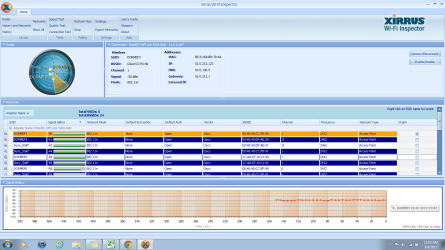
Here it is. Like i said the signal strength is fine in my room because my roommates computer works fine and his is a crappier version of mine. I use the DORMEF3 connection at the top of the list.
 

My Computer

Computer Manufacturer/Model Number
Dell/ studio xps 1645
OS
Windows 7 64 bit
CPU
Intel core I7
Internet Speed
slow lol
Too many unsecured networks all using channel 1 and 11, I'm also wondering why there are a bunch of repeat wireless networks that say the same thing. Lots of channel overlap going on there from the looks of it.

I guess that's how they do things on college dorms these days but it certainly isn't how I'd set those networks up. :)
 

My Computer

Computer type
PC/Desktop
Computer Manufacturer/Model Number
Home built
OS
Windows 7 Ult, Windows 8.1 Pro,
CPU
Q9650-4.275GHz, E8600 4.5GHz, E6750-3.8GHz
Motherboard
Evga 780i FTW
Memory
G.Skill PC2 9600 1200Mhz 5 5 5 15 2T
Graphics Card(s)
GTX480
Sound Card
Asus Xonar D2
Monitor(s) Displays
HannsG
Screen Resolution
1680X1050
Hard Drives
GSkill Phoenix Pro 120GB SSD
PSU
ThermalTake Toughpower 1000Watt modular
Case
ThermalTake XaserV
Cooling
Xigmatek S1283
Keyboard
Logitech G15
Mouse
Logitech G9
Internet Speed
T1
yea i know i thought the same thing. it still doesnt really explain why other people have no issues with it. i used my roommates computer to bridge a connection to my xbox yesterday and i played for like 3 hours with no problem. yet when i try to use mine i get dissconnected within minutes.
 

My Computer

Computer Manufacturer/Model Number
Dell/ studio xps 1645
OS
Windows 7 64 bit
CPU
Intel core I7
Internet Speed
slow lol
yea i know i thought the same thing. it still doesnt really explain why other people have no issues with it. i used my roommates computer to bridge a connection to my xbox yesterday and i played for like 3 hours with no problem. yet when i try to use mine i get dissconnected within minutes.

Have you tried starting up in safe mode with networking to see if there might be an installed program that is causing the problem?

You also might try looking for a more updated driver for your network adaptor.
 

My Computer

Computer type
PC/Desktop
Computer Manufacturer/Model Number
Home built
OS
Windows 7 Ult, Windows 8.1 Pro,
CPU
Q9650-4.275GHz, E8600 4.5GHz, E6750-3.8GHz
Motherboard
Evga 780i FTW
Memory
G.Skill PC2 9600 1200Mhz 5 5 5 15 2T
Graphics Card(s)
GTX480
Sound Card
Asus Xonar D2
Monitor(s) Displays
HannsG
Screen Resolution
1680X1050
Hard Drives
GSkill Phoenix Pro 120GB SSD
PSU
ThermalTake Toughpower 1000Watt modular
Case
ThermalTake XaserV
Cooling
Xigmatek S1283
Keyboard
Logitech G15
Mouse
Logitech G9
Internet Speed
T1
yea ive started in safe mode. ive run malwarebytes, McAfee, and another antivirus software that my IT guy recommended (i cant remember the name lol) but none of it did anything at all.
 

My Computer

Computer Manufacturer/Model Number
Dell/ studio xps 1645
OS
Windows 7 64 bit
CPU
Intel core I7
Internet Speed
slow lol
yea ive started in safe mode. ive run malwarebytes, McAfee, and another antivirus software that my IT guy recommended (i cant remember the name lol) but none of it did anything at all.

Do you have McAfee installed on this system?

McAfee could be part of the problem but since it's intermittent it's hard to say what the actual problem is. The link below explains about the McAfee problem.

You have no Internet access and/or see error messages from McAfee on your computer
 

My Computer

Computer type
PC/Desktop
Computer Manufacturer/Model Number
Home built
OS
Windows 7 Ult, Windows 8.1 Pro,
CPU
Q9650-4.275GHz, E8600 4.5GHz, E6750-3.8GHz
Motherboard
Evga 780i FTW
Memory
G.Skill PC2 9600 1200Mhz 5 5 5 15 2T
Graphics Card(s)
GTX480
Sound Card
Asus Xonar D2
Monitor(s) Displays
HannsG
Screen Resolution
1680X1050
Hard Drives
GSkill Phoenix Pro 120GB SSD
PSU
ThermalTake Toughpower 1000Watt modular
Case
ThermalTake XaserV
Cooling
Xigmatek S1283
Keyboard
Logitech G15
Mouse
Logitech G9
Internet Speed
T1
I do but i was going to change to AVG next month anyways so i just Uninstalled it and i still have the same problem. I didnt like McAfee and IMO it doesnt even work very well. I got a couple viruses while i had it but i got rid of all of them earlier in the summer.
 

My Computer

Computer Manufacturer/Model Number
Dell/ studio xps 1645
OS
Windows 7 64 bit
CPU
Intel core I7
Internet Speed
slow lol
I figured it out, i had to uninstall and reinstall the newest drivers on my wifi card.
 

My Computer

Computer Manufacturer/Model Number
Dell/ studio xps 1645
OS
Windows 7 64 bit
CPU
Intel core I7
Internet Speed
slow lol
I figured it out, i had to uninstall and reinstall the newest drivers on my wifi card.

Installing the latest driver worked, ok good then. :)
 

My Computer

Computer type
PC/Desktop
Computer Manufacturer/Model Number
Home built
OS
Windows 7 Ult, Windows 8.1 Pro,
CPU
Q9650-4.275GHz, E8600 4.5GHz, E6750-3.8GHz
Motherboard
Evga 780i FTW
Memory
G.Skill PC2 9600 1200Mhz 5 5 5 15 2T
Graphics Card(s)
GTX480
Sound Card
Asus Xonar D2
Monitor(s) Displays
HannsG
Screen Resolution
1680X1050
Hard Drives
GSkill Phoenix Pro 120GB SSD
PSU
ThermalTake Toughpower 1000Watt modular
Case
ThermalTake XaserV
Cooling
Xigmatek S1283
Keyboard
Logitech G15
Mouse
Logitech G9
Internet Speed
T1
Back
Top