| Windows 7: Old router still shows up in network infrastructure |
10 Oct 2012
|
#1 | | Windows 7 Home premium 64 bit |
Old router still shows up in network infrastructure Hello,
I recently upgraded my old Wirless G/10/100 network with a wireless N/gigabit network by replacing the router, adding two gigabit switches, and adding another router configured as a wired WAP. The network is working great but there is a nagging issue.
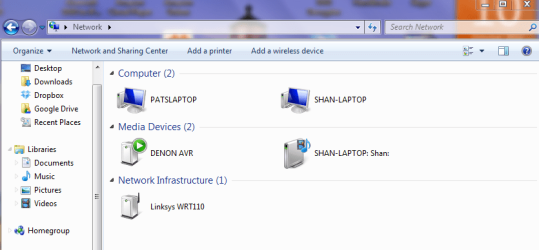
In Windows 7, the old router "WRT110" still shows up under "network infrastructure". I can't figure out how to remove it. I have tried disabling network discovery then re-enabling, I have tried leaving the home network then re-joining it, etc. I can't remove it by using the delete button nor by right clicking. Any ideas? I've attached a screenshot of it for reference.
A second issue is that Windows 7 just calls my Buffalo router "gateway" while identifying the Belkin N600HD with a nice picture of it! Any way I can rename the "gateway" to what it really is? A screen shot of that is also attached.
Thanks,
Pat | My System Specs |
| OS Windows 7 Home premium 64 bit |
10 Oct 2012
|
#2 | | |
Welcome to Seven Forums,
Is/Are there any connectivity issues happening in your network at all?
Have you tried rebooting all the devices and power cycling your modem/router including the computers and see if that clears all other devices that showing up in your network? | My System Specs | | System Manufacturer/Model Number Lenovo Desktop/Samsung Laptop OS Win7 & Win8 64bit CPU Intel i5 Internet Speed Charter-20 Mbps Antivirus Avast Browser FF, IE9 and Chrome |
10 Oct 2012
|
#3 | | Windows 7 Home premium 64 bit |
Thanks. No , there are no connectivity issues at all. It's an annoyance more than anything. The PC (actually both my main laptops) think that router is still there despite being unplugged and in a box. I have tried all combinations on rebooting modem, rebooting routers, and rebooting computers I can think of. | My System Specs | | OS Windows 7 Home premium 64 bit |
10 Oct 2012
|
#4 | | |
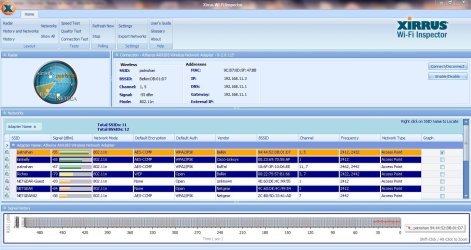
Can you please install and run Xirrus Wi-Fi Inspector? Let's see if you find out anything.
To run Xirrus Wi-Fi Inspector, double click the Xirrus icon on your Desktop, you may use the Windows 7 snipping tool to crop or Paint by tapping the Print screen key on your keyboard, open up Paint (Click on Start>All Programs>Accessories>Paint) then choose Edit from the Menu and select Paste, then save it and please attach the file on your next post.
What was your old SSID name? What's the new SSID?
Also, try removing all the wireless profiles (SSIDs) stored in your computer, then re-add SSID.
Last edited by 2xg; 10 Oct 2012 at 05:16 PM..
| My System Specs | | System Manufacturer/Model Number Lenovo Desktop/Samsung Laptop OS Win7 & Win8 64bit CPU Intel i5 Internet Speed Charter-20 Mbps Antivirus Avast Browser FF, IE9 and Chrome |
11 Oct 2012
|
#5 | | Windows 7 Ult, Windows 8 Pro, San Diego |
Most likely the WRT110 is not your old router but one of your neighbors routers.
I have Google around this on this problem and apparently the WRT110 mysteriously shows up all the time in peoples network map and infrastructure.
The posts I read concluded it was one of the neighbors routers that was mysteriously showing up there, it's some type of signal glitch that Windows picks up for some reason only on certain routers. This phantom router showing up is pretty common but with no clear resolution. | My System Specs | | System Manufacturer/Model Number Home built OS Windows 7 Ult, Windows 8 Pro, CPU Q9650-4.275GHz, E8600 4.5GHz, E6750-3.8GHz Motherboard Evga 780i FTW Memory G.Skill PC2 9600 1200Mhz 5 5 5 15 2T Graphics Card GTX480 Sound Card Asus Xonar D2 Monitor(s) Displays HannsG Screen Resolution 1680X1050 Keyboard Logitech G15 Mouse Logitech G9 PSU ThermalTake Toughpower 1000Watt modular Case ThermalTake XaserV Cooling Xigmatek S1283 Hard Drives GSkill Phoenix Pro 120GB SSD Internet Speed T1 |
11 Oct 2012
|
#6 | | Windows 7 Home premium 64 bit |
Wow, that's really odd. So I will just learn to deal with it being there.
Thanks much for all the help!
Pat | My System Specs | | OS Windows 7 Home premium 64 bit |
11 Oct 2012
|
#7 | | Windows 7 Ult, Windows 8 Pro, San Diego |

Quote: Originally Posted by patnshan Wow, that's really odd. So I will just learn to deal with it being there.
Thanks much for all the help!
Pat Yes I tried to find someone who had fixed this problem but apparently it's just a glitch with certain routers being picked up but doesn't seem to cause any harm. | My System Specs | | System Manufacturer/Model Number Home built OS Windows 7 Ult, Windows 8 Pro, CPU Q9650-4.275GHz, E8600 4.5GHz, E6750-3.8GHz Motherboard Evga 780i FTW Memory G.Skill PC2 9600 1200Mhz 5 5 5 15 2T Graphics Card GTX480 Sound Card Asus Xonar D2 Monitor(s) Displays HannsG Screen Resolution 1680X1050 Keyboard Logitech G15 Mouse Logitech G9 PSU ThermalTake Toughpower 1000Watt modular Case ThermalTake XaserV Cooling Xigmatek S1283 Hard Drives GSkill Phoenix Pro 120GB SSD Internet Speed T1 |
11 Oct 2012
|
#8 | | |
Most neighbors (mine as well) they would leave the default router's name as their SSID, not a good practice. As long as you're not having any connectivity issues, you should be fine. Have you tried my suggestion, might do a miracle? | My System Specs | | System Manufacturer/Model Number Lenovo Desktop/Samsung Laptop OS Win7 & Win8 64bit CPU Intel i5 Internet Speed Charter-20 Mbps Antivirus Avast Browser FF, IE9 and Chrome |
15 Oct 2012
|
#9 | | Windows 7 Home premium 64 bit |

Quote: Originally Posted by 2xg Can you please install and run Xirrus Wi-Fi Inspector? Let's see if you find out anything.
To run Xirrus Wi-Fi Inspector, double click the Xirrus icon on your Desktop, you may use the Windows 7 snipping tool to crop or Paint by tapping the Print screen key on your keyboard, open up Paint (Click on Start>All Programs>Accessories>Paint) then choose Edit from the Menu and select Paste, then save it and please attach the file on your next post.
What was your old SSID name? What's the new SSID?
Also, try removing all the wireless profiles (SSIDs) stored in your computer, then re-add SSID. The SSID is patnshan and has always been.
Below is the screenshot.
Thanks,
Pat | My System Specs | | OS Windows 7 Home premium 64 bit |
23 Oct 2012
|
#10 | | |
My apology for the tardiness, I have been very swamped at work.
Your Xirrus capture looks good, it might do a miracle (sort of an odd request) if you may change the wireless channel to 6, your neighbors are using the same channel as yours although you're not having any interference issues at all.
Have you also removed all the wireless profiles stored in your computer then re-add your SSID? | My System Specs | | System Manufacturer/Model Number Lenovo Desktop/Samsung Laptop OS Win7 & Win8 64bit CPU Intel i5 Internet Speed Charter-20 Mbps Antivirus Avast Browser FF, IE9 and Chrome Old router still shows up in network infrastructure problems? All times are GMT -5. The time now is 10:08 PM. | |