Windows 7 Forums


Windows 7: windows 7 scheduled task remote access

22 Sep 2009   #1

windows 7
 
 
windows 7 scheduled task remote access

I recently upgraded my system to Windows 7 and I am unable to access scheduled taks on my remote servers. Before when I was running off win XP i had no problem with this. But now, even when opening up share folders on all my servers, i dont see the scheduled task folder; however, when i check on a workstation running on XP, i can still see the scheduled tasks folder. any help would be appreciated. thanks.

My System SpecsSystem Spec

22 Sep 2009   #2

Windows7
 
 
Windows7 - no access to remote scheduled tasks

I have this same problem. I am an administrator on all the servers I'm trying to access, but no scheduled tasks folder is available. May be a simple feature I've yet to discover, but this is a pretty important change. Hopefully there is an easy answer.

I've currently resorted to shortcuts for schtasks.exe calls:

ex. schtasks /RUN /S <remoteservername> /TN "Task I want to run"
My System SpecsSystem Spec
22 Sep 2009   #3

Vista Ult64, Win7600
Dublin


Hi, just type into the search at the start button Sch and the tasks will open at the top of the page, I hope this is this what you're looking for.

Last edited by jfar; 22 Sep 2009 at 10:36 AM..
My System SpecsSystem Spec
.


22 Sep 2009   #4

Windows7


Thanks, it looks like that is current way to get to this functionality. That actually will work if I then click on Task Scheduler and connect to the other computer. It flashes up a messages that Task Scheduler service is not available:

---------------------------
Task Scheduler
---------------------------
Task Scheduler service is not available. Task Scheduler will attempt to reconnect to it.
---------------------------
OK
---------------------------

After that message it will then show a list of the scheduled tasks from the other machine.
My System SpecsSystem Spec
22 Sep 2009   #5

windows 7


I am getting that error as well.

Jfar, thanks for replying. I dont have any problem opening up the task scheduler interface. however, when i try to connect to another machine's task scheduler. that's when the issue comes in play....

ERROR:

task scheduler service is not available. Task Scheduler will attemtp to reconnect.

when i do the same on another machine that is currently running on winXP, it works just fine.

note: yes, all machines are on the same domain (no access restrictions whatsoever)
My System SpecsSystem Spec
19 Apr 2010   #6

Windows 7 Ultimate 32 and 64 bit


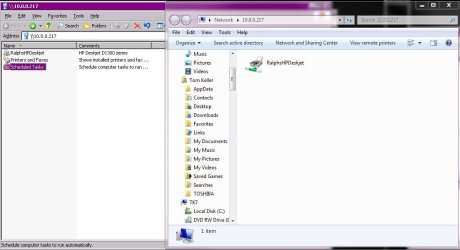
I also have this problem. When viewing a remote computer basic "Network Share" the Scheduled Task icon is not available. This is available on 2003 and XP... I attached a screen shot of two views, 2003 (xp) on the left and 7 Professional on the right.

What gives?
Attached Thumbnails
windows 7 scheduled task remote access-scheduledtasksshare.jpg  
My System SpecsSystem Spec
11 Jul 2010   #7

Windows 7 Ultimate


I found another way to work around this limitation in Windows 7. You'll need to create a custom MMC console and add each remote computer to it. If you normally manage several computers, this actually wouldn't be so bad, but if you were doing a one-off task, it's not the quickest method.

- Open up an empty MMC console (mmc.exe).
- File --> Add/Remove Snap-in --> scroll down and select "Task Scheduler" --> Add --> select "Another computer" --> type the remote computer's name --> OK --> OK.
- File --> Save As --> save the custom MMC console.

Now whenever you open up that MMC, you'll see the scheduled tasks for the remote computers that you added. Note that it could take a minute or so to bring up the Task Scheduler for the remote computers. On the left pane you'll see Task Scheduler (<remote-computer-name>) and then under that will be Task Scheduler Library with all the scheduled tasks.

Note: I only tested by adding one remote computer to the console, but it looks like several can be added.

Last edited by M90210; 14 Oct 2010 at 10:11 PM.. Reason: clarification
My System SpecsSystem Spec
09 Jul 2012   #8

win7-64bit


Outstanding! short and to the point and best of all it works!
Thank you
My System SpecsSystem Spec
Reply

 windows 7 scheduled task remote access problems?


Thread Tools


Similar help and support threads for: windows 7 scheduled task remote access
Thread Forum
Infection Of Windows Through Remote Access/Remote Desktop System Security
Solved "at" command in cmd, Remote Scheduled Task for NOW Network & Sharing
Scheduled task does not run General Discussion
How can I set a scheduled task to minimize open windows before sleep? General Discussion
Scheduled Task revisit... General Discussion


All times are GMT -5. The time now is 08:22 PM.


Seven Forums Android App Seven Forums IOS App Follow us on Facebook

Windows 7 Forums is an independent web site and has not been authorized,
sponsored, or otherwise approved by Microsoft Corporation.
"Windows 7" and related materials are trademarks of Microsoft Corp.
© Designer Media Ltd
  

1 2 3 4 5 6 7 8 9 10 11 12 13 14 15 16 17 18 19 20 21 22 23 24 25 26 27 28 29 30 31 32