Internet Taskbar Icon shows Ethernet unplugged when connected via wifi
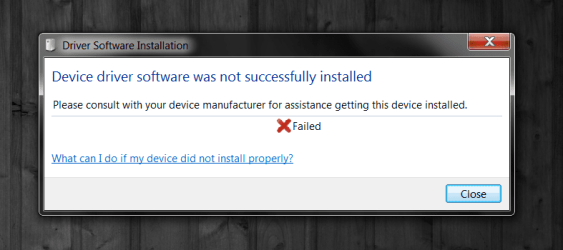
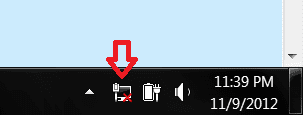
As stated in the title, the Network icon on the taskbar in the bottom right, always shows the disconnected Ethernet, even while I am connected to wifi. I've also tried connecting it via the Ethernet port, and it still shows the disconnected Ethernet icon. Also, not sure if this is related or not, but at every boot, windows tries to install an unidentified-unnamed device. I will post screenshots of the problems.
System Manufacturer/Model Number Asus G75VW-NS71 OS Windows 7 Home Premium 64bit CPU Intel Core i7-3610QM CPU 2.30GHz Memory 12GB Graphics Card Nvidia Geforce GTX 670M w/ 3GB vRam Screen Resolution 1920x1080
Hard Drives 1x 500GB (Windows Part, Data Part)
1x 160GB (Mac OS X Part, Swap Part)
As stated in the title, the Network icon on the taskbar in the bottom right, always shows the disconnected Ethernet, even while I am connected to wifi. I've also tried connecting it via the Ethernet port, and it still shows the disconnected Ethernet icon. Also, not sure if this is related or not, but at every boot, windows tries to install an unidentified-unnamed device. I will post screenshots of the problems.
Here's the screenshots.
If you can post a screen shot of your ipconfig/all it will help me to see the adaptor that is causing the problem.
System Manufacturer/Model Number Home built OS Windows 7 Ult, Windows 8 Pro, CPU Q9650-4.275GHz, E8600 4.5GHz, E6750-3.8GHz Motherboard Evga 780i FTW Memory G.Skill PC2 9600 1200Mhz 5 5 5 15 2T Graphics Card GTX480 Sound Card Asus Xonar D2 Monitor(s) Displays HannsG Screen Resolution 1680X1050
Keyboard Logitech G15 Mouse Logitech G9 PSU ThermalTake Toughpower 1000Watt modular Case ThermalTake XaserV Cooling Xigmatek S1283 Hard Drives GSkill Phoenix Pro 120GB SSD Internet Speed T1
System Manufacturer/Model Number Asus G75VW-NS71 OS Windows 7 Home Premium 64bit CPU Intel Core i7-3610QM CPU 2.30GHz Memory 12GB Graphics Card Nvidia Geforce GTX 670M w/ 3GB vRam Screen Resolution 1920x1080
Hard Drives 1x 500GB (Windows Part, Data Part)
1x 160GB (Mac OS X Part, Swap Part)
The red X is just Windows letting you know there is a network adaptor that isn't plugged in.
You just need to disable the unused Atheros AR8151 PCI-E Gigabit Ethernet adaptor by going into Device Manager then right click it and choose disable. This will keep the red X from appearing. Just remember to enable it again if you need to use a wired connection.
I'm not sure which adaptor Windows is trying to install the drivers for on start up, it apparently can't find the drivers for one of your adaptors, you might try disabling the Bluetooth Ethernet adaptor in Device Manager>Network Adaptors' to see if that helps.
In Device Manager, you may need to go to the View tab and then click on "Show Hidden Devices" in order to see them all.
System Manufacturer/Model Number Home built OS Windows 7 Ult, Windows 8 Pro, CPU Q9650-4.275GHz, E8600 4.5GHz, E6750-3.8GHz Motherboard Evga 780i FTW Memory G.Skill PC2 9600 1200Mhz 5 5 5 15 2T Graphics Card GTX480 Sound Card Asus Xonar D2 Monitor(s) Displays HannsG Screen Resolution 1680X1050
Keyboard Logitech G15 Mouse Logitech G9 PSU ThermalTake Toughpower 1000Watt modular Case ThermalTake XaserV Cooling Xigmatek S1283 Hard Drives GSkill Phoenix Pro 120GB SSD Internet Speed T1
After disabling the recommended Ethernet adapter, as well as the Bluetooth adapters, and restarting my computer, the icon is still there. I enabled the "Show Hidden Devices" option, and took a screenshot of the Network Devices. Posted below..
System Manufacturer/Model Number Asus G75VW-NS71 OS Windows 7 Home Premium 64bit CPU Intel Core i7-3610QM CPU 2.30GHz Memory 12GB Graphics Card Nvidia Geforce GTX 670M w/ 3GB vRam Screen Resolution 1920x1080
Hard Drives 1x 500GB (Windows Part, Data Part)
1x 160GB (Mac OS X Part, Swap Part)
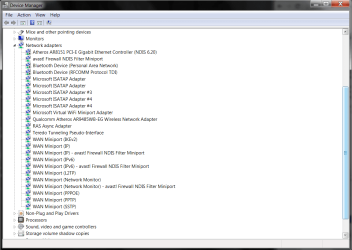
If the error message was from the Ethernet adaptor that should have fixed the problem.
Since it's not fixed I would say there are some other adaptors causing the problem.
I would suspect that all the extra Avast NDIS filter mini ports could be part of the problem so you might try disabling all the Avast adaptors and see if it has any effect on the problem.
System Manufacturer/Model Number Home built OS Windows 7 Ult, Windows 8 Pro, CPU Q9650-4.275GHz, E8600 4.5GHz, E6750-3.8GHz Motherboard Evga 780i FTW Memory G.Skill PC2 9600 1200Mhz 5 5 5 15 2T Graphics Card GTX480 Sound Card Asus Xonar D2 Monitor(s) Displays HannsG Screen Resolution 1680X1050
Keyboard Logitech G15 Mouse Logitech G9 PSU ThermalTake Toughpower 1000Watt modular Case ThermalTake XaserV Cooling Xigmatek S1283 Hard Drives GSkill Phoenix Pro 120GB SSD Internet Speed T1
Unfortunately, disabling anything with Avast in the name also didn't help, Would it be bad to disable everything, other than the wifi adapter of course, to see if anything fixes it? Or may that cause some problems..?
System Manufacturer/Model Number Asus G75VW-NS71 OS Windows 7 Home Premium 64bit CPU Intel Core i7-3610QM CPU 2.30GHz Memory 12GB Graphics Card Nvidia Geforce GTX 670M w/ 3GB vRam Screen Resolution 1920x1080
Hard Drives 1x 500GB (Windows Part, Data Part)
1x 160GB (Mac OS X Part, Swap Part)
This network icon disconnected problem might also be from a network printer or some other connected networked device, possibly the Bluetooth device that is not plugged in to an Ethernet connection or doesn't have the correct software installed or is using wireless instead to connect.
You might try to uninstall the Bluetooth device software then check to see if the problem persists.
You will usually see a yellow triangle when drivers aren't installed on a device.
System Manufacturer/Model Number Home built OS Windows 7 Ult, Windows 8 Pro, CPU Q9650-4.275GHz, E8600 4.5GHz, E6750-3.8GHz Motherboard Evga 780i FTW Memory G.Skill PC2 9600 1200Mhz 5 5 5 15 2T Graphics Card GTX480 Sound Card Asus Xonar D2 Monitor(s) Displays HannsG Screen Resolution 1680X1050
Keyboard Logitech G15 Mouse Logitech G9 PSU ThermalTake Toughpower 1000Watt modular Case ThermalTake XaserV Cooling Xigmatek S1283 Hard Drives GSkill Phoenix Pro 120GB SSD Internet Speed T1
System Manufacturer/Model Number Asus G75VW-NS71 OS Windows 7 Home Premium 64bit CPU Intel Core i7-3610QM CPU 2.30GHz Memory 12GB Graphics Card Nvidia Geforce GTX 670M w/ 3GB vRam Screen Resolution 1920x1080
Hard Drives 1x 500GB (Windows Part, Data Part)
1x 160GB (Mac OS X Part, Swap Part)
System Manufacturer/Model Number Asus G75VW-NS71 OS Windows 7 Home Premium 64bit CPU Intel Core i7-3610QM CPU 2.30GHz Memory 12GB Graphics Card Nvidia Geforce GTX 670M w/ 3GB vRam Screen Resolution 1920x1080
Hard Drives 1x 500GB (Windows Part, Data Part)
1x 160GB (Mac OS X Part, Swap Part)