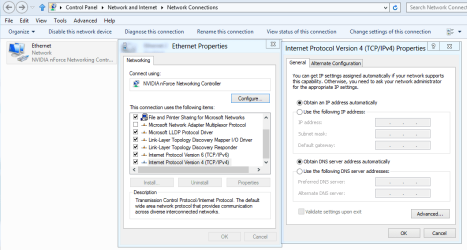
I have a problem which started appearing quite recently, namely, the wired internet adapter automatically sets my internal IP to 169.254.x.x and subnet to 255.255.0.0 instead of 192.168.x.x and subnet to 255.255.255.0 . The only workaround is setting my IPv4 manually.
I have a x79 extreme4-m motherboard with broadcom netlink ethernet adapter and the latest drivers installed. I'm using windows 7 ultimate 64 bit. Reinstalling the drivers didn't help.
This is NOT a problem with my router or its settings, as every other computer connects to the internet automatically just fine. The problem started occuring after i connected the PC to the schools network once.
My ipconfig /all:
Microsoft Windows [Version 6.1.7601]
Copyright (c) 2009 Microsoft Corporation. All rights reserved.
C:\Users\Wezdor>ipconfig /all
Windows IP Configuration
Host Name . . . . . . . . . . . . : Wezdor-PC
Primary Dns Suffix . . . . . . . :
Node Type . . . . . . . . . . . . : Hybrid
IP Routing Enabled. . . . . . . . : No
WINS Proxy Enabled. . . . . . . . : No
Ethernet adapter Local Area Connection:
Connection-specific DNS Suffix . :
Description . . . . . . . . . . . : Broadcom NetLink (TM) Gigabit Ethernet
Physical Address. . . . . . . . . : BC-5F-F4-0E-83-0A
DHCP Enabled. . . . . . . . . . . : Yes
Autoconfiguration Enabled . . . . : Yes
Link-local IPv6 Address . . . . . : fe80::3113:5200:e21:b5c2%11(Preferred)
Autoconfiguration IPv4 Address. . : 169.254.181.194(Preferred)
Subnet Mask . . . . . . . . . . . : 255.255.0.0
Default Gateway . . . . . . . . . :
DHCPv6 IAID . . . . . . . . . . . : 247226356
DHCPv6 Client DUID. . . . . . . . : 00-01-00-01-18-04-BE-AC-BC-5F-F4-0E-83-0A
DNS Servers . . . . . . . . . . . : fec0:0:0:ffff::1%1
fec0:0:0:ffff::2%1
fec0:0:0:ffff::3%1
NetBIOS over Tcpip. . . . . . . . : Enabled
Tunnel adapter isatap.{54CBA65E-4F36-41BB-9732-8DB169170B8B}:
Media State . . . . . . . . . . . : Media disconnected
Connection-specific DNS Suffix . :
Description . . . . . . . . . . . : Microsoft ISATAP Adapter
Physical Address. . . . . . . . . : 00-00-00-00-00-00-00-E0
DHCP Enabled. . . . . . . . . . . : No
Autoconfiguration Enabled . . . . : Yes
Tunnel adapter Teredo Tunneling Pseudo-Interface:
Media State . . . . . . . . . . . : Media disconnected
Connection-specific DNS Suffix . :
Description . . . . . . . . . . . : Teredo Tunneling Pseudo-Interface
Physical Address. . . . . . . . . : 00-00-00-00-00-00-00-E0
DHCP Enabled. . . . . . . . . . . : No
Autoconfiguration Enabled . . . . : Yes
And how it should look like:
C:\Users\Wezdor>ipconfig /all
Windows IP Configuration
Host Name . . . . . . . . . . . . : Wezdor-PC
Primary Dns Suffix . . . . . . . :
Node Type . . . . . . . . . . . . : Hybrid
IP Routing Enabled. . . . . . . . : No
WINS Proxy Enabled. . . . . . . . : No
Ethernet adapter Local Area Connection:
Connection-specific DNS Suffix . :
Description . . . . . . . . . . . : Broadcom NetLink (TM) Gigabit Ethernet
Physical Address. . . . . . . . . : BC-5F-F4-0E-83-0A
DHCP Enabled. . . . . . . . . . . : No
Autoconfiguration Enabled . . . . : Yes
Link-local IPv6 Address . . . . . : fe80::9ca4:b98d:e2b3:504f%11(Preferred)
IPv4 Address. . . . . . . . . . . : 192.168.64.111(Preferred)
Subnet Mask . . . . . . . . . . . : 255.255.255.0
Default Gateway . . . . . . . . . : 192.168.64.1
DHCPv6 IAID . . . . . . . . . . . : 196894708
DHCPv6 Client DUID. . . . . . . . : 00-01-00-01-18-04-BE-AC-BC-5F-F4-0E-83-0A
DNS Servers . . . . . . . . . . . : 192.168.64.1
NetBIOS over Tcpip. . . . . . . . : Enabled
Tunnel adapter isatap.{65A7FD2D-E324-41F2-BD22-8E68BBC263A9}:
Media State . . . . . . . . . . . : Media disconnected
Connection-specific DNS Suffix . :
Description . . . . . . . . . . . : Microsoft ISATAP Adapter
Physical Address. . . . . . . . . : 00-00-00-00-00-00-00-E0
DHCP Enabled. . . . . . . . . . . : No
Autoconfiguration Enabled . . . . : Yes
Tunnel adapter Teredo Tunneling Pseudo-Interface:
Connection-specific DNS Suffix . :
Description . . . . . . . . . . . : Teredo Tunneling Pseudo-Interface
Physical Address. . . . . . . . . : 00-00-00-00-00-00-00-E0
DHCP Enabled. . . . . . . . . . . : No
Autoconfiguration Enabled . . . . : Yes
IPv6 Address. . . . . . . . . . . : 2001:0:5ef5:79fb:105c:20c9:a298:4408(Pref
erred)
Link-local IPv6 Address . . . . . : fe80::105c:20c9:a298:4408%13(Preferred)
Default Gateway . . . . . . . . . : ::
NetBIOS over Tcpip. . . . . . . . : Disabled
My question is: How can i get the adapter to automatically assign me the correct IP?
And help would be appreciated as this is quite annoying.
I have a x79 extreme4-m motherboard with broadcom netlink ethernet adapter and the latest drivers installed. I'm using windows 7 ultimate 64 bit. Reinstalling the drivers didn't help.
This is NOT a problem with my router or its settings, as every other computer connects to the internet automatically just fine. The problem started occuring after i connected the PC to the schools network once.
My ipconfig /all:
Microsoft Windows [Version 6.1.7601]
Copyright (c) 2009 Microsoft Corporation. All rights reserved.
C:\Users\Wezdor>ipconfig /all
Windows IP Configuration
Host Name . . . . . . . . . . . . : Wezdor-PC
Primary Dns Suffix . . . . . . . :
Node Type . . . . . . . . . . . . : Hybrid
IP Routing Enabled. . . . . . . . : No
WINS Proxy Enabled. . . . . . . . : No
Ethernet adapter Local Area Connection:
Connection-specific DNS Suffix . :
Description . . . . . . . . . . . : Broadcom NetLink (TM) Gigabit Ethernet
Physical Address. . . . . . . . . : BC-5F-F4-0E-83-0A
DHCP Enabled. . . . . . . . . . . : Yes
Autoconfiguration Enabled . . . . : Yes
Link-local IPv6 Address . . . . . : fe80::3113:5200:e21:b5c2%11(Preferred)
Autoconfiguration IPv4 Address. . : 169.254.181.194(Preferred)
Subnet Mask . . . . . . . . . . . : 255.255.0.0
Default Gateway . . . . . . . . . :
DHCPv6 IAID . . . . . . . . . . . : 247226356
DHCPv6 Client DUID. . . . . . . . : 00-01-00-01-18-04-BE-AC-BC-5F-F4-0E-83-0A
DNS Servers . . . . . . . . . . . : fec0:0:0:ffff::1%1
fec0:0:0:ffff::2%1
fec0:0:0:ffff::3%1
NetBIOS over Tcpip. . . . . . . . : Enabled
Tunnel adapter isatap.{54CBA65E-4F36-41BB-9732-8DB169170B8B}:
Media State . . . . . . . . . . . : Media disconnected
Connection-specific DNS Suffix . :
Description . . . . . . . . . . . : Microsoft ISATAP Adapter
Physical Address. . . . . . . . . : 00-00-00-00-00-00-00-E0
DHCP Enabled. . . . . . . . . . . : No
Autoconfiguration Enabled . . . . : Yes
Tunnel adapter Teredo Tunneling Pseudo-Interface:
Media State . . . . . . . . . . . : Media disconnected
Connection-specific DNS Suffix . :
Description . . . . . . . . . . . : Teredo Tunneling Pseudo-Interface
Physical Address. . . . . . . . . : 00-00-00-00-00-00-00-E0
DHCP Enabled. . . . . . . . . . . : No
Autoconfiguration Enabled . . . . : Yes
And how it should look like:
C:\Users\Wezdor>ipconfig /all
Windows IP Configuration
Host Name . . . . . . . . . . . . : Wezdor-PC
Primary Dns Suffix . . . . . . . :
Node Type . . . . . . . . . . . . : Hybrid
IP Routing Enabled. . . . . . . . : No
WINS Proxy Enabled. . . . . . . . : No
Ethernet adapter Local Area Connection:
Connection-specific DNS Suffix . :
Description . . . . . . . . . . . : Broadcom NetLink (TM) Gigabit Ethernet
Physical Address. . . . . . . . . : BC-5F-F4-0E-83-0A
DHCP Enabled. . . . . . . . . . . : No
Autoconfiguration Enabled . . . . : Yes
Link-local IPv6 Address . . . . . : fe80::9ca4:b98d:e2b3:504f%11(Preferred)
IPv4 Address. . . . . . . . . . . : 192.168.64.111(Preferred)
Subnet Mask . . . . . . . . . . . : 255.255.255.0
Default Gateway . . . . . . . . . : 192.168.64.1
DHCPv6 IAID . . . . . . . . . . . : 196894708
DHCPv6 Client DUID. . . . . . . . : 00-01-00-01-18-04-BE-AC-BC-5F-F4-0E-83-0A
DNS Servers . . . . . . . . . . . : 192.168.64.1
NetBIOS over Tcpip. . . . . . . . : Enabled
Tunnel adapter isatap.{65A7FD2D-E324-41F2-BD22-8E68BBC263A9}:
Media State . . . . . . . . . . . : Media disconnected
Connection-specific DNS Suffix . :
Description . . . . . . . . . . . : Microsoft ISATAP Adapter
Physical Address. . . . . . . . . : 00-00-00-00-00-00-00-E0
DHCP Enabled. . . . . . . . . . . : No
Autoconfiguration Enabled . . . . : Yes
Tunnel adapter Teredo Tunneling Pseudo-Interface:
Connection-specific DNS Suffix . :
Description . . . . . . . . . . . : Teredo Tunneling Pseudo-Interface
Physical Address. . . . . . . . . : 00-00-00-00-00-00-00-E0
DHCP Enabled. . . . . . . . . . . : No
Autoconfiguration Enabled . . . . : Yes
IPv6 Address. . . . . . . . . . . : 2001:0:5ef5:79fb:105c:20c9:a298:4408(Pref
erred)
Link-local IPv6 Address . . . . . : fe80::105c:20c9:a298:4408%13(Preferred)
Default Gateway . . . . . . . . . : ::
NetBIOS over Tcpip. . . . . . . . : Disabled
My question is: How can i get the adapter to automatically assign me the correct IP?
And help would be appreciated as this is quite annoying.
My Computer
At a glance
Windows 7 Ultimate x64 SP1i7-3820 @4.6Ghz4x4GB Kingston HyperX 1600mhzSapphire 7970 OC dualX
- OS
- Windows 7 Ultimate x64 SP1
- CPU
- i7-3820 @4.6Ghz
- Motherboard
- Asrock x79 Extreme4-M
- Memory
- 4x4GB Kingston HyperX 1600mhz
- Graphics Card(s)
- Sapphire 7970 OC dualX
- PSU
- ATX 850W CorsairTX2
- Case
- Gigabyte Poseidon 310i
- Cooling
- NH-D14 2011 socket