
J4m3z420
New member
Hi everyone. Been using Windows 7 for a while now. Trying to understand the advanced sharing a little more. Here is what I want to accomplish.
I have 2 computers both with Win7 RTM. One laptop and one desktop.
I want both of the computers to each have shared folders each with....
1 Shared folder that requires a login with the same username/password on the host computer
1 Public folder that doesn't need login and can be accessed by anyone in my workgroup.
As of right now I have almost got what I wanted, except for the logon thing.
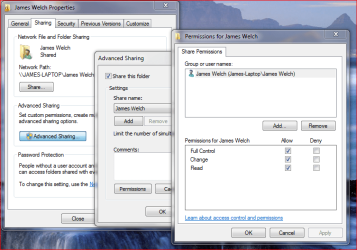
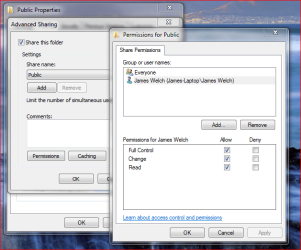
By using advanced sharing I have got a public folder that can be seen by everyone as well as a folder that is only accessible by me. Since both my computers have the same login/pw, I can only access this private folder on either PC when I am logged on.
If I use my roomates computer for example, which uses a different Username/pw, I am not prompted to enter my credentials. I am just unable to access the folder.
Is there a way to add the option to allow credential login on these private folders so I an access them from any computer granted that I use my Username and PW to login.
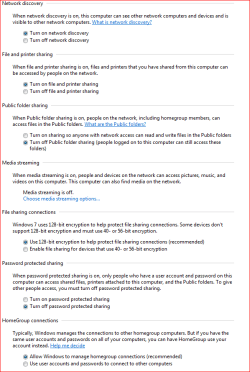
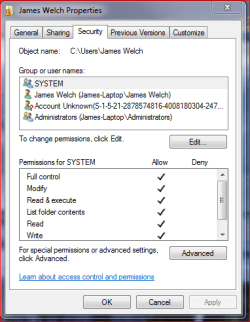
Here are some screenshots of how my private and public folders are set up as well as my Win 7 networking settings.
To sum it up. I want to be able to access private shared folders from computers other than my own where I can login to them with my username/pw.
Thanks in advance!
I have 2 computers both with Win7 RTM. One laptop and one desktop.
I want both of the computers to each have shared folders each with....
1 Shared folder that requires a login with the same username/password on the host computer
1 Public folder that doesn't need login and can be accessed by anyone in my workgroup.
As of right now I have almost got what I wanted, except for the logon thing.
By using advanced sharing I have got a public folder that can be seen by everyone as well as a folder that is only accessible by me. Since both my computers have the same login/pw, I can only access this private folder on either PC when I am logged on.
If I use my roomates computer for example, which uses a different Username/pw, I am not prompted to enter my credentials. I am just unable to access the folder.
Is there a way to add the option to allow credential login on these private folders so I an access them from any computer granted that I use my Username and PW to login.
Here are some screenshots of how my private and public folders are set up as well as my Win 7 networking settings.
To sum it up. I want to be able to access private shared folders from computers other than my own where I can login to them with my username/pw.
Thanks in advance!
Attachments
My Computer
At a glance
Windows 7Athlon 64 3700+2GB Corsair XMS6800GT
- OS
- Windows 7
- CPU
- Athlon 64 3700+
- Motherboard
- MSI Ne4 SLI Platinum
- Memory
- 2GB Corsair XMS
- Graphics Card(s)
- 6800GT
- Hard Drives
- 750GB
- Case
- Thermaltake Tsunami Dream
- Internet Speed
- Cable


