
Windows 7 Forums


Windows 7: Deleted registry entry to fix code 31, network adapters won't work

12 Jan 2013   #1

Windows 7 32bit
 
 
Deleted registry entry to fix code 31, network adapters won't work


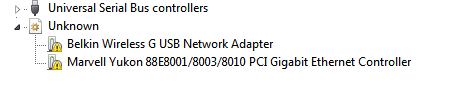
The comp started BSOD'ing out of nowhere, a new adapter I think called ISATAP or something like that shows up under network adapters in device manager which had a yellow exclamation icon. (Code: 31). Disabling or uninstalling its drivers resulted in BSOD's. Googled around and found the only way to fix it was to delete some registry entries, so without backing up the registry I deleted some keys. I don't remember which keys but the image above is the result. I got Ubuntu live booted up and using it to post this because my Win 7 installation obviously can't connect to the Internet.

*I tried reinstalling drivers (Marvel Yukon & Belkin), disabling and enabling stuff but nothing seems to be happening.
*Got some registry fixing tools or whatever, still the same.

Any idea how to fix this, guys ? Thanks for any help.
My System SpecsSystem Spec

12 Jan 2013   #2

Win 7 Pro 64-bit
South Central Texas


Hello tjacob and welcome to Seven Forums.

See if you can roll back your computer to an earlier date/time (prior to editing the registry) using system restore.

System Restore
My System SpecsSystem Spec
12 Jan 2013   #3

Windows 7 32bit


Nop, no system restore either, this a month old installation. I don't have any backups.
My System SpecsSystem Spec
.


12 Jan 2013   #4

Win 7 Pro 64-bit
South Central Texas


System Restore is on by default (as part of System Protection) and automatically creates restore points at least once every 7 days; more often under certain circumstances like when installing programs, some Windows Updates, drivers, etc. Are you saying you turned System Restore/System Protection off?

What is System Restore?

What is system protection?
My System SpecsSystem Spec
12 Jan 2013   #5

Windows 7 32bit


System restore is active but didn't have any restore points. I'd have happily restored to a previous date if there was one.

Any other remedies ?
My System SpecsSystem Spec
12 Jan 2013   #6

Win 7 Pro 64-bit
South Central Texas


It's a long shot but maybe the registry editing damaged some system files. You could try running a system file checker scan from an elevated command prompt (option two.) If problems are found run the scan 3 times and reboot the computer after each scan.

SFC /SCANNOW Command - System File Checker

Also, one of the Forum experts prepared a troubleshooting guide with some additional suggestions that may help.

Troubleshooting Steps for Windows 7

One other possibility is to use a free driver scanning utility such as DriverMax. Let it run its scan and then make note of whatever drivers it says are out of date or missing. You could then visit the manufacturers' websites to see if those drivers are available. (If DriverMax says drivers are needed I think it's safer to go to the manufacturer.)

Driver update - Use DriverMax to update all your Windows PC drivers
My System SpecsSystem Spec
14 Jan 2013   #7

Windows 7 32bit


SFC didn't find anything wrong with the files and driver max needs to connect to go online to check if there the internet is working or not! anything else that can be done ?
My System SpecsSystem Spec
Reply

 Deleted registry entry to fix code 31, network adapters won't work problems?


Thread Tools


Similar help and support threads for: Deleted registry entry to fix code 31, network adapters won't work
Thread Forum
error code 31 for all network adapters Drivers
Solved Deleted boot entry! Will WIN7 installation fix it? Installation & Setup
No network adapters work!!! (argh) Network & Sharing
Framework 1.1 sp1 - manual registry entry? Software
Default program registry entry Software


All times are GMT -5. The time now is 09:20 PM.


Windows 7 Forums is an independent web site and has not been authorized,
sponsored, or otherwise approved by Microsoft Corporation.
"Windows 7" and related materials are trademarks of Microsoft Corp.
© Designer Media Ltd