Windows 7 Forums


Windows 7: The “cmd” command to show the all the connected machines on network

20 Jan 2013   #11

Windows 7 Professional x64
North


How come my blackberry doesn't show up when I type NET VIEW in cmd even though its on my network?

My System SpecsSystem Spec

20 Jan 2013   #12

Windows 7 x64 Ultimate
A Finnish immigrant in Leipzig, Germany


Can you see it in Explorer > Network and command prompt > ipconfig?
My System SpecsSystem Spec
20 Jan 2013   #13

Windows 7 Professional x64
North


Quote   Quote: Originally Posted by Kari View Post
Can you see it in Explorer > Network and command prompt > ipconfig?
I'm not sure what you mean by Explorer > Network and command prompt > but when I type ipconfig in cmd it doesn't show up.
My System SpecsSystem Spec
.


20 Jan 2013   #14

Windows 7 x64 Ultimate
A Finnish immigrant in Leipzig, Germany


Windows Explorer > Network can be viewed by clicking Network on the left side navigation pane:


Highlighted part of Explorer screenshot above shows computers belonging to same subnet.

Command ipconfig /all in Command Prompt also shows computers and devices in your network.

If your device is not shown in these, it will not belong to same subnet or as UsernameIssues has told previously in this thread it is hidden from network. In this case you need to change network settings on your device (Blackberry).

I have absolutely no knowledge of Blackberries so I can not help you in that.

Kari
My System SpecsSystem Spec
20 Jan 2013   #15

Windows 7 Professional x64
North


Oh, no it doesn't show up. It shows up in my router though.
My System SpecsSystem Spec
20 Jan 2013   #16

Windows 7 Ultimate x64
Topeka Kansas


The only way to see everything on a network is to scan it with tools like nmap and use the network ID as your target.
My System SpecsSystem Spec
20 Jan 2013   #17

W7 Pro SP1 64bit


Quote   Quote: Originally Posted by Kari View Post
~~~
I am sorry but now I think you are a bit picky, splitting hairs as we say in Finnish. My answer to the OP is (never been modest ) the best given in this thread. Sorry Google if you now index wrong information, wasn't even thinking of that, and never will; I was and will be thinking the best possible answer to the OP's issue, all things considered, and post it if I know it.

Kari
Thank you taking the time to explain. I was probably overly concerned with those that find this thread via Google after some frustrating searches of my own that led to one dead end after another.
My System SpecsSystem Spec
21 Jan 2013   #18

Windows 7 Ultimate x64


Than you guys for the input. This is very useful.

I do agree, Kari is a star.

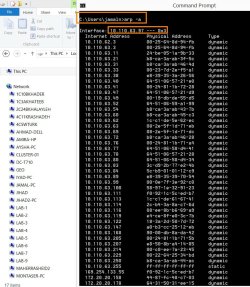
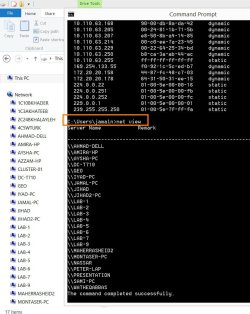
May I have another question? How to have the IP address of the machines (exclusively the machines)?

Best

Jamal
Attached Thumbnails
The “cmd” command to show the all the connected machines on network-clip_16.jpg  
My System SpecsSystem Spec
21 Jan 2013   #19

Windows 7 x64 Ultimate
A Finnish immigrant in Leipzig, Germany


The only command I know to show IPs of all networked PCs is ipconfig /all.
My System SpecsSystem Spec
21 Jan 2013   #20

Windows 7 Ultimate x64
Topeka Kansas


If your dns server is setup correctly. You should be able to use

nslookup FQDN

FQDN= fully qualified domain name.

Find your fqdn with
echo %COMPUTERNAME%.%USERDNSDOMAIN%


example from work:
C:\Documents and Settings\CParman>echo %COMPUTERNAME%.%USERDNSDOMAIN%
CPARMAN-8DFCMF1.CORP

update:
%USERDNSDOMAIN% only works on a domain

So you can get it with the ipconfig /all output.

Code:
C:\Documents and Settings\CParman>ipconfig /all

Windows IP Configuration

        Host Name . . . . . . . . . . . . : cparman-8dfcmf1
        Primary Dns Suffix  . . . . . . . : CORP

Last edited by Parman; 21 Jan 2013 at 03:24 PM..
My System SpecsSystem Spec
Reply

 The “cmd” command to show the all the connected machines on network problems?


Thread Tools


Similar help and support threads for: The “cmd” command to show the all the connected machines on network
Thread Forum
Workgroup Member Machines no longer show up, but can map drives Network & Sharing
Solved Connected to Wireless network, but windows says Not connected Network & Sharing
Office 2010 Slow To Show "Open" Dialog Box When Connected To Network Microsoft Office
USB printers connected to hub show under one icon Hardware & Devices
Can't see NAS or XP machines on Network (64 bit RC) Network & Sharing


All times are GMT -5. The time now is 12:22 AM.


Seven Forums Android App Seven Forums IOS App Follow us on Facebook

Windows 7 Forums is an independent web site and has not been authorized,
sponsored, or otherwise approved by Microsoft Corporation.
"Windows 7" and related materials are trademarks of Microsoft Corp.
© Designer Media Ltd
  

1 2 3 4 5 6 7 8 9 10 11 12 13 14 15 16 17 18 19 20 21 22 23 24 25 26 27 28 29 30 31 32