Windows 7 Forums


Windows 7: The “cmd” command to show the all the connected machines on network

26 Jan 2013   #21

Windows 7 Ultimate x64


Quote   Quote: Originally Posted by Parman View Post
If your dns server is setup correctly. You should be able to use

nslookup FQDN

FQDN= fully qualified domain name.

Find your fqdn with
echo %COMPUTERNAME%.%USERDNSDOMAIN%


example from work:
C:\Documents and Settings\CParman>echo %COMPUTERNAME%.%USERDNSDOMAIN%
CPARMAN-8DFCMF1.CORP

update:
%USERDNSDOMAIN% only works on a domain

So you can get it with the ipconfig /all output.

Code:
C:\Documents and Settings\CParman>ipconfig /all

Windows IP Configuration

        Host Name . . . . . . . . . . . . : cparman-8dfcmf1
        Primary Dns Suffix  . . . . . . . : CORP
Very much appreciated Kari and Parman.


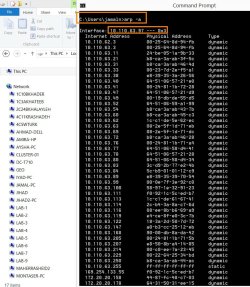
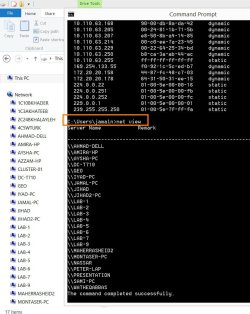
Once, I saw an IT personnel using a command to show all the connected machines with a particular machine (the command is joined with identifying its IP address). I couldn’t remember the command he used.


All the best
Jamal
My System SpecsSystem Spec

26 Jan 2013   #22

Windows 7 Ultimate x64
Topeka Kansas


I personally don't know any built in windows commands that can do that. But like I said before there are plenty of third party programs that can. He might of been using one of them.
My System SpecsSystem Spec
26 Jan 2013   #23

Windows 7 Home Premium 64 Bit
Manchester, England


If your not fused what device you use to find out all ips, computer names etc etc, if you have an android or iPhone device, Download an app called fing. Its free , connect your device to the network and open the fing app, it will scan the network and show all devices, ip address, mac address.
My System SpecsSystem Spec
.


27 Jan 2013   #24

Windows 7 Ultimate x64


Quote   Quote: Originally Posted by braddersz View Post
If your not fused what device you use to find out all ips, computer names etc etc, if you have an android or iPhone device, Download an app called fing. Its free , connect your device to the network and open the fing app, it will scan the network and show all devices, ip address, mac address.

Many thanks guys for the help. This is very useful

Best

Jamal
My System SpecsSystem Spec
27 Jan 2013   #25

Windows 7 Home Premium 64 Bit
Manchester, England


Quote   Quote: Originally Posted by Jamal NUMAN View Post
Quote   Quote: Originally Posted by braddersz View Post
If your not fused what device you use to find out all ips, computer names etc etc, if you have an android or iPhone device, Download an app called fing. Its free , connect your device to the network and open the fing app, it will scan the network and show all devices, ip address, mac address.

Many thanks guys for the help. This is very useful

Best

Jamal

Glad we can help.

Heres what FING looks like in action:
The “cmd” command to show the all the connected machines on network-2367726050.jpg
My System SpecsSystem Spec
Reply

 The “cmd” command to show the all the connected machines on network problems?


Thread Tools


Similar help and support threads for: The “cmd” command to show the all the connected machines on network
Thread Forum
Workgroup Member Machines no longer show up, but can map drives Network & Sharing
Solved Connected to Wireless network, but windows says Not connected Network & Sharing
Office 2010 Slow To Show "Open" Dialog Box When Connected To Network Microsoft Office
USB printers connected to hub show under one icon Hardware & Devices
Can't see NAS or XP machines on Network (64 bit RC) Network & Sharing


All times are GMT -5. The time now is 06:32 PM.


Seven Forums Android App Seven Forums IOS App Follow us on Facebook

Windows 7 Forums is an independent web site and has not been authorized,
sponsored, or otherwise approved by Microsoft Corporation.
"Windows 7" and related materials are trademarks of Microsoft Corp.
© Designer Media Ltd
  

1 2 3 4 5 6 7 8 9 10 11 12 13 14 15 16 17 18 19 20 21 22 23 24 25 26 27 28 29 30 31 32