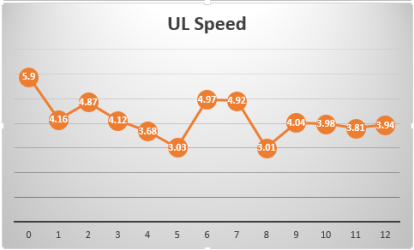
Hi geeks.
Not an issue, just something I would like to understand. Have been testing backups to cloud which of course will benefit from higher UL speeds.
Test scenario:
Test PC uses a dedicated line that has a theoretical maximum of 6.2 MBps UL speed, or 50 Mbps. Only test PC is connected to this line, all other network usage denied or disabled. The line is only used for this test.
To measure UL speed, I start uploading to a cloud server. Test backup size 30 GB. A counter starts measuring the speed when it hits 5.8 MBps, marking then actual speed every 20 seconds.
This shows averages after about 20 tests:
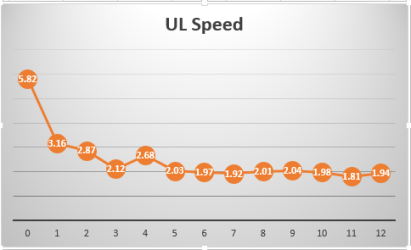
Horizontal values show elapsed time in minutes. Variations in all tests max 10% to any direction, the fact seems to be that after about 3 minutes the UL speed sets in around 2 MBps and stays there. Results are similar with XP Pro, Windows 7 and Windows 8 Enterprise editions so it does not look as an OS related thing.
I am very interested to hear opinions in this, why over 60% overhead on a dedicated line?
Kari
Not an issue, just something I would like to understand. Have been testing backups to cloud which of course will benefit from higher UL speeds.
Test scenario:
Test PC uses a dedicated line that has a theoretical maximum of 6.2 MBps UL speed, or 50 Mbps. Only test PC is connected to this line, all other network usage denied or disabled. The line is only used for this test.
To measure UL speed, I start uploading to a cloud server. Test backup size 30 GB. A counter starts measuring the speed when it hits 5.8 MBps, marking then actual speed every 20 seconds.
This shows averages after about 20 tests:
Horizontal values show elapsed time in minutes. Variations in all tests max 10% to any direction, the fact seems to be that after about 3 minutes the UL speed sets in around 2 MBps and stays there. Results are similar with XP Pro, Windows 7 and Windows 8 Enterprise editions so it does not look as an OS related thing.
I am very interested to hear opinions in this, why over 60% overhead on a dedicated line?
Kari
Last edited:
My Computer
At a glance
Windows 10 Pro x64 EN-GB1.6 GHz Intel Core i7-720QM Processor6 GBATI Mobility Radeon HD 5850 Graphics
- Computer type
- Laptop
- Computer Manufacturer/Model Number
- HP ENVY 17-1150eg
- OS
- Windows 10 Pro x64 EN-GB
- CPU
- 1.6 GHz Intel Core i7-720QM Processor
- Memory
- 6 GB
- Graphics Card(s)
- ATI Mobility Radeon HD 5850 Graphics
- Sound Card
- Beats sound system with integrated subwoofer
- Monitor(s) Displays
- 17" laptop display, 22" LED and 32" Full HD TV through HDMI
- Screen Resolution
- 1600*900 (1), 1920*1080 (2&3)
- Hard Drives
- Internal: 2 x 500 GB SATA Hard Disk Drive 7200 rpm
External: 2TB for backups, 3TB USB3 network drive for media
- Cooling
- As Envy runs a bit warm, I have it on a Cooler Master pad
- Keyboard
- Logitech diNovo Media Desktop Laser (bluetooth)
- Mouse
- Logitech Performance Mouse MX
- Internet Speed
- 50/10 Mbps VDSL
- Antivirus
- Windows Defender 4.3.9431.0
- Browser
- Maxthon 3.5.2., IE11


 (Dunno what happens with upload though).