| Windows 7: Can connect without a router; cant with |
04 Feb 2013
|
#1 | | |
Can connect without a router; cant with Hi guys. Yesterday, all was fine. Today, I cant connect when either of my computers is plugged inot my router.
I have two computers, 1 is Vista, the other is a dual boot with Windows 7 and XP. Both are connected via a linksys wired router. I woke up this morning and cold not connect, and my Network And Sharing Center is telling me there is no connectivity.
If I plug the computer directly into the modem AND change the TCP/IP settings to obtain ip address and dns server auto, then I can connect. This is true of both the Windows 7 partition, and the XP partition. While still plugged into the router, I ran troubleshooting in Vista, and it told me that there was a problem with the DNS config.
My first thought thought is that the problem is the router, even tho all the lights are on, and I did try unplugging it (And as well the modem). Was wondering if anyone has any other suggestions as to anything I can try? Should I try accessing my linksys page (I forget how to do that) and see if there is anything there I can do?
Any ideas are welcome - thanks! | My System Specs |
| |
04 Feb 2013
|
#2 | | Windows 7 Ult, Windows 8 Pro, San Diego |

Quote: Originally Posted by jasong1968 Hi guys. Yesterday, all was fine. Today, I cant connect when either of my computers is plugged inot my router.
I have two computers, 1 is Vista, the other is a dual boot with Windows 7 and XP. Both are connected via a linksys wired router. I woke up this morning and cold not connect, and my Network And Sharing Center is telling me there is no connectivity.
If I plug the computer directly into the modem AND change the TCP/IP settings to obtain ip address and dns server auto, then I can connect. This is true of both the Windows 7 partition, and the XP partition. While still plugged into the router, I ran troubleshooting in Vista, and it told me that there was a problem with the DNS config.
My first thought thought is that the problem is the router, even tho all the lights are on, and I did try unplugging it (And as well the modem). Was wondering if anyone has any other suggestions as to anything I can try? Should I try accessing my linksys page (I forget how to do that) and see if there is anything there I can do?
Any ideas are welcome - thanks! I'd say that you definitely need to perform a reset on your router. There is usually a small button for this some place on the router. The 30-30-30 Hard Reset Rule for Routers | My System Specs | | System Manufacturer/Model Number Home built OS Windows 7 Ult, Windows 8 Pro, CPU Q9650-4.275GHz, E8600 4.5GHz, E6750-3.8GHz Motherboard Evga 780i FTW Memory G.Skill PC2 9600 1200Mhz 5 5 5 15 2T Graphics Card GTX480 Sound Card Asus Xonar D2 Monitor(s) Displays HannsG Screen Resolution 1680X1050 Keyboard Logitech G15 Mouse Logitech G9 PSU ThermalTake Toughpower 1000Watt modular Case ThermalTake XaserV Cooling Xigmatek S1283 Hard Drives GSkill Phoenix Pro 120GB SSD Internet Speed T1 |
04 Feb 2013
|
#3 | | |
Thanks for the response.
Using the 30 30 30 rule, I reset the router, but the problem stil exists. | My System Specs | | |
04 Feb 2013
|
#4 | | Windows 7 Ult, Windows 8 Pro, San Diego |

Quote: Originally Posted by jasong1968 Thanks for the response.
Using the 30 30 30 rule, I reset the router, but the problem stil exists. Do you have two valid DNS server IP's typed into your routers set up page where it says DNS servers?
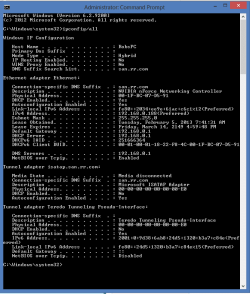
If you can post a screen shot of the ipconfig/all from this machine it might be helpful. | My System Specs | | System Manufacturer/Model Number Home built OS Windows 7 Ult, Windows 8 Pro, CPU Q9650-4.275GHz, E8600 4.5GHz, E6750-3.8GHz Motherboard Evga 780i FTW Memory G.Skill PC2 9600 1200Mhz 5 5 5 15 2T Graphics Card GTX480 Sound Card Asus Xonar D2 Monitor(s) Displays HannsG Screen Resolution 1680X1050 Keyboard Logitech G15 Mouse Logitech G9 PSU ThermalTake Toughpower 1000Watt modular Case ThermalTake XaserV Cooling Xigmatek S1283 Hard Drives GSkill Phoenix Pro 120GB SSD Internet Speed T1 |
05 Feb 2013
|
#5 | | |

Quote: Originally Posted by chev65 Do you have two valid DNS server IP's typed into your routers set up page where it says DNS servers? Eh, I accessed the router page, cant seem to find the routers set up page where it says DNS servers.... | My System Specs | | |
05 Feb 2013
|
#6 | | Windows 7 Ult, Windows 8 Pro, San Diego |

Quote: Originally Posted by jasong1968 
Quote: Originally Posted by chev65 Do you have two valid DNS server IP's typed into your routers set up page where it says DNS servers? Eh, I accessed the router page, cant seem to find the routers set up page where it says DNS servers....  It's there somewhere but the user interfaces are all different for routers.
But you can also type the DNS server IP's into your IPv4 properties. Link below shows how to add Google's DSN servers to your Ipv4 properties. How To Add Google Public DNS In Windows 7 - Speed Up Web Browsing | The Tech Journal | My System Specs | | System Manufacturer/Model Number Home built OS Windows 7 Ult, Windows 8 Pro, CPU Q9650-4.275GHz, E8600 4.5GHz, E6750-3.8GHz Motherboard Evga 780i FTW Memory G.Skill PC2 9600 1200Mhz 5 5 5 15 2T Graphics Card GTX480 Sound Card Asus Xonar D2 Monitor(s) Displays HannsG Screen Resolution 1680X1050 Keyboard Logitech G15 Mouse Logitech G9 PSU ThermalTake Toughpower 1000Watt modular Case ThermalTake XaserV Cooling Xigmatek S1283 Hard Drives GSkill Phoenix Pro 120GB SSD Internet Speed T1 |
05 Feb 2013
|
#7 | | |
Hi jasong1968,
Please share some more details for a better understanding:
- Make / Model of the router that is in use
- Is it deriving 'Internet' from a 'Modem'? If yes, please check and share the 'Port number' (on the router) where cable from the modem is plugged in. You may also try plugging the 'Modem cable' into each of the computers one by one to see if bypassing the router works for you (for diagnosis)
- Also ensure that the 'Input cable' from the 'Internet Service Provider' is plugged into the 'modem' properly. You may try re-seating it.
- Also share if the 'connection' is a 'DSL / Cable Internet'
- What steps did you take to 'setup the router' after you 'reset it'?
- As suggested by 'chev65', results of 'IPconfig /all' may offer information that is more conclusive
Do reply with the findings. Would be glad to assist. | My System Specs | | |
05 Feb 2013
|
#8 | | |

Quote: Originally Posted by chev65 But you can also type the DNS server IP's into your IPv4 properties. Link below shows how to add Google's DSN servers to your Ipv4 properties. Yeah - I dont know about doing anything google related here. I just want to get this working back to the way it was. I never had anything google anywhere, and it all worked fine without it.
My adapter ip4, set to 'use following ip add' is:
IP address: 192.168.1.100
Subnet mask: 255.255.255.0
Default gateway: 192.168.1.1
Preferred DNS Server: 192.168.1.1
Here is my router DNS page:
Login Type: DHCP
Internet IP Address: 0.0.0.0
Subnet Mask: 255.255.255.0
Default Gateway: 0.0.0.0
Static DNS 1: 0.0.0.0
MTU: 1500
And from my local network page:
Local MAC Address: xx-xx-xx (an actual # is there, of course)
IP Address: 192.168.1.1
Subnet Mask: 255.255.255.0
DHCP Server: Enabled
I tried a DHCP Renew, but that didn't help. The 'Internet IP Address' is bugging me a bit here.
Saurabh - thanks for chiming in here.
Linksys BEFSR41, used with a cable (not DSL) modem. Computer > any router port, out into the cable modem. Yes, the cables are seated properly.
" What steps did you take to 'setup the router' after you 'reset it'?" Uhh, none, actually. Do I need to do anything after a reset? As I stated above, I tried a DHCP Renew, but that's all I tried. Oh yeah - I can connect to my other computer via the router; I can r/w to and from both. It's just the internet that's the issue. I called Comcast, but they unfortunately do not man there internet tech support dept with qualified personnel. If I call up and ask the internet tech support rep if they know what a DNS server is and they say no, well, that's pretty bad. | My System Specs | | |
05 Feb 2013
|
#9 | | Windows 7 Ult, Windows 8 Pro, San Diego |
That isn't the ipconfig/all which is what I need to see.
I would prefer an actual screen shot like this one. | My System Specs | | System Manufacturer/Model Number Home built OS Windows 7 Ult, Windows 8 Pro, CPU Q9650-4.275GHz, E8600 4.5GHz, E6750-3.8GHz Motherboard Evga 780i FTW Memory G.Skill PC2 9600 1200Mhz 5 5 5 15 2T Graphics Card GTX480 Sound Card Asus Xonar D2 Monitor(s) Displays HannsG Screen Resolution 1680X1050 Keyboard Logitech G15 Mouse Logitech G9 PSU ThermalTake Toughpower 1000Watt modular Case ThermalTake XaserV Cooling Xigmatek S1283 Hard Drives GSkill Phoenix Pro 120GB SSD Internet Speed T1 |
05 Feb 2013
|
#10 | | Windows 7 Ultimate x64 Service Pack 1 Doncaster, UK |
Try following the instructions here: Article
In particular, take note of the following (taken from the above article): Quote: NOTE: Most Cable Internet Service Providers (ISP) use Media Access Control (MAC) Address authentication to establish Internet connection to Internet subscribers. A MAC address is a unique identifier pre-assigned to the network adapter/s of the computer. When you connect a computer directly to the Cable modem, the Internet Service Provider (ISP) verifies if the MAC address is allowed to obtain Internet access. All routers also have a unique MAC address.
If this MAC address is not recognized by the Cable Internet Service Provider, you will not be able to share Internet connection using a router. To set up your Linksys router to work with a Cable ISP, you have to enable the MAC Address Clone feature using the router’s web-based setup page. This feature will allow your ISP to recognize the router as the computer with the registered MAC address. | My System Specs | | System Manufacturer/Model Number Dwarf Dwf/11/2012 OS Windows 7 Ultimate x64 Service Pack 1 CPU Intel Core-i5-3570K 4-core @ 3.4GHz (Ivy Bridge) (OC 4.2GHz) Motherboard ASRock Z77 Extreme4-M Memory 4 x 4GB DDR3-1600 Corsair Vengeance CMZ8GX3M2A1600C9B (16GB) Graphics Card 2 x AMD Radeon HD7770 1GB CrossFired (OC 1100MHz/1250MHz) Sound Card Realtek High Definition on board solution (ALC 898) Monitor(s) Displays ViewSonic VA1912w Widescreen (VGA) Screen Resolution 1440x900 Keyboard Microsoft Comfort Curve Keyboard 3000 (USB) Mouse Microsoft Comfort Mouse 3000 for Business (USB) PSU XFX Pro Series 850W Semi-Modular Case Gigabyte IF233 Cooling 1 x 120mm Front Inlet 1 x 120mm Rear Exhaust Hard Drives OCZ Agility 3 SSD 120GB SATA III x2 (RAID 0)
Samsung HD501LJ 500GB SATA II x2
Hitachi HDS721010CLA332 1TB SATA II
Iomega 1.5TB Ext USB 2.0
WD 2.0TB Ext USB 3.0 Internet Speed NetGear DG834Gv3 ADSL Modem/Router (Ethernet) ~4.0 Mb/s (O2) Antivirus Avast! 7.0.1474 Browser IE 9 Other Info Optical Drive: HL-DT-ST BD-RE BH10LS30 SATA Bluray
Lexmark S305 Printer/Scanner/Copier (USB)
CTF-430 Tablet & Pen
WEI Score: 7.7/7.9/7.4/7.4/7.9
Asus Eee PC 1011PX Netbook (Windows 7 x86 Starter) Can connect without a router; cant with problems? All times are GMT -5. The time now is 12:27 AM. | |