Windows 7 Forums


Windows 7: Possible to have 2 drives linked with one shortcut?

05 Feb 2013   #1
tys

Windows 7 Professional x64
 
 
Possible to have 2 drives linked with one shortcut?

Hi all,

Just curious as to whether it is possible to have a shortcut to a folder which leads to two drives.

Basically, I wan't to be able to work on my projects within a folder and this to be then backed-up automatically to a NAS drive and the local C drive from this one folder.

I don't think this is possible, but who knows?

Thanks

My System SpecsSystem Spec

05 Feb 2013   #2

W7 X-64 RTM,SUSE 11.1, XP PRO SP3 as a VM, VMware ESXi
Hafnarfjörður IS


Hi there
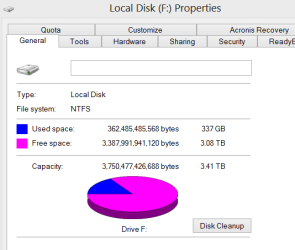
A way which gets round the problem is to create a SPANNED Drive which the computer sees as one logical drive even though it can consist of several physical drives.

For instance I have a LARGE music library which spans more than one physical HDD -
Note though - if ONE volume in the spanned set fails then you lose data from the whole spanned volume.

IMO though HDD's fail very very rarely - so if you have a decent backup strategy this shouldn't be a problem --certainly not if you backup data as data -- not as a disk / partition image-- regularly.

Enc screenshot here -- two physical disks which the system thinks is drive "F".

I use this quite a lot -- for example on another system I've got 4 500 GB disks which I use as a Video library -- it's far more convenient to have this whole lot grouped together as a single " 2TB spanned volume" as I don't have to worry about filling the 500 GB drive half way through a video download etc etc.

Hi quality HD video uses a LOT of disk space BTW and doing it this way you can keep your libraries decently organised on the same "Volume" and use some of your older smaller capacity HDD's. For these types of applications the speed / performance of the HDD's isn't important --just data drives -- I always use separate SSD's for my OS.

(A lot of music / photo software doesn't handle multi volume data - so by spanning you've avoided the problem as it's treated as a SINGLE disk).

There is a trade off -- if you lose a disk you lose all the data so do back up regularly --in any case you should be doing that anyway.

Cheers
jimbo


Enc screenshot
Attached Thumbnails
Possible to have 2 drives linked with one shortcut?-spanned.png   Possible to have 2 drives linked with one shortcut?-span3.png  
My System SpecsSystem Spec
05 Feb 2013   #3

Win 7 Ultimate 64 bit
At home.


A safer way would be to use Win 7 Libraries.
My System SpecsSystem Spec
.


05 Feb 2013   #4
tys

Windows 7 Professional x64


Thanks guys,

How would I go about the libraries? I tried to add a new folder from the NAS drive and it wouldn't allow me because it isn't indexed.
My System SpecsSystem Spec
05 Feb 2013   #5
tys

Windows 7 Professional x64


actually, just tried to add another network drive, that worked, although when I save a document into the Library, it only saves to the C drive and not to the Network drive aswell.
My System SpecsSystem Spec
20 Feb 2013   #6
tys

Windows 7 Professional x64


Anyone... help ?
My System SpecsSystem Spec
Reply

 Possible to have 2 drives linked with one shortcut? problems?


Thread Tools


Similar help and support threads for: Possible to have 2 drives linked with one shortcut?
Thread Forum
HIS Radeon 5770 showing Red LED - Can it be linked to HDD? Graphic Cards
Deducing hard-linked files General Discussion
Can't get laptop and netbook linked via Homegroup Network & Sharing
start - downloads -linked to library? General Discussion
Cross-linked files??? Installation & Setup


All times are GMT -5. The time now is 12:40 PM.


Seven Forums Android App Seven Forums IOS App Follow us on Facebook

Windows 7 Forums is an independent web site and has not been authorized,
sponsored, or otherwise approved by Microsoft Corporation.
"Windows 7" and related materials are trademarks of Microsoft Corp.
© Designer Media Ltd
  

1 2 3 4 5 6 7 8 9 10 11 12 13 14 15 16 17 18 19 20 21 22 23 24 25 26 27 28 29 30 31 32