Solved Only Skype and Google search are opening. No other website.

akshayshinde

New member
Local time
1:15 PM
Messages
17
Hey guys, I am stuck here. I have Windows 7 Home Premium 64 bit operating system. A few hours ago, my internet has started acting funny. I was browsing as usual on Google Chrome and suddenly I started getting Error 118: operation timed out. Surprisingly, gmail, twitter, facebook, and the search bar work just fine. I can search and get results but cannot open the websites. Even Skype seems to work. Other computers do not seem to have this problem. I tried all the suggestions on the internet (using my phone browser to do this, connected to same wireless network, works fine). I tried the ipconfig/flushdns and netsh interface ip commands. Even tried system restore. Triple checked for malwares and viruses. Disabled antivirus and firewalls. Nothing seems to work. What shall I do. I know its not the router issue, 3 other laptops on the same network and same OS work fine. Please help.
UPDATE: For some inexplicable reason, everything has started working back to how it was..not sure if to mark this as solved or not...r
UPDATE: nope, it worked for 5 minutes and stopped working again.
UPDATE : And its back again...
 
Last edited:

My Computer My Computer

At a glance

Windows 7 Home Premium 64bit
OS
Windows 7 Home Premium 64bit
UPDATE: For some inexplicable reason, everything has started working back to how it was..not sure if to mark this as solved or not...r
UPDATE: nope, it worked for 5 minutes and stopped working again.
 
Last edited:

My Computer My Computer

At a glance

Windows 7 Home Premium 64bit
OS
Windows 7 Home Premium 64bit
UPDATE: And is back online again..WTF??????? Its coming and going!
 

My Computer My Computer

At a glance

Windows 7 Home Premium 64bit
OS
Windows 7 Home Premium 64bit
Help me!! Its gone again. It works automatically for a few minutes and then disappears..
 

My Computer My Computer

At a glance

Windows 7 Home Premium 64bit
OS
Windows 7 Home Premium 64bit
What scanners did you use for malware scans?
 

My Computer My Computer

At a glance

Windows 7 Ultimate X64 SP1Intel i5-2550K, Differing ~4.4-4.8GHz No buil...16GB G.Skill Sniper 1866MHz @ 2133MHz 2x8GBASUS GTX650TIB-DC2OC-2GD5, (650TI Boost)
Computer type
PC/Desktop
Computer Manufacturer/Model Number
Home Built Desktop By DataTech
OS
Windows 7 Ultimate X64 SP1
CPU
Intel i5-2550K, Differing ~4.4-4.8GHz No built in GPU
Motherboard
ASUS P8Z68-V PRO/GEN3
Memory
16GB G.Skill Sniper 1866MHz @ 2133MHz 2x8GB
Graphics Card(s)
ASUS GTX650TIB-DC2OC-2GD5, (650TI Boost)
Sound Card
Onboard Realtek 5-1
Monitor(s) Displays
Samsung P2570HD
Screen Resolution
1920x1080
Hard Drives
Samsung 840 Pro 256GB SSD for OS, 500GB Seagate Constellation (Enterprise drive) for Data
PSU
Corsair HX650W
Case
Inwin Dragon Rider
Cooling
Hyper 212 EVO w/two Noctua fans, push-pull, @1300 RPM
Keyboard
E-Z Eyes, bright yellow keys with large characters
Mouse
steelseries SENSEI Laser Pro Gaming
Internet Speed
48-51Mbs Mbs down, 11 Mbs up Xfinity Cable
Antivirus
Norton Internet Security 2013
Browser
IE 10, Opera, Pale Moon if needed
Other Info
4 case fans, LG BluRay-RE, ASUS DVD-RW, Mr. Fusion power supply, 1.21 gigawatts.
I used malwarebytes and avg before uninstalling avg...both in safe mode.
 

My Computer My Computer

At a glance

Windows 7 Home Premium 64bit
OS
Windows 7 Home Premium 64bit
try in the command prompt the following:
netstat -an

see how many connections r active..
 

My Computer My Computer

At a glance

Windows 7 Professional x64
OS
Windows 7 Professional x64
there are 3connections active. i am attaching an image because i am doing all thus. from my android.
 

Attachments

  • 2013-02-11_00-37-28_903-665930588.jpg
    2013-02-11_00-37-28_903-665930588.jpg
    772.3 KB · Views: 11

My Computer My Computer

At a glance

Windows 7 Home Premium 64bit
OS
Windows 7 Home Premium 64bit
well, those r connections to Montana State University.. im guessing they'r legit?

also, do "netstat -an" to see if there's connection attempts spamming..
 

My Computer My Computer

At a glance

Windows 7 Professional x64
OS
Windows 7 Professional x64
The command is netstat_-an, without the underscore, it's a space.
 

My Computer My Computer

At a glance

Windows 7 Ultimate X64 SP1Intel i5-2550K, Differing ~4.4-4.8GHz No buil...16GB G.Skill Sniper 1866MHz @ 2133MHz 2x8GBASUS GTX650TIB-DC2OC-2GD5, (650TI Boost)
Computer type
PC/Desktop
Computer Manufacturer/Model Number
Home Built Desktop By DataTech
OS
Windows 7 Ultimate X64 SP1
CPU
Intel i5-2550K, Differing ~4.4-4.8GHz No built in GPU
Motherboard
ASUS P8Z68-V PRO/GEN3
Memory
16GB G.Skill Sniper 1866MHz @ 2133MHz 2x8GB
Graphics Card(s)
ASUS GTX650TIB-DC2OC-2GD5, (650TI Boost)
Sound Card
Onboard Realtek 5-1
Monitor(s) Displays
Samsung P2570HD
Screen Resolution
1920x1080
Hard Drives
Samsung 840 Pro 256GB SSD for OS, 500GB Seagate Constellation (Enterprise drive) for Data
PSU
Corsair HX650W
Case
Inwin Dragon Rider
Cooling
Hyper 212 EVO w/two Noctua fans, push-pull, @1300 RPM
Keyboard
E-Z Eyes, bright yellow keys with large characters
Mouse
steelseries SENSEI Laser Pro Gaming
Internet Speed
48-51Mbs Mbs down, 11 Mbs up Xfinity Cable
Antivirus
Norton Internet Security 2013
Browser
IE 10, Opera, Pale Moon if needed
Other Info
4 case fans, LG BluRay-RE, ASUS DVD-RW, Mr. Fusion power supply, 1.21 gigawatts.
this is what i get after that command...and sorry about the late replies...
 

Attachments

  • 2013-02-11_06-24-14_742302034409.jpg
    2013-02-11_06-24-14_742302034409.jpg
    491.3 KB · Views: 8

My Computer My Computer

At a glance

Windows 7 Home Premium 64bit
OS
Windows 7 Home Premium 64bit
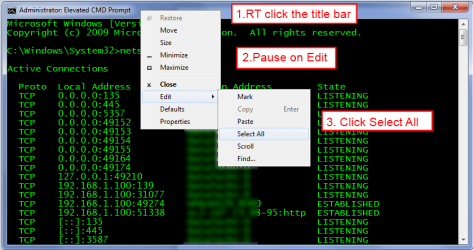
To help akshayshinde see your info, you can copy/paste the text from cmd like this:
cmd copy.png
Then open paste in your post between the code tags. code.JPG
 

My Computer My Computer

At a glance

Windows 7 Ultimate X64 SP1Intel i5-2550K, Differing ~4.4-4.8GHz No buil...16GB G.Skill Sniper 1866MHz @ 2133MHz 2x8GBASUS GTX650TIB-DC2OC-2GD5, (650TI Boost)
Computer type
PC/Desktop
Computer Manufacturer/Model Number
Home Built Desktop By DataTech
OS
Windows 7 Ultimate X64 SP1
CPU
Intel i5-2550K, Differing ~4.4-4.8GHz No built in GPU
Motherboard
ASUS P8Z68-V PRO/GEN3
Memory
16GB G.Skill Sniper 1866MHz @ 2133MHz 2x8GB
Graphics Card(s)
ASUS GTX650TIB-DC2OC-2GD5, (650TI Boost)
Sound Card
Onboard Realtek 5-1
Monitor(s) Displays
Samsung P2570HD
Screen Resolution
1920x1080
Hard Drives
Samsung 840 Pro 256GB SSD for OS, 500GB Seagate Constellation (Enterprise drive) for Data
PSU
Corsair HX650W
Case
Inwin Dragon Rider
Cooling
Hyper 212 EVO w/two Noctua fans, push-pull, @1300 RPM
Keyboard
E-Z Eyes, bright yellow keys with large characters
Mouse
steelseries SENSEI Laser Pro Gaming
Internet Speed
48-51Mbs Mbs down, 11 Mbs up Xfinity Cable
Antivirus
Norton Internet Security 2013
Browser
IE 10, Opera, Pale Moon if needed
Other Info
4 case fans, LG BluRay-RE, ASUS DVD-RW, Mr. Fusion power supply, 1.21 gigawatts.
NEW UPDATE: Now my WiFi is connected but now even Skype does not connect. Even the google search has stopped.. And I am doing all this on my android phone. so the photos. please, any help is appreciated.
 

My Computer My Computer

At a glance

Windows 7 Home Premium 64bit
OS
Windows 7 Home Premium 64bit
NEW UPDATE: Ok now it is getting weird. WiFi is connected but it says no internet access. But I have internet access because my android phone is on the same network and i am doing all this using the phone and it works fine. I dont get it. Till yesterday atleast it was connecting to Skype but now it says no internet access. What am I to do now?
 

My Computer My Computer

At a glance

Windows 7 Home Premium 64bit
OS
Windows 7 Home Premium 64bit
There is a change today after i type in the command netstat -an. Two addresses are saying established. But the situarion has not improved. Until yesterday morning my Skype was working and google facebook twitter opened. but since yesterday afternoon everything has stopped. The Wireless Network Connection shows I am connected and has internet access but nothing seems to work. But it does take some time to have internet access after connecting. After like 10 minutes or so it goes back to having internet access. And in safe mode with networking, it never has internet access even if it is connected. I did a full scan again yesterday in safe mode found no infections. Xan nobody help me?
 

Attachments

  • 2013-02-12_21-11-55_320-216626376.jpg
    2013-02-12_21-11-55_320-216626376.jpg
    528.1 KB · Views: 6

My Computer My Computer

At a glance

Windows 7 Home Premium 64bit
OS
Windows 7 Home Premium 64bit
When you uninstalled AVG, what did you replace it with?
What other Anti-Virus products have EVER been installed on this machine?

Start by opening an Elevated Command Prompt, and running the following command....

NETSH WINSOCK RESET

reboot on request.
 

My Computer My Computer

At a glance

Win 7 x64 Home Premium (and x86 VirtualBox VM...i3 370M/i7 6500U8GB - finally :)/8GBit's an i3, dude!/dual Intel&nVidia
Computer type
Laptop
Computer Manufacturer/Model Number
Asus K52F or Lenovo B51-80
OS
Win 7 x64 Home Premium (and x86 VirtualBox VM)/Win10
CPU
i3 370M/i7 6500U
Motherboard
Asus/Lenovo
Memory
8GB - finally :)/8GB
Graphics Card(s)
it's an i3, dude!/dual Intel&nVidia
Sound Card
onboard
Monitor(s) Displays
15.6" built-in
Screen Resolution
1366x768/1920x1080
Hard Drives
750GB Seagate internal
Sundry external drives attached to other computers on the local network
1TB SSD on the Lenovo
PSU
n/a
Internet Speed
as much as I can get - usually on a dongle/phone, so <1MB/s
Antivirus
MSE/Defender
Browser
IE11/12/Edge/Chrome/FF(if I must)
i tried avast. and i did run those commands. been running them for 2the days now. nothing seens to work. i removed avast. got anewer avg and ran the sxans. still nothig. and now it seems the network is connected but shows no internet access. i am not sure what to do now.
 

My Computer My Computer

At a glance

Windows 7 Home Premium 64bit
OS
Windows 7 Home Premium 64bit
What are the 'sxans' ??

You need to run the cleanup tools for Avast and AVG -

Download the Avast removal utility from here http://www.avast.com/uninstall-utility
Follow the instructions for running it, and when complete, reboot the machine.

Uninstall the current AVG and then run both the AVG 2012 and 2013 removers
Download the AVG Remover from here
http://www.avg.com/us-en/utilities
Follow the instructions for running it, and then reboot the machine (whether it asks for it or not, and whether the program rebooted already or not).

Then run NETSH WINSOCK RESET again, and reboot.

Install MSE for the moment, as it's least likely to cause conflicts.... Microsoft Security Essentials - Microsoft Windows
 

My Computer My Computer

At a glance

Win 7 x64 Home Premium (and x86 VirtualBox VM...i3 370M/i7 6500U8GB - finally :)/8GBit's an i3, dude!/dual Intel&nVidia
Computer type
Laptop
Computer Manufacturer/Model Number
Asus K52F or Lenovo B51-80
OS
Win 7 x64 Home Premium (and x86 VirtualBox VM)/Win10
CPU
i3 370M/i7 6500U
Motherboard
Asus/Lenovo
Memory
8GB - finally :)/8GB
Graphics Card(s)
it's an i3, dude!/dual Intel&nVidia
Sound Card
onboard
Monitor(s) Displays
15.6" built-in
Screen Resolution
1366x768/1920x1080
Hard Drives
750GB Seagate internal
Sundry external drives attached to other computers on the local network
1TB SSD on the Lenovo
PSU
n/a
Internet Speed
as much as I can get - usually on a dongle/phone, so <1MB/s
Antivirus
MSE/Defender
Browser
IE11/12/Edge/Chrome/FF(if I must)
Sorry about the spelling mistakes. i am using my phone to do all this so a few errors. but i have to wait till my room mate comes back to download the removal tool since i cannot do it on my laptop. i have to do it on his. but thanks for the help. i will run everything and post the results again.
 

My Computer My Computer

At a glance

Windows 7 Home Premium 64bit
OS
Windows 7 Home Premium 64bit
Can you access the internet properly using Safe Mode with Networking?
try it and see.
 

My Computer My Computer

At a glance

Win 7 x64 Home Premium (and x86 VirtualBox VM...i3 370M/i7 6500U8GB - finally :)/8GBit's an i3, dude!/dual Intel&nVidia
Computer type
Laptop
Computer Manufacturer/Model Number
Asus K52F or Lenovo B51-80
OS
Win 7 x64 Home Premium (and x86 VirtualBox VM)/Win10
CPU
i3 370M/i7 6500U
Motherboard
Asus/Lenovo
Memory
8GB - finally :)/8GB
Graphics Card(s)
it's an i3, dude!/dual Intel&nVidia
Sound Card
onboard
Monitor(s) Displays
15.6" built-in
Screen Resolution
1366x768/1920x1080
Hard Drives
750GB Seagate internal
Sundry external drives attached to other computers on the local network
1TB SSD on the Lenovo
PSU
n/a
Internet Speed
as much as I can get - usually on a dongle/phone, so <1MB/s
Antivirus
MSE/Defender
Browser
IE11/12/Edge/Chrome/FF(if I must)
Back
Top