Windows 7 Forums


Windows 7: Conflicting Wi-Fi Router Channels

21 Feb 2013   #1

Windows 7 Professional 64bit
 
 
Conflicting Wi-Fi Router Channels

As many of you know you can change your routers channel that it broadcasts on. However in my neighbourhood they don't as the same channel is being broadcasted. Furthermore the SSID name suggests they use the same ISP as me.

My question is does it affect my internet connection all?

I was thinking of renaming my wireless to something along the lines of "neighbours update your router settings, wireless channel"


Okay doubt that would fit

What do you think?
My System SpecsSystem Spec

21 Feb 2013   #2

Windows 7 Ultimate x64
Topeka Kansas


I wouldn't worry about your neighbors. If your channel is the same as there's change it. The save channels are 1,6, and 11.

If you have the same said that can be a problem. If it looks the same and it confuses you then change it so you know what one is yours.
My System SpecsSystem Spec
21 Feb 2013   #3

Windows 7 Professional 64bit


On a 2.4 Ghz band I have an option of choosing anything from 1-13.

Does higher than channel i.e. 13 mean stronger signal & speed or is there no correlation between the channel number and signal/speed?
My System SpecsSystem Spec
.


21 Feb 2013   #4

Windows 7 Ultimate x64
Topeka Kansas


Nope. Just a different channel so the radio waves don't collide.
My System SpecsSystem Spec
21 Feb 2013   #5

Windows 7 Ultimate X64 SP1
Mt. Crumpit/Whoville


no correlation, it's just a different frequency within the whole band, 2.4GHz.
You can make your SSID something like, FBI Surveillance.
My System SpecsSystem Spec
21 Feb 2013   #6

Windows 7 HP 64bit, Windows 8 Pro w/Media Center 64bit
Covington, La


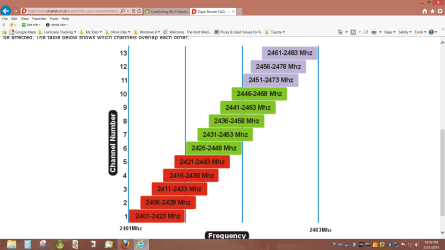
Also channels overlap so see what your neighbors are using and choose a channel that does not overlap if possible.

Conflicting Wi-Fi Router Channels-screenshot-37-.png

Jim
My System SpecsSystem Spec
22 Feb 2013   #7

Windows 7 Professional 64bit


Thanks for your help everyone so far.

Lets say 6 is the only channel being used.

If I change mine to 13 will it benefit me more than if I change it to 7 or is it once your away from 6 it makes the same impact?

Last edited by mangoh; 23 Feb 2013 at 11:29 AM..
My System SpecsSystem Spec
22 Feb 2013   #8

Windows 7 Ultimate x64
Topeka Kansas


Look at the over lap chart posted. You should choose something that does not over lap with a channel being used.
My System SpecsSystem Spec
22 Feb 2013   #9

Windows 7 HP 64bit, Windows 8 Pro w/Media Center 64bit
Covington, La


If everyone is using 6 then 1,11,12,13 have no overlap and using one of those will cut down any interference.

Jim
My System SpecsSystem Spec
23 Feb 2013   #10

Windows 7 HP 64bit, Windows 8 Pro w/Media Center 64bit
Covington, La


There are 2 parts to your service. The WAN is from your ISP server to your modem. The LAN (Wi-Fi) is from your modem to your PC. By using a clear channel then you help the LAN (Wi-Fi) portion to run better. I don't know what type of ISP you have but there is not much you can do to improve the WAN portion.

Jim
My System SpecsSystem Spec
Reply

 Conflicting Wi-Fi Router Channels problems?


Thread Tools


Similar help and support threads for: Conflicting Wi-Fi Router Channels
Thread Forum
32-bit conflicting Browsers & Mail
WMP 12/Mp3 conflicting with MSN and/or webcam? Music, Pictures & Video
Conflicting drivers Drivers
HP PSC 1350 conflicting with DVD-RW Hardware & Devices
Conflicting Drivers? Drivers


All times are GMT -5. The time now is 07:24 PM.


Seven Forums Android App Seven Forums IOS App Follow us on Facebook

Windows 7 Forums is an independent web site and has not been authorized,
sponsored, or otherwise approved by Microsoft Corporation.
"Windows 7" and related materials are trademarks of Microsoft Corp.
© Designer Media Ltd
  

1 2 3 4 5 6 7 8 9 10 11 12 13 14 15 16 17 18 19 20 21 22 23 24 25 26 27 28 29 30 31 32