Windows 7 Forums Search
Welcome to Windows 7 Forums. Our forum is dedicated to helping you find solutions with any problems, errors or issues you are experiencing with Windows 7. The Windows 7 forum also covers news and updates and has an extensive Windows 7 tutorial section that covers a wide range of tips and tricks.


Windows 7 - Windows 7 Ultimate, can not access network shares

 
10-12-2009   #1


Windows 7 Ultimate


Windows 7 Ultimate, can not access network shares

I installed Windows 7 Ultimate saturday night (I got it early to have a release party). It was an upgrade from Vista Ultimate.
I can't access any of my network shares. I am running a NSALite2 server with 3 drives and a Linksys NAS200 with 2 1Tb drives. I can access both via HTTP, but can not access them via a network share. I can ping both of them as well. I am using a laptop and connecting via wireless N. I can get on the Internet just fine. I can access the drives just fine on 2 XP machines on the network. I was able to access these drives previous using Vista Ultimate.
I have read some about changing the encryption from 128bit to 64bit, but was having trouble finding where to make this change.
Any ideas?

My System SpecsSystem Spec
10-12-2009   #2


WCP ONLY


Quote   Quote: Originally Posted by Homerj View Post
I installed Windows 7 Ultimate saturday night (I got it early to have a release party). It was an upgrade from Vista Ultimate.
I can't access any of my network shares. I am running a NSALite2 server with 3 drives and a Linksys NAS200 with 2 1Tb drives. I can access both via HTTP, but can not access them via a network share. I can ping both of them as well. I am using a laptop and connecting via wireless N. I can get on the Internet just fine. I can access the drives just fine on 2 XP machines on the network. I was able to access these drives previous using Vista Ultimate.
I have read some about changing the encryption from 128bit to 64bit, but was having trouble finding where to make this change.
Any ideas?
Homer

You running homegroup or workgroup? how are you sharing the files and who is the owner of them

thanks

Ken
My System SpecsSystem Spec
10-12-2009   #3


Windows 7 Ultimate


I tried it with both a homegroup and a workgroup, neither worked. Up till now I have not had to share the files. My wife and I have full access to all the drives. I simply mapped drives to each drive from our computers.
My System SpecsSystem Spec
.


10-12-2009   #4


7 Prof


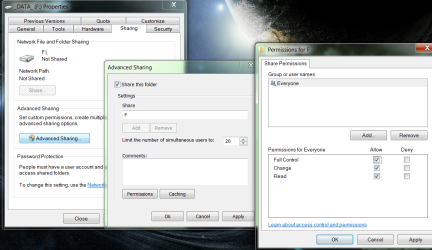
How have you set up your shared drives? I don't wanna assume anything, so I'll start with the basic version, as long as my computers were in the same workgroup, on a new install with the proper services running, the following will normally get my computers to share.
Failing this, I think you need to config ownership.
Attached Thumbnails
Windows 7 Ultimate, can not access network shares-capture.png  
My System SpecsSystem Spec
10-12-2009   #5


Windows 7 Ultimate


I am getting a "Network path was not found" message. So I can not get as far as setting up sharing. I have tried to recreate the network path but no luck.
My System SpecsSystem Spec
10-12-2009   #6


7 Prof


Are the computers in the same workgroup? If they are, do you have file/printer
sharing enabled?
My System SpecsSystem Spec
10-12-2009   #7
aem


Windows 7 Ultimate 64Bit


The fundamental thing here is to get the pcs talking/seeing each other (i would not look into adding or editting workgroups yet). Get all the pcs connected to the internet first (auto detect settings to start with), this would means they are on the same vlan (your home network), if they are all ok then setup the shares. Makes sure each shares has correct permissions AND which account can access it (don't assume the Everyone group can). Test mapp and if you get a logon credentials box, then that's where the IDs comes into play.
My System SpecsSystem Spec
10-12-2009   #8


Windows 7 Ultimate


Part of the issue is that the drives I am trying to access are not running on Windows computers. 2 of the drives are in a Linksys NAS200, the other 3 are in a computer running Naslite2. The NASLite2 is showing in the same workgroup as the laptop.
My System SpecsSystem Spec
10-13-2009   #9


7 Prof


Ok then you might have to hang on till some one who owns a NAS box can pitch in.
My System SpecsSystem Spec
10-13-2009   #10


Windows 7 Ultimate


I read something about the version of the software being used by NASLite was not compatible with Windows 7. Funny part was the beta worked fine, although in a netobook. Trying to figure out what I did different this time. A bit puzzled by the Linksys NAS200 not working though, may need an update from them. I am figuring there is a sharing/security setting I need to change, just trying to find it.
My System SpecsSystem Spec
Reply

 Windows 7 Ultimate, can not access network shares problems?


Thread Tools


Similar Threads for: Windows 7 Ultimate, can not access network shares
Thread Forum
Windows 7 cannot access all shares Network & Sharing
Cannot access shares on same computer through network folder Network & Sharing
Can access Vista shares from XP but not from Windows 7 (access denied) Network & Sharing
Help - Unable to access network shares Network & Sharing
Cannot access network shares... Network & Sharing


All times are GMT -5. The time now is 04:41 PM.


Windows 7 Forums is an independent web site and has not been authorized,
sponsored, or otherwise approved by Microsoft Corporation.
"Windows 7" and related materials are trademarks of Microsoft Corp.
© Designer Media Ltd
  

1 2 3 4 5 6 7 8 9 10 11 12 13 14 15 16 17 18 19 20 21 22 23 24 25 26 27 28 29 30