Windows 7 Forums


Windows 7: Windows 7 network password issue

06 Nov 2009  
WayCon

Windows 7
21 posts
 
 
Windows 7 network password issue

Hello,


When, in Windows 7, I try to access another computer on my tiny network from left side of the 'Computer' screen, I am asked for a password. I haven't assigned any password--my little network (through a router) doesn't need password security. How do I get rid of all this request for passwords that I never had on other computers with other OSs?

I thank you for your time.
My System SpecsSystem Spec

06 Nov 2009  
rsvr85

Windows 7 Ultimate x64
1,087 posts
C:\Users\Home


The required password will be the password used to login to the machine you are trying to access.
My System SpecsSystem Spec
06 Nov 2009  
WayCon

Windows 7
21 posts


Thank you, rsvr85, for answering so quickly.

I'm not logged onto either of the computers as anyone. In particular I'm not logged onto the computer using Windows 7 which is denying access to the other computer. Is the a default log-on name and pass code? Is there anyway to eliminate passwords within my network?

Thank you, again.

WayCon
My System SpecsSystem Spec
.


06 Nov 2009  
rsvr85

Windows 7 Ultimate x64
1,087 posts
C:\Users\Home


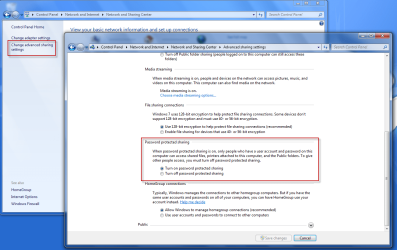
You can try turning off Password protected sharing?

Windows 7 network password issue-ghfg.png
My System SpecsSystem Spec
06 Nov 2009  
WayCon

Windows 7
21 posts


Thank you, rsvr85, for getting back, again.

I tried what you suggested, but that didn't change things. I do have the new computer icon on my other computers My Network Places, but when I click on it, I still get the message:

xxx is not accessible

Access is denied.

Any other ideas?

Sincerely,

WayCon
My System SpecsSystem Spec
06 Nov 2009  
WayCon

Windows 7
21 posts


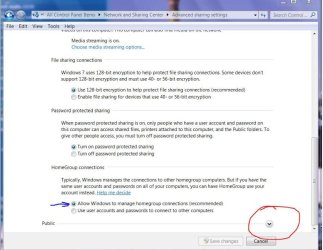
Now I have another problem. As I tried to walk through the steps about Password sharing, I saw the password for homegroups, and recorded it. When I reboot, I'm entirely locked out of my computer. The password doesn't seem to work. (I know the password is case sensitive.)

Windows 7 doesn't seem to be at all user friendly.
My System SpecsSystem Spec
06 Nov 2009  
DocBrown

Win7 Enterprise, Win7 x86 (Ult 7600), Win7 x64 Ult 7600, TechNet RTM on AMD x64 (2.8Ghz)
8,576 posts
SomeWhere in the HOT Arizona Desert !


Quote   Quote: Originally Posted by WayCon View Post
Now I have another problem. As I tried to walk through the steps about Password sharing, I saw the password for homegroups, and recorded it. When I reboot, I'm entirely locked out of my computer. The password doesn't seem to work.

Windows 7 doesn't seem to be at all user friendly.
Windows 7 Homegroups does not seem to work very well for a lot of users. Usually only works between Windows 7 computers on a network.

I like using a business type workgroup even for a small home network.

Not sure how you locked yourself out. Try booting into Safe Mode to see if you get an administrator acct that you can log into.
My System SpecsSystem Spec
06 Nov 2009  
WayCon

Windows 7
21 posts


Thank you, DocBrown,

You absolutely got me out of this problem. Now, I can go back to my other struggles with this very unfriendly OS.

Thank you, thank you,

Sincerely,

WayCon
My System SpecsSystem Spec
07 Nov 2009  
DocBrown

Win7 Enterprise, Win7 x86 (Ult 7600), Win7 x64 Ult 7600, TechNet RTM on AMD x64 (2.8Ghz)
8,576 posts
SomeWhere in the HOT Arizona Desert !


Quote   Quote: Originally Posted by WayCon View Post
Thank you, DocBrown,

You absolutely got me out of this problem. Now, I can go back to my other struggles with this very unfriendly OS.

Thank you, thank you,

Sincerely,

WayCon

We are working hard analizing the problems. Glad I could help
Attached Thumbnails
Windows 7 network password issue-doc_analizing_the_problem.jpg  
My System SpecsSystem Spec
07 Nov 2009  
WayCon

Windows 7
21 posts


Here is my current status:

When I'm on my Windows 7 computer, logged in as administrator, I can map to and read/write to the other computer. When I switch to a user on the Windows 7 computer and try to Map Network Drive, I'm asked to Enter Network Password. I don't have one.

When I try to see my Windows 7 computer (where I'm logged in either as adminstrator or user), I am told on my other computer in My Network Places, "Login Failure: user account retriction."

I have no need for security between my computers (which are side by side). How do I take eliminate all these passwords, etc.?

Thank you.

WayCon
My System SpecsSystem Spec
Reply

 Windows 7 network password issue problems?


Thread Tools


Similar help and support threads for: Windows 7 network password issue
Thread Forum
Solved Windows 7 Network Password Issue Network & Sharing
Need help resolving "Enter Network Password" issue Network & Sharing
Windows keeps asking for Network Password to access computer Network & Sharing
Windows Security: Network Password Network & Sharing
Windows 7 bootup password issue Performance & Maintenance


All times are GMT -5. The time now is 09:53 PM.


Windows 7 Forums is an independent web site and has not been authorized,
sponsored, or otherwise approved by Microsoft Corporation.
"Windows 7" and related materials are trademarks of Microsoft Corp.
© Designer Media Ltd