Windows 7 Forums Search
Welcome to Windows 7 Forums. Our forum is dedicated to helping you find solutions with any problems, errors or issues you are experiencing with Windows 7. The Windows 7 forum also covers news and updates and has an extensive Windows 7 tutorial section that covers a wide range of tips and tricks.


Windows 7 - Unknown Router displaying on my Network


11-06-2009   #1


Windows 7 64 bit


Unknown Router displaying on my Network

I have a home network connecting 4 computers, 2 print servers, and a media bridge to a Linksys wireless router. Pretty much the same setup from XP to Vista to Windows 7.

After installing Windows 7 x64, I am seeing a device under the category "Infrastructure (1)" on my Windows Network screen. It identifies itself as "WNR843Bv" - a Netgear router - which is definitely NOT a device on my network! Maybe it belongs to a neighbor, I can't verify this. Other than this - the network is functioning as expected.

I use WPA2 encryption and MAC Address filtering on my Linksys router, so I am (reasonably) confident that this device is not connected to my network. However, I am not comfortable with this.

Can anyone help me understand :

(1) What is an "Infrastructure (1) device?
(2) Why is it showing up on my Network screen in Windows 7?
(3) How can I get rid of it?

Thanks.

My System SpecsSystem Spec
11-10-2009   #2


Windows 7 64 bit


BUMP!

I attached a screenshot to illustrate the problem. The mysterious network device is circled. Thanks!
Attached Thumbnails
Unknown Router displaying on my Network-network_screenshot.png  
My System SpecsSystem Spec
11-10-2009   #3


7600.20510 x86


That's your router. I'm willing to bet 20:1 that you installed a 3rd party Linux based firmware on it, right? Something like DD-WRT? I dunno really though. Just a guess.
My System SpecsSystem Spec
.


11-10-2009   #4


Windows 7 64 bit


Quote   Quote: Originally Posted by torrentg View Post
That's your router. I'm willing to bet 20:1 that you installed a 3rd party Linux based firmware on it, right? Something like DD-WRT? I dunno really though. Just a guess.
You can put your $20 bill away! I appreciate any assistance!

You're partially right - I do have 3rd party firmware on MY Linksys router - however, the device showing as "Infrastructure (1)" is not my router. How do I know this?

(1) When I do Right Click > Properties on the device in My Network, it reveals its MAC Address, and that it's a Netgear RangeMax Wireless-N Router - which I do not own.

(2) I did a WiFi scan with inSSIDer (cool app.) and it clearly identifies that one of my neighbors is using this Netgear Router on his network. inSSIDER identifies it by the MAC Address, so I am pretty sure this is the router.

(3) My wireless network is locked down with WPA and MAC Filtering. I use Channel 1. The neighbor's wireless router uses WEP and is on Channel 11.

So, why is this device displaying as "Infrastructure (1)" on my network?
My System SpecsSystem Spec
11-10-2009   #5


Vista SP2 HP 32-bit & Ult 64-bit W7 SP1 Pro 32-bit & 64-bit


Hi Track7

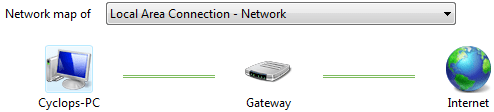
Can you repost your network configuration as shown below. You've stated that you have 3rd party firmware installed on your router - it is possible that this is where the problem lies and it is actually your router which is being mis-identified.
Unknown Router displaying on my Network-capture.png
My System SpecsSystem Spec
11-10-2009   #6


Windows 7 64 bit


Thanks Dwarf

Here is my network configuration:
Attached Thumbnails
Unknown Router displaying on my Network-network_center.png  
My System SpecsSystem Spec
11-10-2009   #7


Windows 7 Ultimate x64 + x86 + Windows 8 x64


A couple of questions

Are you in a highly populated area?

Is your router set to the default settings?

What i am thinking is that this could be a neighbour's router that is set with the default IP address range. There is also a chance that the SSID could be the same - a lot of people call the network something such as Home or Wireless and the chance is there that two nearby systems could be named the same - this is more likely when the routers are from the same manufacturer and are left at default
My System SpecsSystem Spec
11-10-2009   #8


Vista SP2 HP 32-bit & Ult 64-bit W7 SP1 Pro 32-bit & 64-bit


Can you repost your network layout - this time click on See full map.
My System SpecsSystem Spec
11-10-2009   #9


Windows 7 64 bit


Quote   Quote: Originally Posted by Dwarf View Post
Can you repost your network layout - this time click on See full map.
Here it is!
Attached Thumbnails
Unknown Router displaying on my Network-network_map.png  
My System SpecsSystem Spec
11-11-2009   #10


Windows 7 Ultimate 64Bit


If this device is not yours than it's your neighbour's. Why not go around and ask them. Btw, can u disabled it?
My System SpecsSystem Spec
Reply

Unknown Router displaying on my Network problems?


Thread Tools


Similar Threads for: Unknown Router displaying on my Network
Thread Forum
Displaying inactive network connections Network & Sharing
Wireless Network Signal Strength Icon Displaying red Cross Network & Sharing
More than 100 unknown devices in network adapters Hardware & Devices
Unknown new network connections Network & Sharing
Displaying my Network in desktop General Discussion


All times are GMT -5. The time now is 02:49 AM.


Windows 7 Forums is an independent web site and has not been authorized,
sponsored, or otherwise approved by Microsoft Corporation.
"Windows 7" and related materials are trademarks of Microsoft Corp.
© Designer Media Ltd
  

1 2 3 4 5 6 7 8 9 10 11 12 13 14 15 16 17 18 19 20 21 22 23 24 25 26 27 28 29 30