Windows 7 Forums


Windows 7: "No Other Homegroup Computers Are Available"

08 Nov 2009   #1

windows 7
"on the beach"
 
 
"No Other Homegroup Computers Are Available"

Hi All,
Ive got 2 desktops & 1 Laptop connected all running Windows 7.
Desktop 1 created the homegroup, but cannot see the others in homegroup and gives message above. But does see them in workgroup networking.
Desktop 2 & laptop joined this homegroup, and see each other and the original desktop1. These two work fine.
Ive looked through the forum, havent found the answer.
Any ideas?


My System SpecsSystem Spec

28 Nov 2009   #2

Windows 7 Professional
Jensen Beach FL


Same problem so I'll ride along. 7 on 2 PC's. Passwod the same.
Desktop sees laptop.
Laptop doesn't see Desktop. Networking sees both.
My System SpecsSystem Spec
28 Nov 2009   #3

windows 7 64 bit


I had the same problem until I stumbled on this link.(Share libraries with your homegroup). If you follow this it might help. I had done everything to set up the homegroup. But if you don't actualy go through and select what you want to share then you get the no other homegroup available message. Also windows defenders firewall is set up to allow homegroups. I just reinstalled my security suite without the firewall part and then set up windows defender just for the firewall.
My System SpecsSystem Spec
.


29 Nov 2009   #4

Windows 7 Professional
Jensen Beach FL


That did it.
I selected Read/Write since I want to be able to make changes from my laptop to the Desktop.

I wonder why the directions on Homegroups don't spell this out.
Or did I miss it.

Thanks, Greg
My System SpecsSystem Spec
29 Nov 2009   #5

Windows 7


Quote   Quote: Originally Posted by petacof View Post
Hi All,
Ive got 2 desktops & 1 Laptop connected all running Windows 7.
Desktop 1 created the homegroup, but cannot see the others in homegroup and gives message above. But does see them in workgroup networking.
Desktop 2 & laptop joined this homegroup, and see each other and the original desktop1. These two work fine.
Ive looked through the forum, havent found the answer.
Any ideas?
check your security software. I had to uninstall mine - apparently most security software (like the McAfee i uninstalled) install a firewall that blocks more than it should. I ended up going to the free Microsoft security essentials.
My System SpecsSystem Spec
29 Nov 2009   #6

Windows 7 Professional
Jensen Beach FL


This is what works. I didn't have to make any changes to AV/AS-Firewall.


Share libraries with your homegroup


When you set up a homegroup, you choose which libraries and printers you want to share with other people in the group.
But what if you want to share more libraries later? Here’s how to share additional or custom libraries with a homegroup.

Follow these steps on a computer that belongs to the homegroup and has libraries that you want to share:
  1. Open HomeGroup by clicking the Start button , clicking Control Panel, typing homegroup in the search box, and then clicking HomeGroup.
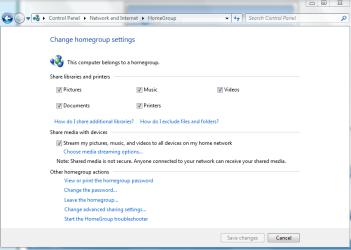
  2. Under Share libraries and printers, select the check box for each library you want to share, and then click Save changes.

To share other libraries that you've created, follow these steps:
  1. Click the Start button , and then click your user name.
  2. Select the library you want to share, and then, in the toolbar, click Share with.

    The Share with menu

  3. Select the people you want to share with.
My System SpecsSystem Spec
29 Nov 2009   #7

Windows 7 Ult, Windows 8 Pro,
San Diego


Don't forget that you can also tell Windows which Library's you want to share.
Attached Thumbnails
"No Other Homegroup Computers Are Available"-homegroup-sharing-librarys.png  
My System SpecsSystem Spec
01 Dec 2009   #8

windows 7 64 bit


Yes you need to do that step. But I think everyone does that. Its the step posted before yours that worked for me. Also I tried Reinstalling Mcafee it worked fine. I don't think the security programs are a problem in most cases. Maybee in some cases the firewall setings need to be changed. In researching this I found alot of people having this problem with the homegroup. I think if you follow the sharing steps it will solve this 90% of the time.
My System SpecsSystem Spec
01 Dec 2009   #9

Windows 7 Ult, Windows 8 Pro,
San Diego


Quote   Quote: Originally Posted by gregw View Post
Yes you need to do that step. But I think everyone does that. Its the step posted before yours that worked for me. Also I tried Reinstalling Mcafee it worked fine. I don't think the security programs are a problem in most cases. Maybee in some cases the firewall setings need to be changed. In researching this I found alot of people having this problem with the homegroup. I think if you follow the sharing steps it will solve this 90% of the time.
I felt it was necessary to show that this is the one you would use to share individual library files only because it pretains to the subject matter.

The fact that people are missing the great big "share with" button at the top of the page is obviously another problem altogether and had nothing to do with my statement, which I believe stands on it's own merit.
My System SpecsSystem Spec
01 Dec 2009   #10

7 x64
Upstate, AZ


Still not working for me. The laptop can access all the shares on the desktop (via workgroup) but it is still unable to join the homegroup even though it is invited.
My System SpecsSystem Spec
Reply

 "No Other Homegroup Computers Are Available" problems?


Thread Tools


Similar help and support threads for: "No Other Homegroup Computers Are Available"
Thread Forum
Small network issues. Wired-has internet, can't "see" other computers Network & Sharing
"No other homegroup computers are currently available" Network & Sharing
Solved How do I set "Allowed Computers" in Windows Firewall with Advanced Sec System Security
Not receiving "connect to..." dialog on windows 7 computers Network & Sharing
Computer List Shows "Ghost" Computers Network & Sharing


All times are GMT -5. The time now is 12:42 PM.


Seven Forums Android App Seven Forums IOS App Follow us on Facebook

Windows 7 Forums is an independent web site and has not been authorized,
sponsored, or otherwise approved by Microsoft Corporation.
"Windows 7" and related materials are trademarks of Microsoft Corp.
© Designer Media Ltd
  

1 2 3 4 5 6 7 8 9 10 11 12 13 14 15 16 17 18 19 20 21 22 23 24 25 26 27 28 29 30 31 32