Windows 7 Forums Search
Welcome to Windows 7 Forums. Our forum is dedicated to helping you find solutions with any problems, errors or issues you are experiencing with Windows 7. The Windows 7 forum also covers news and updates and has an extensive Windows 7 tutorial section that covers a wide range of tips and tricks.


Windows 7 - Samba network share issue with Windows 7

 
10-07-2010   #31


Windows 7 RTM X64


Quote   Quote: Originally Posted by zorro3692 View Post
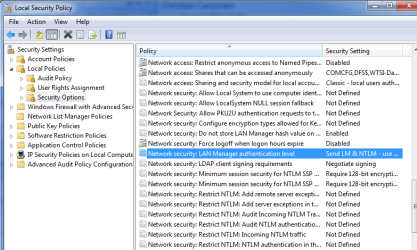
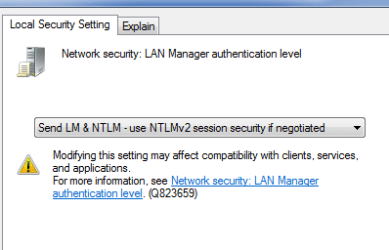
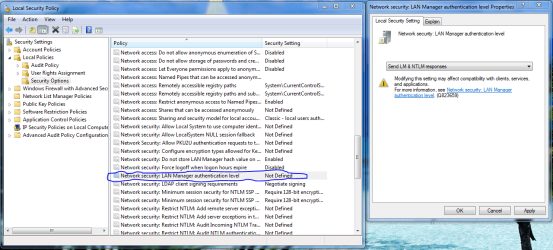
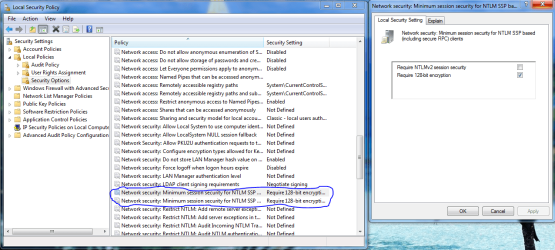
Tried everything. LM & NTLM, unchecked 128 bit encyption, created the D Words with values.
I cannot add a printer on my Ubuntu machine via Samba or CUPS which is connected to my Windows 7 machine. I keep getting authentication dialog box when I try to access the printer on my Win 7 machine. And despite the correct username and password, it gives me either "Permission Denied" or "Password Maybe Incorrect".

I even applied the "hot fix" as per the Samba wiki!

Nowhere to turn?
This Msoft .xps white paper document shows how to downlevel share with other Op systems. You want the third one down .xps.

Download details: Windows 7 & HomeGroup: Sharing with Windows XP, Windows Vista, and other operating systems

My System SpecsSystem Spec
10-07-2010   #32


Windows 7 Ultimate 32 bit


My Ubuntu machine is connected to the router via ethernet, which I guess is DHCP. Samba works fine as far as mounting shares and sharing files with my Win 7 machine and vice versa. It's only the printer I am having problems with. And besides, if I connect the printer to my Ubuntu, I can print from Win 7!
My System SpecsSystem Spec
10-08-2010   #33


Windows 7 Ultimate 32 bit


This Msoft .xps white paper document shows how to downlevel share with other Op systems. You want the third one down .xps.

Download details: Windows 7 & HomeGroup: Sharing with Windows XP, Windows Vista, and other operating systems[/QUOTE]
Hi Chev,
I downloaded the .xps, but what does it do? I cannot open it.
Can you please explain.

Regards,
My System SpecsSystem Spec
.


10-11-2010   #34


Windows 7 Ultimate 32 bit


Ha! Finally, after months of trying. My Ubuntu machine prints from my HP printer connected to my Windows 7 machine.

The problem was that god-damned Windows Live Sign-In Assistant(!*?). Uninstalling same let me access my print shares on Win 7 without having to log in!

See: Possible problem with Windows Live Sign-In Assistant and file sharing (SMB)
My System SpecsSystem Spec
01-19-2011   #35


Vista


Shares login problem

I have a very specific problem.

I have Windows 7 shares working 100% with most devices - eg. other PCs (Vista), an Android file viewer, etc. These all have 'everyone' access and no passwords.

One device (Technisat sat box) can access shares on all other devices EXCEPT Windows 7 when a login box appears and no combination of user/password works.

I have changed every possible value (regedit policies) recommended in 100s of posts. Nothing works.

I have been told that the failure is due to MS-RAP being deprecated in Windows 7. There is no possibility to modify the network parameters on the sat box. The only solution offered by Microsoft is to install and use Xp-mode!!! Can this be really the case?

Is there no known fix to reinstate the ms-rap protocol in Windows 7 so that other devices can use shares as in Vista and Xp (and linux, etc).

This is driving me nuts.

Help please!!!????
My System SpecsSystem Spec
Reply

 Samba network share issue with Windows 7 problems?


Thread Tools


Similar Threads for: Samba network share issue with Windows 7
Thread Forum
Solved samba share is not accessible from Windows 7 client... Network & Sharing
Can't browse samba share by ip but can by hostname Network & Sharing
SAMBA share windows 7 and HP Unix Network & Sharing
Connecting Windows 7 to SLES 10 Sp1 Samba Share Network & Sharing
Can't connect to samba share Network & Sharing


All times are GMT -5. The time now is 08:37 PM.


Windows 7 Forums is an independent web site and has not been authorized,
sponsored, or otherwise approved by Microsoft Corporation.
"Windows 7" and related materials are trademarks of Microsoft Corp.
© Designer Media Ltd
  

1 2 3 4 5 6 7 8 9 10 11 12 13 14 15 16 17 18 19 20 21 22 23 24 25 26 27 28 29 30