| Windows 7: My neighbor's router? |
02 Dec 2009
|
#1 | | |
My neighbor's router? Hi all--
I have a problem and this isn't a Windows 7 problem(because Vista fixed it automatically), but the people here are so knowledgeable I thought I'd post here.
EVERY time P  a  u  l, my neighbor, either signs on to his router or cell phone(I'm not sure which), I get bumped off my internet connection while using my laptop. And with Windows 7, I now have to reset my router to reconnect.
What can I do to ignore his signal?
Thanks; sigh. | My System Specs |
| System Manufacturer/Model Number hp s5220f, hp f730us, hp s3300f OS 7 HP & ULT CPU intel and amd Memory 4GB desk/2GB lap/2GB theater Graphics Card nvidia Sound Card realtek Monitor(s) Displays sceptre magnavox Internet Speed sux (with cable!) |
02 Dec 2009
|
#2 | | Win 8 Release candidate 8400 |

Quote: Originally Posted by Fuentes Hi all--
I have a problem and this isn't a Windows 7 problem(because Vista fixed it automatically), but the people here are so knowledgeable I thought I'd post here.
EVERY time P  a  u  l, my neighbor, either signs on to his router or cell phone(I'm not sure which), I get bumped off my internet connection while using my laptop. And with Windows 7, I now have to reset my router to reconnect.
What can I do to ignore his signal?
Thanks; sigh. Hi Fuentes and welcome
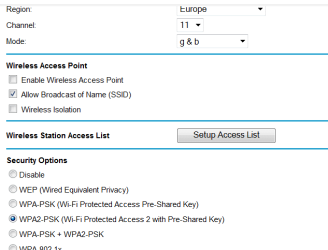
Easy, Change the channel the router is using. If you tell us what router we can give you some help. I have had to do it twice here.
Let us know
Ken J+ | My System Specs | | System Manufacturer/Model Number HP Pavillion dv-7 1005 Tx OS Win 8 Release candidate 8400 CPU 2@2.4 Memory 4 gigs Graphics Card Nvidia 9600M Sound Card HD built-in Monitor(s) Displays 17" Wxga Screen Resolution 1440x900 Cooling none Internet Speed 45Mb down 5Mb up |
03 Dec 2009
|
#3 | | |
Hi Ken--
It's a Linksys WRT54G router. If I go into the router configuration, what do I need to change to correct the problem? I'm a little nervous in that particular area. All I have are a desktop and a laptop, and as far as I know, I only get bumped when using my laptop.
I was on channel 6 and have since changed it to channel 11.
Thanks Ken, thanks all.
EDIT: I realize it's only been a day or two, but thanks Ken, your suggestion seems to have cleared up the network confusion.
Last edited by Fuentes; 04 Dec 2009 at 01:22 PM..
| My System Specs | | System Manufacturer/Model Number hp s5220f, hp f730us, hp s3300f OS 7 HP & ULT CPU intel and amd Memory 4GB desk/2GB lap/2GB theater Graphics Card nvidia Sound Card realtek Monitor(s) Displays sceptre magnavox Internet Speed sux (with cable!) |
06 Dec 2009
|
#4 | | Win 8 Release candidate 8400 |

Quote: Originally Posted by Fuentes Hi Ken--
It's a Linksys WRT54G router. If I go into the router configuration, what do I need to change to correct the problem? I'm a little nervous in that particular area. All I have are a desktop and a laptop, and as far as I know, I only get bumped when using my laptop.
I was on channel 6 and have since changed it to channel 11.
Thanks Ken, thanks all.
EDIT: I realize it's only been a day or two, but thanks Ken, your suggestion seems to have cleared up the network confusion. Glad it worked. I was just coming back to check
Ken J+ | My System Specs | | System Manufacturer/Model Number HP Pavillion dv-7 1005 Tx OS Win 8 Release candidate 8400 CPU 2@2.4 Memory 4 gigs Graphics Card Nvidia 9600M Sound Card HD built-in Monitor(s) Displays 17" Wxga Screen Resolution 1440x900 Cooling none Internet Speed 45Mb down 5Mb up |
06 Dec 2009
|
#5 | | Windows 7 Ult, Windows 8 Pro, San Diego |
Nice work Ken, I was wondering if those channels were good for anything, looks like they are there for a reason. | My System Specs | | System Manufacturer/Model Number Home built OS Windows 7 Ult, Windows 8 Pro, CPU Q9650-4.275GHz, E8600 4.5GHz, E6750-3.8GHz Motherboard Evga 780i FTW Memory G.Skill PC2 9600 1200Mhz 5 5 5 15 2T Graphics Card GTX480 Sound Card Asus Xonar D2 Monitor(s) Displays HannsG Screen Resolution 1680X1050 Keyboard Logitech G15 Mouse Logitech G9 PSU ThermalTake Toughpower 1000Watt modular Case ThermalTake XaserV Cooling Xigmatek S1283 Hard Drives GSkill Phoenix Pro 120GB SSD Internet Speed T1 |
12 Dec 2009
|
#6 | | |
Update: Buddy Paul showed up again yesterday, even after switching to channel 11. This morning, I changed to channel 1, and guess what?
Bumped again!
Any other ideas?
As usual, thanks all. | My System Specs | | System Manufacturer/Model Number hp s5220f, hp f730us, hp s3300f OS 7 HP & ULT CPU intel and amd Memory 4GB desk/2GB lap/2GB theater Graphics Card nvidia Sound Card realtek Monitor(s) Displays sceptre magnavox Internet Speed sux (with cable!) |
13 Dec 2009
|
#7 | | Windows 7 Ultimate x64 Service Pack 1 Doncaster, UK |
Hi Fuentes,
Are you saying that it is only your laptop that gets bumped off? What happens if you have both online at the same time? | My System Specs | | System Manufacturer/Model Number Dwarf Dwf/11/2012 OS Windows 7 Ultimate x64 Service Pack 1 CPU Intel Core-i5-3570K 4-core @ 3.4GHz (Ivy Bridge) (OC 4.2GHz) Motherboard ASRock Z77 Extreme4-M Memory 4 x 4GB DDR3-1600 Corsair Vengeance CMZ8GX3M2A1600C9B (16GB) Graphics Card 2 x AMD Radeon HD7770 1GB CrossFired (OC 1100MHz/1250MHz) Sound Card Realtek High Definition on board solution (ALC 898) Monitor(s) Displays ViewSonic VA1912w Widescreen (VGA) Screen Resolution 1440x900 Keyboard Microsoft Comfort Curve Keyboard 3000 (USB) Mouse Microsoft Comfort Mouse 3000 for Business (USB) PSU XFX Pro Series 850W Semi-Modular Case Gigabyte IF233 Cooling 1 x 120mm Front Inlet 1 x 120mm Rear Exhaust Hard Drives OCZ Agility 3 SSD 120GB SATA III x2 (RAID 0)
Samsung HD501LJ 500GB SATA II x2
Hitachi HDS721010CLA332 1TB SATA II
Iomega 1.5TB Ext USB 2.0
WD 2.0TB Ext USB 3.0 Internet Speed NetGear DG834Gv3 ADSL Modem/Router (Ethernet) ~4.0 Mb/s (O2) Antivirus Avast! 7.0.1474 Browser IE 9 Other Info Optical Drive: HL-DT-ST BD-RE BH10LS30 SATA Bluray
Lexmark S305 Printer/Scanner/Copier (USB)
CTF-430 Tablet & Pen
WEI Score: 7.7/7.9/7.4/7.4/7.9
Asus Eee PC 1011PX Netbook (Windows 7 x86 Starter) |
13 Dec 2009
|
#8 | | Window 7 Ultiamte 32bit Netherlands |
hey, if you dont want your neighbour to connect to your wireless connection anymore, then why dont just add password to the wireless connection | My System Specs | | System Manufacturer/Model Number Sony Vaio VGN-NR21S/S OS Window 7 Ultiamte 32bit CPU Intel Core 2 Duo processor T5450 1.66 GHz Memory 3GB/Go DDR2 SDRAM Graphics Card NVIDIA Geforce 8400M GT GPU Monitor(s) Displays 15.4 WXGA (1280 x 800) X-black LCD Screen Resolution 1280x800 Hard Drives 250 GB/Go |
13 Dec 2009
|
#9 | | |

Quote: Originally Posted by joeykhor hey, if you dont want your neighbour to connect to your wireless connection anymore, then why dont just add password to the wireless connection  He isn't connecting to my bandwidth, just knocking me off mine. Quote: Dwarf wrote:Are you saying that it is only your laptop that gets bumped off? What happens if you have both online at the same time? Just my laptop gets bumped Dwarf. | My System Specs | | System Manufacturer/Model Number hp s5220f, hp f730us, hp s3300f OS 7 HP & ULT CPU intel and amd Memory 4GB desk/2GB lap/2GB theater Graphics Card nvidia Sound Card realtek Monitor(s) Displays sceptre magnavox Internet Speed sux (with cable!) |
13 Dec 2009
|
#10 | | W7 x64 3rd Rock from the Sun |
Resite your router as far from your neighbours as possible, and if the problems don't stop at this point then try fitting a lower gain wifi antenna on your router (or turning down the Tx power both on the router and your WiFi cards) if channel switching, and attenuation, isn't curing the problems all alone.
Look carefully at your AP settings and your WiFi cards advanced parametres too.
If you still have no joy then speak to your neighbour and explain that the only resort left open to you is to complain to the authorities responsible for regulation of WiFi and other domestic emisions which cause interference. | My System Specs | | System Manufacturer/Model Number Custom built machine OS W7 x64 CPU Intel Q9300 2.5Ghz Quad LGA775 (Would like Q9650) Motherboard Gigabyte GA-EP45T-UD3R (F6 Bios) Memory 4Gb OCZ Gold 1,333Mhz Graphics Card Palit HD4850 O/C Sonic 512Mb DDR3, Dual DViD's Sound Card Azalia to twin Samson 50w Studio Monitors Monitor(s) Displays Twin Dell (E-IPS) U2311H 23.6" Screens Screen Resolution 1920 x 1080 @ 60Hz Keyboard Cherry PS/2 custom model Mouse Lenovo USB laser "Thinkpad" Mouse PSU OCZ 600w Case Lian-Li PC8 acoustifoamed' aluminium tower Cooling Scythe 140mm Zipang Hard Drives Crucial M4 SSD, archives on twin Western Digital Caviar Black WD2002FAEX, 2TB, 7200rpm HDD's, Samsung Ritemaster CD/DVD Burner... Internet Speed ADSL2+ @14Mbps downstream & Cat6 Gigabit Ethernet Antivirus NOD32 Browser Opera Other Info Silicon Dust HD Homerun Dual FTA (Ethernet) TV Tuners, Dray Tek Vigor 2850Vn router and 8x HP Gigabit Switch. Lian-Li CR26 Card Reader, Canon MF4430 iSensys laser printer/scanner. My neighbor's router? problems? All times are GMT -5. The time now is 06:10 AM. | |