Win 7 user name and password for network

TerSans

New member
I have four computer networked all using Win 7 Pro or Ultimate. I set up the network as prompted and set th user name and password. All computers are new to newer Dell running 64bit. Went to setup my HPMediaSmart 6TB Server and everything just fine. After all setup everything worked fiine until I wated to axcess the server. A Windows Security window opens requesting Network Password and User Name to connect to the HP Server. Well nothing I input does any good ALL my entries are rejected.:cry: This is a total f.:devil:.:mad: k up as I know what I used for the main network and what I used for the HP Server but neither work. I have tried about everything I can think of and am still locked out. All else fails compltet rest and reboot but just wondering if same problem someone else might have seen for answer. Thank you.
 

My Computer

Computer Manufacturer/Model Number
DELL Studio XPS 435T/9000 System Service Tag: 9RJSVH1
OS
Win 7 Ultimate 64bit
CPU
2.67 gigahertz Intel Core i7 920 2.67 gighertz
Motherboard
DELL 0X501H A02
Memory
12280 Megabytes Tri channel
Graphics Card(s)
NVIDIA GeForce GTS 240
Sound Card
Sound Blaster X-Fi Xtreme Audio
Monitor(s) Displays
DELL 2405FPW & DELL SP2309W
Hard Drives
3 Western Digital Green 1TB each
PSU
475 watt
Case
Dell XPS 9000
Cooling
air
Keyboard
Logitech MX5500
Mouse
Logitech MX5500
Internet Speed
DSL
Hi TerSans & welcome to SF :)

You may just need to check the permissions that are set on the server.
I had exactly the same thing happen to me trying to connect to an XP machine. The username & password i supplied was correct but it kept rejecting them because I hadn't got permission from XP to access it.
I suggest looking at the ACL of your server drive, adding NETWORK and assigning the appropriate permissions.

I hope this helps somewhat. :)
 

My Computer

Computer Manufacturer/Model Number
HP Touchsmart IQ771.uk
OS
Windows 7 Ultimate x64
CPU
AMD Turion(tm) 64 X2 Mobile Technology TL-56
Motherboard
ASUS Pheonix
Memory
3GB Nanya PC2-6400 DDR2-SDRAM SO-DIM (400MHz)
Graphics Card(s)
NVIDIA GeForce Go 7600 256MB GDDR3 SDRAM
Sound Card
High Definition Intergrated NVIDIA MCP51
Monitor(s) Displays
46" Sony Bravia HDTV
Screen Resolution
1600x1200
Hard Drives
1.5TB Samsug
320GB Seagate ST3320820AS - SATA 3Gb/s 8MB
500GB Maxtor Basics STM305003EHD301-RK
Internet Speed
↓6.32 Mb/s ↑0.35 Mb/s ↔26ms
Other Info
BIOS - American Megatrends Inc. 5.07
Ethernet Port - NVIDIA nForce 10/100/1000 Mbps
DVD Drive - TSSTcorp DVDR/RW TS-T632L
Sounds good..
What is an ACL?

How do you set NETWORK PERMISSIONS?

Thanks.
 

My Computer

OS
windows 7
ACL = Access Control List
Right click the server drive > Properties > Security Tab;
Under object name you'll see a list of name and the permissions they have. Make sure you are in that list and have appropriate permissions.

You can add NETWORK to the ACL by clicking on edit (in the security tab of it's properties) > Add.

N.B I you assign full control to NETWORK in the ACL of the server drive, that means anyone with access to your network will also have complete control of the drive.
 

My Computer

Computer Manufacturer/Model Number
HP Touchsmart IQ771.uk
OS
Windows 7 Ultimate x64
CPU
AMD Turion(tm) 64 X2 Mobile Technology TL-56
Motherboard
ASUS Pheonix
Memory
3GB Nanya PC2-6400 DDR2-SDRAM SO-DIM (400MHz)
Graphics Card(s)
NVIDIA GeForce Go 7600 256MB GDDR3 SDRAM
Sound Card
High Definition Intergrated NVIDIA MCP51
Monitor(s) Displays
46" Sony Bravia HDTV
Screen Resolution
1600x1200
Hard Drives
1.5TB Samsug
320GB Seagate ST3320820AS - SATA 3Gb/s 8MB
500GB Maxtor Basics STM305003EHD301-RK
Internet Speed
↓6.32 Mb/s ↑0.35 Mb/s ↔26ms
Other Info
BIOS - American Megatrends Inc. 5.07
Ethernet Port - NVIDIA nForce 10/100/1000 Mbps
DVD Drive - TSSTcorp DVDR/RW TS-T632L
THANKS! Your suggestions went a long way toward enabling me to access/change/delete files on my remote servers.

I occasionally still have problems of "Access Denied" without explanation on some files that I set up and used on XP. for example <system.dat> I set up as a repository for log files and I need to delete the file once in awhile and I cannot do this from either the LOCAL computer Win7 nor from the Remote computer (also Win7).

It does allow me to RENAME the file. So I rename the file, delete it and then it will allow me (or the system) to rewrite the <system.dat> file. My server has five drives. I expected the C: drive to be "fully protected" but I am finding that the E:, F:, G:, and H: drives have the same pecularities. ie: I cannot delete files such as <system.dat>, <boot.dat> and similar. How do I handle these files with special names except by renaming, etc as noted above?

Thanks for the great advice! Very helpful!
Joe
 

My Computer

OS
windows 7
I'm glad you are somewhat better off than you were!

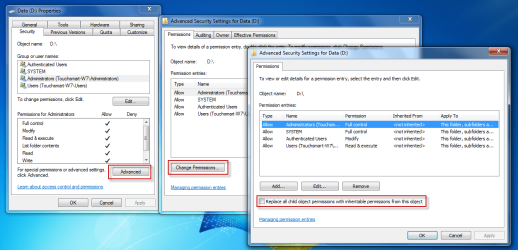
In the properties of your drive, go back to the security tab and make sure that child objects are set to inherit permissions from parent. eg.,

07-12-2009 06-02-16.png

I hope this helps :)
 

My Computer

Computer Manufacturer/Model Number
HP Touchsmart IQ771.uk
OS
Windows 7 Ultimate x64
CPU
AMD Turion(tm) 64 X2 Mobile Technology TL-56
Motherboard
ASUS Pheonix
Memory
3GB Nanya PC2-6400 DDR2-SDRAM SO-DIM (400MHz)
Graphics Card(s)
NVIDIA GeForce Go 7600 256MB GDDR3 SDRAM
Sound Card
High Definition Intergrated NVIDIA MCP51
Monitor(s) Displays
46" Sony Bravia HDTV
Screen Resolution
1600x1200
Hard Drives
1.5TB Samsug
320GB Seagate ST3320820AS - SATA 3Gb/s 8MB
500GB Maxtor Basics STM305003EHD301-RK
Internet Speed
↓6.32 Mb/s ↑0.35 Mb/s ↔26ms
Other Info
BIOS - American Megatrends Inc. 5.07
Ethernet Port - NVIDIA nForce 10/100/1000 Mbps
DVD Drive - TSSTcorp DVDR/RW TS-T632L
Thanks for that TIP also! That got a lot more files so I can easily edit/delete/copy/move them!

As far as I can tell now, that 100% makes me able to edit/copy/delete/move all of my files while still giving protection to the OS files and program file directories.

BRAVO and thanks for the help.

It would be a great help to others if all these hidden tricks were published on a page or two for those of us who are not Win7 Gurus!

In any event, your help is sincerely appreciated!
Joe
 

My Computer

OS
windows 7
One more question please.
Everything is now working to my satisfaction except with a couple of applications. For example: I have an application <hgraph.exe> that opens a file
c:\fcmd\joe6\hgraphjoe6.dis. The construct in the TARGET windows of the icon properties is
c:\fcmd\bin\hgraph.exe c:\fcmd\joe6\hgraphjoe6.dis
This opens the selected graph just fine.

But when I EXIT the program hgraph.exe, the program normally asks "Do you want to save changes made to <hgraphjoe6.dis>? with a yes/no option.

If I answer YES to the question, I get a window that says ACCESS NOT ALLOWED.

How do I get a program able to have administrator privileges so it can write to this file?

Thanks.
Joe
 

My Computer

OS
windows 7
Set the appropriate permissions on hgraphjoe6.dis.
The easiest way would probably be to add EVERYONE to the hgraphjoe6.dis ACL and assign it full control.
 

My Computer

Computer Manufacturer/Model Number
HP Touchsmart IQ771.uk
OS
Windows 7 Ultimate x64
CPU
AMD Turion(tm) 64 X2 Mobile Technology TL-56
Motherboard
ASUS Pheonix
Memory
3GB Nanya PC2-6400 DDR2-SDRAM SO-DIM (400MHz)
Graphics Card(s)
NVIDIA GeForce Go 7600 256MB GDDR3 SDRAM
Sound Card
High Definition Intergrated NVIDIA MCP51
Monitor(s) Displays
46" Sony Bravia HDTV
Screen Resolution
1600x1200
Hard Drives
1.5TB Samsug
320GB Seagate ST3320820AS - SATA 3Gb/s 8MB
500GB Maxtor Basics STM305003EHD301-RK
Internet Speed
↓6.32 Mb/s ↑0.35 Mb/s ↔26ms
Other Info
BIOS - American Megatrends Inc. 5.07
Ethernet Port - NVIDIA nForce 10/100/1000 Mbps
DVD Drive - TSSTcorp DVDR/RW TS-T632L
Thanks.. Setting the ACL to EVERYONE works fine.

Another related question please..
One of my computers acts as my file server. When I try to SAVE files from another computer on the LAN, I get the attached "Permission Needed" error message.

While the error messages says "permissions needed to save this file", no advice is given on how to GIVE these needed permissions. I really would not mind inputting a username/password in such situations, but the only way that I can see that MIGHT work is to give ALL FOLDERS on the file server computer the EVERYONE can write ACL.

Are there other options?
Thanks
Joe
 

Attachments

  • win7SaveFilePermissionsError.png
    win7SaveFilePermissionsError.png
    42.3 KB · Views: 34

My Computer

OS
windows 7
Back
Top