| Windows 7: Cannot ping W7 machine from any vista machine |
05 Dec 2009
|
#1 | | |
Cannot ping W7 machine from any vista machine I have my first windows 7 computer on my home network, and it appears to me I have outgoing networking, but not incoming. On the Windows 7 computer, I can get to the router and the Internet, and can access shared folders on Vista machines on the home network. The computer name "advertising protocol" works as the name of the Windows 7 computer in the "Network" user interface on the Vista machines (the user interface accessed from Network and Sharing Center by 'view computers and devices"), but attempting to access it gets a "cannot access" error, and attmepting to diagnose gets a "cannot find" error. For whatever it is worth, highlighting the icon in the "network" user interface does not show anything for "location".
I am going through this to get shared folders on the Windows 7 computer visible on other computers on the network. Obviously this is not working. Just to recap the configuration:
1) all computers on the network are members of same Workgroup
2) My documents on the Windows 7 computer are shared read-write with everyone
3) advance sharing options show:
Network discovery ON
File and print sharing ON
Public folder sharing ON
128 bit encryption
Password protected sharing OFF
IPv6 disabled
Homegroup stuff either OFF or ON and managed by Windows (but this is irrelevant)
4) firewall off
A observation:
I noticed something funky with MacIDs. the router - when the Windows 7 computer authenticates - shows one MacID, but the network status dialog on the Windows 7 computer shows a different one
A question:
Does Microsoft Network Monitor 3.3 work on Windows 7?
Jonathan | My System Specs |
| |
05 Dec 2009
|
#2 | | Windows 7 Ult, Windows 8 Pro, San Diego |
Why is IPv6 disabled? You do realize that IPv6 is only used on the LAN and is needed for Homegroups to work correctly. Maybe you were just thrown off by the first picture below which is only telling you that IPv6 is not connected to the WAN because it's not supposed to be.
The second picture shows it as enabled for the LAN.
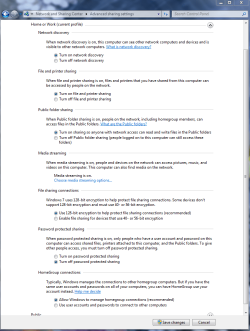
It doesn't matter much either way unless you are Homegroup, but Homegroup only works with Windows 7 computers. For Vista and Win 7 you need to use either workgroup or public file sharing. You also need to enable file sharing on the Vista machine.
You should not need to turn the firewall off.
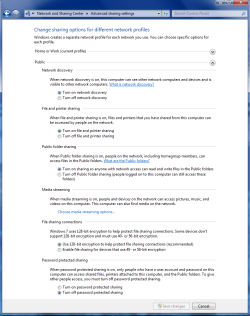
Are you sure that you are sharing the correct group. There is a seperate public file sharing settings page but the workgroup and homegroup use the same settings page.
Maybe you were thrown off because there are two settings pages. The third picture is the Homegroup and Workgroup settings page and the fourth one is for the Public file sharing. | My System Specs | | System Manufacturer/Model Number Home built OS Windows 7 Ult, Windows 8 Pro, CPU Q9650-4.275GHz, E8600 4.5GHz, E6750-3.8GHz Motherboard Evga 780i FTW Memory G.Skill PC2 9600 1200Mhz 5 5 5 15 2T Graphics Card GTX480 Sound Card Asus Xonar D2 Monitor(s) Displays HannsG Screen Resolution 1680X1050 Keyboard Logitech G15 Mouse Logitech G9 PSU ThermalTake Toughpower 1000Watt modular Case ThermalTake XaserV Cooling Xigmatek S1283 Hard Drives GSkill Phoenix Pro 120GB SSD Internet Speed T1 |
05 Dec 2009
|
#3 | | |
I have tried it with IPv6 turned off and with IPv6 turned on - same result
I have tried it with the firewall on and the firewall off - same result
My settings match those on your page 3 (just tried replicating those setting into the advanced settings for "public" networks and there was no impact)
File sharing has worked on the Vista machines for years.
None of this should explain failure to ping anyway
Any other thoughts? | My System Specs | | |
05 Dec 2009
|
#4 | | Windows 7 Ult, Windows 8 Pro, San Diego |
None of this should explain failure to Ping? IMO those settings have everything to do with it. Unless you have a particular problem those settings will work everytime.
Maybe try a DNS flush. | My System Specs | | System Manufacturer/Model Number Home built OS Windows 7 Ult, Windows 8 Pro, CPU Q9650-4.275GHz, E8600 4.5GHz, E6750-3.8GHz Motherboard Evga 780i FTW Memory G.Skill PC2 9600 1200Mhz 5 5 5 15 2T Graphics Card GTX480 Sound Card Asus Xonar D2 Monitor(s) Displays HannsG Screen Resolution 1680X1050 Keyboard Logitech G15 Mouse Logitech G9 PSU ThermalTake Toughpower 1000Watt modular Case ThermalTake XaserV Cooling Xigmatek S1283 Hard Drives GSkill Phoenix Pro 120GB SSD Internet Speed T1 |
05 Dec 2009
|
#5 | | |
Thanks for your efforts, but FYI:
The ICMP (ping) protocols are very separate from the file sharing (SMB and a few other protocols)
Ping'ing a numeric IP bypasses all the name resolution stuff (DNS, WINS, etc.)
Jonathan | My System Specs | | |
05 Dec 2009
|
#6 | | Windows 7 Ult, Windows 8 Pro, San Diego |
FYI if your network is working then you should have no problems pinging between machines. But since it doesn't work your problems go beyond the network settings and tend to point to the router itself.
Maybe the fact that you were working with the file sharing options for a ping problem confused me a bit as this tends to contradict your earlier statement.
I can only hope that you aren't using the same user name on both computers.
Last edited by chev65; 05 Dec 2009 at 03:24 PM..
| My System Specs | | System Manufacturer/Model Number Home built OS Windows 7 Ult, Windows 8 Pro, CPU Q9650-4.275GHz, E8600 4.5GHz, E6750-3.8GHz Motherboard Evga 780i FTW Memory G.Skill PC2 9600 1200Mhz 5 5 5 15 2T Graphics Card GTX480 Sound Card Asus Xonar D2 Monitor(s) Displays HannsG Screen Resolution 1680X1050 Keyboard Logitech G15 Mouse Logitech G9 PSU ThermalTake Toughpower 1000Watt modular Case ThermalTake XaserV Cooling Xigmatek S1283 Hard Drives GSkill Phoenix Pro 120GB SSD Internet Speed T1 Cannot ping W7 machine from any vista machine problems? All times are GMT -5. The time now is 05:38 AM. | |