adsl connection keep running but no internet? (Solved)
Hello
I only had windows 7 for a week and i managed to configure my windows the way i want thanks to this site.
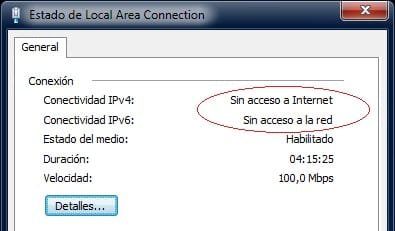
Now i have a persistent problem that i couldn't find any solution or the source of the problem.
I use a normal pppoe adsl connection directly from my pc, and it's working fine, and the internet provider that i have provide me with a dynamic ip address, so i can't continuously keep the connection more than 24Hr, it will disconnect from the provider and i had to redial the connection again.
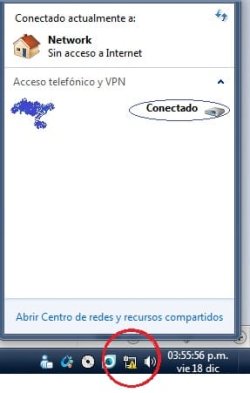
now the problem is that when the connection disconnected by the provider (after the 24Hr) a yellow mark on the taskbar icon appears indicate that there is no connection.
but the adsl connection on my pc keep running and i can't disconnect it to redial the connection.
I tried to disable the Ethernet adapter but still the connection kept on, even when i enabled it again.
The problem will be solved if i restart my pc, but this is not an actual solution to this problem.
I can't do any test or check for this problem because it's not happening now, but if someone can provide my with any guide so i can do before it happened it would be good to solve the problem.
thanks
Edit2:
Problem seems to be solved.
I did a couple of changes at the same time and the problem is gone, so i won't exactly know which one is responsible for the fix. Here what i did:
- Disable IPv6 "under local area connection properties"
- Disable Link-layer technology (both) "under local area connection properties"
- Disable power saving For the ethernet.
- Enable flow control "under My network adapter device manager properties"
Hope this can help.
Hello
I only had windows 7 for a week and i managed to configure my windows the way i want thanks to this site.
Now i have a persistent problem that i couldn't find any solution or the source of the problem.
I use a normal pppoe adsl connection directly from my pc, and it's working fine, and the internet provider that i have provide me with a dynamic ip address, so i can't continuously keep the connection more than 24Hr, it will disconnect from the provider and i had to redial the connection again.
now the problem is that when the connection disconnected by the provider (after the 24Hr) a yellow mark on the taskbar icon appears indicate that there is no connection.
but the adsl connection on my pc keep running and i can't disconnect it to redial the connection.
I tried to disable the Ethernet adapter but still the connection kept on, even when i enabled it again.
The problem will be solved if i restart my pc, but this is not an actual solution to this problem.
I can't do any test or check for this problem because it's not happening now, but if someone can provide my with any guide so i can do before it happened it would be good to solve the problem.
thanks
Edit2:
Problem seems to be solved.
I did a couple of changes at the same time and the problem is gone, so i won't exactly know which one is responsible for the fix. Here what i did:
- Disable IPv6 "under local area connection properties"
- Disable Link-layer technology (both) "under local area connection properties"
- Disable power saving For the ethernet.
- Enable flow control "under My network adapter device manager properties"
Hope this can help.
Last edited:
My Computer
At a glance
windows 7 Ultimate, 32bit, build 7600E7400 Core2due/2.8GHz3GB-kingston/667MHzNvidia Geforce 9400GT/1024MB
- Computer Manufacturer/Model Number
- Custom Build
- OS
- windows 7 Ultimate, 32bit, build 7600
- CPU
- E7400 Core2due/2.8GHz
- Motherboard
- Gigabyte GA-945GCM-S2L
- Memory
- 3GB-kingston/667MHz
- Graphics Card(s)
- Nvidia Geforce 9400GT/1024MB
- Sound Card
- Realtek HD
- Monitor(s) Displays
- Compaq 22"-p1100
- Screen Resolution
- 1600x1200
- Hard Drives
- 320GB WDC
- PSU
- 300W
- Case
- none
- Cooling
- already winter
- Keyboard
- compaq, KU-0133
- Mouse
- Anything in hand
- Internet Speed
- 2048Down/512Up