Windows 7 Forums Search
Welcome to Windows 7 Forums. Our forum is dedicated to helping you find solutions with any problems, errors or issues you are experiencing with Windows 7. The Windows 7 forum also covers news and updates and has an extensive Windows 7 tutorial section that covers a wide range of tips and tricks.


Windows 7 - Legacy Networking - Simple File Sharing

 
12-26-2009   #1


Windows 7 Professional 32 Bit RTM


Legacy Networking - Simple File Sharing

Hi

I have 2 Windows 7 machines connected to a network with several other devices all of which I can see in Windows Explorer - Networking. I've set up shares on each of the Windows 7 machines and turned off Password protected sharing in Advanced sharing settings. The first time I try to access shares on either of the Windows 7 machines from the other machine it asks for a username and password before I can access the shares. Once the credentials have been accepted the shares continue until the machine is rebooted. Setting the 'Remember credentials' box on the login page doesn't help. Other shared resources (XP desktop, NAS, Media player) on the network all work fine from either of the Win 7 machines. What I am looking for is the equivalent of the old "Simple file sharing" from XP, can anyone tell me how to set this in Windows 7 (Ultimate & Professional)?

Andy

My System SpecsSystem Spec
12-26-2009   #2


Windows 7 RTM X64


Old style simple file sharing has changed considerably since the XP days. You will need to use either public file sharing or the Workgroup to share files between XP and Windows 7.

Try this tutorial.> Networking home computers running different versions of Windows
My System SpecsSystem Spec
12-26-2009   #3


Windows 7 Professional 32 Bit RTM


Thanks for that. Just about everything works as it should, the only issue I have is that I need to input Username & Password the first time I try to connect between either of the 2 Win 7 machines after first logging on.

I've already been through the link you kindly provided and everything is as it should be.

Cheers - Andy
My System SpecsSystem Spec
.


12-26-2009   #4


Windows 7 RTM X64


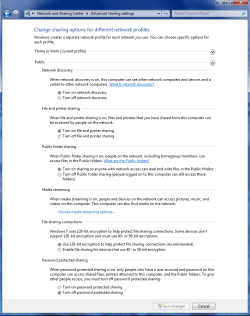
Make sure all these settings are set like the screen shots below for both Home, Work and public file sharing.

Also try turning on passwork protected sharing in the Home and Work advanced settings as this is supposed to keep you from having to enter the password. Try it in both the on and off positions.
Attached Thumbnails
Legacy Networking - Simple File Sharing-home-work-homegroup-enable.png   Legacy Networking - Simple File Sharing-public-sharing-enabled-all.png  
My System SpecsSystem Spec
12-26-2009   #5


Windows 7 Professional 32 Bit RTM


Well. if I turn password protected sharing ON, it still asks for the credentials but it at least remembers them for the next boot if I tell it to remember. (I've also set the same Username & Password on both Win 7 PCs which might be helping.)

This solves the immediate problem but I'm sure I'm now going to have trouble accessing shares from non Win 7 devices. That'll be tomorrow's problem!

Andy
My System SpecsSystem Spec
12-26-2009   #6


Windows 7 RTM X64


Well at least I helped out that problem. Using the same user name and password does help when sharing between different Op systems as you found out.

As for accessing the other shares, it should work if permissions are set up correctly. Tutorial for permissions > Sharing and Permissions


If I helped don't forget to Rep, little scale upper right.
My System SpecsSystem Spec
Reply

 Legacy Networking - Simple File Sharing problems?


Thread Tools


Similar Threads for: Legacy Networking - Simple File Sharing
Thread Forum
Small Office Networking with File Sharing for Certain Users Network & Sharing
Simple Folder Sharing Question. Network & Sharing
Simple folder sharing with XP - permissions problem Network & Sharing
Simple Networking Network & Sharing
Networking woes (file & printer sharing) Network & Sharing


All times are GMT -5. The time now is 08:45 PM.


Windows 7 Forums is an independent web site and has not been authorized,
sponsored, or otherwise approved by Microsoft Corporation.
"Windows 7" and related materials are trademarks of Microsoft Corp.
© Designer Media Ltd
  

1 2 3 4 5 6 7 8 9 10 11 12 13 14 15 16 17 18 19 20 21 22 23 24 25 26 27 28 29 30