Network Windows 7 to 2 Windows XP machines

danielwyork

New member
Hello All,
I have three PCs on a network. The first is a laptop running windows XP, the second is a laptop running windows 7, and the third is a desktop running windows XP. After a lot of work I, and quite a bit of post reading, I was finally able to get the Laptop running Windows 7 to recognize and share files with the desktop running Windows XP, but I can not get it to recognize the laptop running windows XP. All of the workgroups are set to "MSHOME" and I have changed the advanced settings on the Windows 7 machine to allow for better file sharing and network discovery. Please see my short description below of which PCs can see which.


Laptop with XP - Recognizes and can open shared files from both the Desktop with XP and the Laptop with Windows 7

Desktop with XP - Recognizes and can open shared files from both the Laptop with XP and the Laptop with Windows 7

Laptop with Windows 7 - Can only open shared files from the Desktop with XP. It can not recognize the Laptop with XP.

I have tried 'ping'-ing the Laptop with XP from the Laptop with Windows 7 using both the Computer Name and the IP address (at least I think it was the IP address... truth be told I'm not sure I used the right set of numbers...)

Any help anyone could offer would be very much appreciated.
 

My Computer

OS
Windows XP
Hi and Welcome to SF.

I'll begin with asking, how are all your machines connected to the network?
 

My Computer

Computer Manufacturer/Model Number
Lenovo ThinkPad T60
OS
Windows 7 Ultimate 64Bit
CPU
GenuineIntel Intel(R) Core(TM) DuoCore T2400 @ 1.83GHz
Motherboard
Intel(R) 82801G (ICH7 Family)
Memory
2.00 GB
Graphics Card(s)
Mobile Intel(R) 945 Express Chipset
Sound Card
SoundMAX Integrated Digital HD Audio
Monitor(s) Displays
ThinkPad Display
Screen Resolution
1400x1050
Hard Drives
100Gb SATA
Keyboard
Standard Keyboard
Mouse
HID-compliant Mouse
Internet Speed
Cable Broadband - 54Mbps
Other Info
Intel(R) PRO/1000 PL Network Connection
11a/b/g Wireless LAN Mini PCI Express Adapter
Hello,

aem - Thank you for your speedy responce. The Desktop PC with Microsoft XP is hardwired to a Linksys Wireless-G 2.4 GHz 54Mbps router. Both other laptops connect to the network wirelessly though the same router.

Ambra4 - Thank you for the link you provided. I went though the article, but I still couldn't seem to get it all to work. The Window 7 Laptop still 'sees' the Windows XP desktop, but not the Windows XP laptop.
 

My Computer

OS
Windows XP

My Computer

Computer type
PC/Desktop
Computer Manufacturer/Model Number
Home built
OS
Windows 7 Ult, Windows 8.1 Pro,
CPU
Q9650-4.275GHz, E8600 4.5GHz, E6750-3.8GHz
Motherboard
Evga 780i FTW
Memory
G.Skill PC2 9600 1200Mhz 5 5 5 15 2T
Graphics Card(s)
GTX480
Sound Card
Asus Xonar D2
Monitor(s) Displays
HannsG
Screen Resolution
1680X1050
Hard Drives
GSkill Phoenix Pro 120GB SSD
PSU
ThermalTake Toughpower 1000Watt modular
Case
ThermalTake XaserV
Cooling
Xigmatek S1283
Keyboard
Logitech G15
Mouse
Logitech G9
Internet Speed
T1
Best thing to do here is to confirm that you CAN ping all machines from the others.

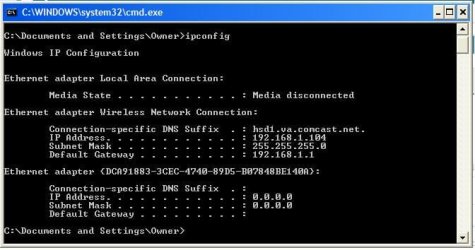
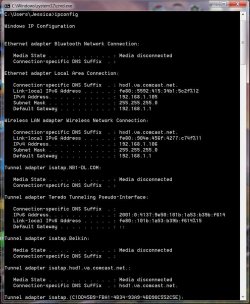
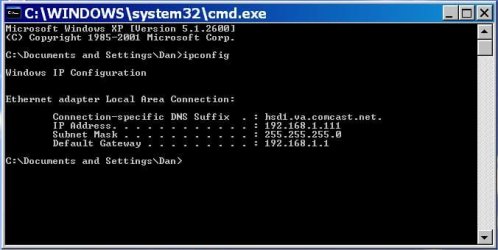
Can you provide ALL ipconfig details of all machines?
 

My Computer

Computer Manufacturer/Model Number
Lenovo ThinkPad T60
OS
Windows 7 Ultimate 64Bit
CPU
GenuineIntel Intel(R) Core(TM) DuoCore T2400 @ 1.83GHz
Motherboard
Intel(R) 82801G (ICH7 Family)
Memory
2.00 GB
Graphics Card(s)
Mobile Intel(R) 945 Express Chipset
Sound Card
SoundMAX Integrated Digital HD Audio
Monitor(s) Displays
ThinkPad Display
Screen Resolution
1400x1050
Hard Drives
100Gb SATA
Keyboard
Standard Keyboard
Mouse
HID-compliant Mouse
Internet Speed
Cable Broadband - 54Mbps
Other Info
Intel(R) PRO/1000 PL Network Connection
11a/b/g Wireless LAN Mini PCI Express Adapter
Hello,

aem - Please find the info attached. (I couldn't figure out how to past the screen shots into the body of the post...) Thank you for all of your help. If you tell me how to properly 'ping' another machine I can try that as well.
 

Attachments

My Computer

OS
Windows XP
In your Laptop with 17, can you manually iput these

IP: 192.168.1.1.07
Subnet 255.255.255.0
Default Gateway: 192.168.1.1.1

After that, do ipconfig on this machine and see if the Ips have stuck.

If so test ping.
 

My Computer

Computer Manufacturer/Model Number
Lenovo ThinkPad T60
OS
Windows 7 Ultimate 64Bit
CPU
GenuineIntel Intel(R) Core(TM) DuoCore T2400 @ 1.83GHz
Motherboard
Intel(R) 82801G (ICH7 Family)
Memory
2.00 GB
Graphics Card(s)
Mobile Intel(R) 945 Express Chipset
Sound Card
SoundMAX Integrated Digital HD Audio
Monitor(s) Displays
ThinkPad Display
Screen Resolution
1400x1050
Hard Drives
100Gb SATA
Keyboard
Standard Keyboard
Mouse
HID-compliant Mouse
Internet Speed
Cable Broadband - 54Mbps
Other Info
Intel(R) PRO/1000 PL Network Connection
11a/b/g Wireless LAN Mini PCI Express Adapter
aem,
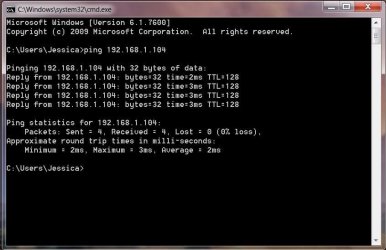
I have successfully pinged the XP Laptop from the Windows 7 Laptop. Please find the results below. I don't know much about networking, but I would take this as a good sign. It appears it isn't a hardware issue. Your continued support if very much appreciated

Ping test results.JPG.
 

My Computer

OS
Windows XP
Ok so what does all the machine's ipconfigs look like?
 

My Computer

Computer Manufacturer/Model Number
Lenovo ThinkPad T60
OS
Windows 7 Ultimate 64Bit
CPU
GenuineIntel Intel(R) Core(TM) DuoCore T2400 @ 1.83GHz
Motherboard
Intel(R) 82801G (ICH7 Family)
Memory
2.00 GB
Graphics Card(s)
Mobile Intel(R) 945 Express Chipset
Sound Card
SoundMAX Integrated Digital HD Audio
Monitor(s) Displays
ThinkPad Display
Screen Resolution
1400x1050
Hard Drives
100Gb SATA
Keyboard
Standard Keyboard
Mouse
HID-compliant Mouse
Internet Speed
Cable Broadband - 54Mbps
Other Info
Intel(R) PRO/1000 PL Network Connection
11a/b/g Wireless LAN Mini PCI Express Adapter
XP Home Or Pro

Is the laptop with XP that is not sharing properly the Home version or Pro version you have only stated XP
 

My Computer

Computer Manufacturer/Model Number
Custom Built
OS
Windows 7 Ultimate 32 bit
CPU
AMD Athlon 64 X2 4200+ Overclocked to 3.0Ghz
Motherboard
Biostar TF560 A2+
Memory
2 Gigs of G.Skill DDR2 800
Graphics Card(s)
HIS ATI Radeon HD 2600 Pro With IceQ cooler
Sound Card
6.1 Channel Sound Blaster Live 24 Bit
Monitor(s) Displays
Dual 20.5 " LG Flatrons W2052TO
Screen Resolution
1152x864
Hard Drives
Dual 36 Gig 10,000 RPM Raptors
PSU
430 watt Seasonic 80%+ Dual 12v Rails 2x80mm fans
Case
CHIEFMAX YA-5X
Cooling
4-80mm case fans 1-140mm case fan freezer 64 Pro CPU cooler
Keyboard
Saitek Eclipse II
Mouse
A4Tech wireless battery free optical scroll mouse
Internet Speed
1.5 meg down 384 up
Other Info
Logisys LED fan/light controller and dual 16" LED sticks mounted inside top of case all fans are LED all lighting is blue
DVD RW and CD RW both and Memory card reader
Hello,

ComputersPlus: The Laptop has Windows XP Home Edition, the other Laptop has Windows 7 Home Premium, and the Desktop has Windows XP Home Edition. I hope this is helpful. Thank you for all of your help.

Sincerely,
Daniel W. York
 

My Computer

OS
Windows XP
Ok Try This

Ok make sure again all machines are in the same workgroup and file and print sharing is turned on on all machines and make sure to restart all machines 123 also what security software/firewall are you using.

In Windows 7 make sure to turn off password protected sharing also it will help

post back
 

My Computer

Computer Manufacturer/Model Number
Custom Built
OS
Windows 7 Ultimate 32 bit
CPU
AMD Athlon 64 X2 4200+ Overclocked to 3.0Ghz
Motherboard
Biostar TF560 A2+
Memory
2 Gigs of G.Skill DDR2 800
Graphics Card(s)
HIS ATI Radeon HD 2600 Pro With IceQ cooler
Sound Card
6.1 Channel Sound Blaster Live 24 Bit
Monitor(s) Displays
Dual 20.5 " LG Flatrons W2052TO
Screen Resolution
1152x864
Hard Drives
Dual 36 Gig 10,000 RPM Raptors
PSU
430 watt Seasonic 80%+ Dual 12v Rails 2x80mm fans
Case
CHIEFMAX YA-5X
Cooling
4-80mm case fans 1-140mm case fan freezer 64 Pro CPU cooler
Keyboard
Saitek Eclipse II
Mouse
A4Tech wireless battery free optical scroll mouse
Internet Speed
1.5 meg down 384 up
Other Info
Logisys LED fan/light controller and dual 16" LED sticks mounted inside top of case all fans are LED all lighting is blue
DVD RW and CD RW both and Memory card reader
Ok well if you can ping machines from the other you can connect to each to share files. You just need to create the shares.

Try RDP to each machine.

Start> type in mstsc to bring up the RD session and put in the IP of a machine. Then Enter to connect.

Once you are asked to put in userid/password. Put in the id that you would when you log onto the destination machine.
 

My Computer

Computer Manufacturer/Model Number
Lenovo ThinkPad T60
OS
Windows 7 Ultimate 64Bit
CPU
GenuineIntel Intel(R) Core(TM) DuoCore T2400 @ 1.83GHz
Motherboard
Intel(R) 82801G (ICH7 Family)
Memory
2.00 GB
Graphics Card(s)
Mobile Intel(R) 945 Express Chipset
Sound Card
SoundMAX Integrated Digital HD Audio
Monitor(s) Displays
ThinkPad Display
Screen Resolution
1400x1050
Hard Drives
100Gb SATA
Keyboard
Standard Keyboard
Mouse
HID-compliant Mouse
Internet Speed
Cable Broadband - 54Mbps
Other Info
Intel(R) PRO/1000 PL Network Connection
11a/b/g Wireless LAN Mini PCI Express Adapter
Hello

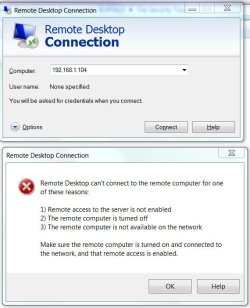
aem - I tried to do as you recommended in the Windows 7 laptop and typed in the IP address for the XP Laptop and got the below error:

Capture.JPG

Computersplus - all machines are in the same workgroup (MSHOME) and file and print sharing is turned on. Both XP machines can share with each other, and can few the Windows 7 Laptop. The windows & laptop however can only see the XP Desktop, not the XP Laptop. I have McAfee virus scan on all three machines and have the Windows firewall disabled. The Windows 7 Laptop has password protected sharing turned off.

Thank you both for all of your help. I'm sure we can figure this out.
 

My Computer

OS
Windows XP
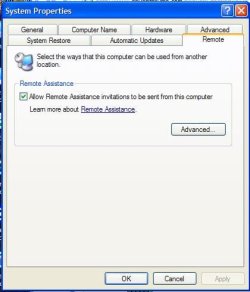
Have you allow for remote assistance in your destination machine, on destination machine, riight-click My Computer, Properties and in Remote tab, there should be an option for you to tick.

Also on your RDP windows, in the little Options drop down, open it up and see what username it has.
 

My Computer

Computer Manufacturer/Model Number
Lenovo ThinkPad T60
OS
Windows 7 Ultimate 64Bit
CPU
GenuineIntel Intel(R) Core(TM) DuoCore T2400 @ 1.83GHz
Motherboard
Intel(R) 82801G (ICH7 Family)
Memory
2.00 GB
Graphics Card(s)
Mobile Intel(R) 945 Express Chipset
Sound Card
SoundMAX Integrated Digital HD Audio
Monitor(s) Displays
ThinkPad Display
Screen Resolution
1400x1050
Hard Drives
100Gb SATA
Keyboard
Standard Keyboard
Mouse
HID-compliant Mouse
Internet Speed
Cable Broadband - 54Mbps
Other Info
Intel(R) PRO/1000 PL Network Connection
11a/b/g Wireless LAN Mini PCI Express Adapter
aem - the recieving machine already had the "allow remote assistance" box checked (see graphic below)
capture 2.JPG

The "user name" field in the RDP box is blank. Any thoughts?
 

My Computer

OS
Windows XP
Try the username and password, to be what you would log on as, on the destination machine.
 

My Computer

Computer Manufacturer/Model Number
Lenovo ThinkPad T60
OS
Windows 7 Ultimate 64Bit
CPU
GenuineIntel Intel(R) Core(TM) DuoCore T2400 @ 1.83GHz
Motherboard
Intel(R) 82801G (ICH7 Family)
Memory
2.00 GB
Graphics Card(s)
Mobile Intel(R) 945 Express Chipset
Sound Card
SoundMAX Integrated Digital HD Audio
Monitor(s) Displays
ThinkPad Display
Screen Resolution
1400x1050
Hard Drives
100Gb SATA
Keyboard
Standard Keyboard
Mouse
HID-compliant Mouse
Internet Speed
Cable Broadband - 54Mbps
Other Info
Intel(R) PRO/1000 PL Network Connection
11a/b/g Wireless LAN Mini PCI Express Adapter
Back
Top