I have set up a Windows 7 machine that shares out a hard drive as a network share along with printers to our network. On another computer I was mapping the network drive and accidentally entered the wrong credentials (wrong user name) and choose the remember credentials setting, and it would not let me map the drive. I tried to go back in and remap the drive again but Windows is remembering the user name/password and I can't map it. I can map the drive from any other computer just fine. Does anyone know how to make Windows forget the credentials so I can map the drive?
My Computer
At a glance
Windows 7 x64 UltimateCore i7 9206 GBNvidia Geforce 260
You would think thats what it would do but its not. I try to click on the computer in the network that has the drive and it just says that I can't connect to it and that I might have the wrong password or that it may not allow sharing (which it does). I could try running ccleaner I guess.
My Computer
At a glance
Windows 7 x64 UltimateCore i7 9206 GBNvidia Geforce 260
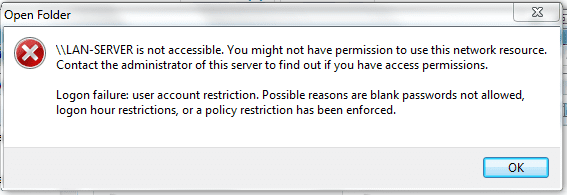
The problem is the drive never mapped. It was in the process of mapping that the wrong information was entered so it never got that far. I attached a picture of the exact error I'm getting. This pops up when I click on the computer's icon. I don't even have a chance to enter any information.
Attachments
Capture.PNG
9.2 KB
· Views: 116
My Computer
At a glance
Windows 7 x64 UltimateCore i7 9206 GBNvidia Geforce 260
What was the effect of that procedure???Change the name LAN-SERVER to LAN-SERVER2 just for testing... If nothing happens you can change it back to previous state .
My Computer
At a glance
Windows Se7en Ultimate + Windows XP SP3AMD Athlon64 X2 5200+CORSAIR DOMINATOR TWIN2X2048-8500C5D 2 GBAti Radeon HD3870
Changing the name of the computer did work but I changed it back so all of the other computer's printers/drives would still work. I keep it in mind as a last resort though.
I did find a key for mapped network drive. I deleted it and restarted the system and it still didn't work.
I'm going to try a few other things and see if I can get anything else to work.
Thanks for your help so far!
My Computer
At a glance
Windows 7 x64 UltimateCore i7 9206 GBNvidia Geforce 260
I worked on the problem some more and found a fix. I logged on to the server computer and changed the names of the accounts on the computer, then went back to the other computer and it finally said that it couldn't find the user name and let me enter a new one. Went back and change the account name back and now everything seems to be working.
You would think there would be an easier way to have windows forget a password!
Thanks for both of your help!
My Computer
At a glance
Windows 7 x64 UltimateCore i7 9206 GBNvidia Geforce 260
Go to "run"
type "credential" and choose "Manage Windows Credentials"
In there you can delete or amend the account for the PC you need to link to. If you delete it it will ask you for credentials next time you try to connect to it.