Windows 7 Forums


Windows 7: Wifi Connection shortcut?

06 Jan 2010   #1

Windows 7
 
 
Wifi Connection shortcut?

Hey, not sure if this is posted in the correct forum or not so moderators feel free to move it if you have too.. Just wondering if it is possible to create a shortcut on your desktop to the system tray "connect to networks" window? For Wifi.. as I like to keep my taskbar hidden yet everytime I wish to change networks I have to make it visible again. I know I could just make shortcuts to different networks, but that would clutter my desktop as I often connect to many different networks and I don't wish to do this.

So is this possible? Simply a shortcut that open the "Connect to network" small box that opens normally when you click the wifi tab in the system tray?


Thanks,
Matthew.
My System SpecsSystem Spec

06 Jan 2010   #2
Dom

Windows Seven Home Premium SP1
I Live At Home


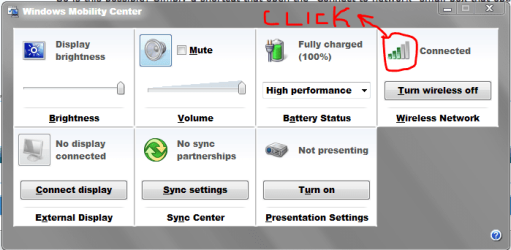
How about try the shortcut on they keyboard : Windows key + X.
Should look like this:
Wifi Connection shortcut?-capture.png
Just click and it shows the centre (or the little box that shows in the right bottom hand corner).
My System SpecsSystem Spec
06 Jan 2010   #3

Windows 7


I guess that's a good compromise but is it actually possible to get a desktop icon like I
asked in my original post? Because then I can put it into Objectdock, making life easier.

Pity System tray icons doesn't work on Objectdock for Windows 7 64-bit, otherwise this wouldn't be a problem
My System SpecsSystem Spec
.


06 Jan 2010   #4
Dom

Windows Seven Home Premium SP1
I Live At Home


Code:
Control Panel\Network and Internet\Network and Sharing Center
Highlight that, press 'Ctrl' + 'C' then 'Ctrl' + 'V' into the address bar of explorer and press enter.
Right click on the Network and sharing centre(Wifi Connection shortcut?-capture.png), and press 'Copy Address' (first option), then right click on the desktop and press 'Copy shortcut'.
This should work
My System SpecsSystem Spec
06 Jan 2010   #5

Windows 7


Quote   Quote: Originally Posted by Lil' Domii View Post
Code:
Control Panel\Network and Internet\Network and Sharing Center
Highlight that, press 'Ctrl' + 'C' then 'Ctrl' + 'V' into the address bar of explorer and press enter.
Right click on the Network and sharing centre(Attachment 45877), and press 'Copy Address' (first option), then right click on the desktop and press 'Copy shortcut'.
This should work
Hmm tried it and it didn't work

But thats not exactly what I'm looking for .. I'm looking for a shortcut to the "Connect or Disconnect" link within the network and sharing centre.. Exactly the same as when you click the wifi icon in the system tray, except I want to turn it into a shortcut to put into Objectdock.
My System SpecsSystem Spec
06 Jan 2010   #6
Dom

Windows Seven Home Premium SP1
I Live At Home


Quote   Quote: Originally Posted by MatthewRuddy View Post
Quote   Quote: Originally Posted by Lil' Domii View Post
Code:
Control Panel\Network and Internet\Network and Sharing Center
Highlight that, press 'Ctrl' + 'C' then 'Ctrl' + 'V' into the address bar of explorer and press enter.
Right click on the Network and sharing centre(Attachment 45877), and press 'Copy Address' (first option), then right click on the desktop and press 'Copy shortcut'.
This should work
Hmm tried it and it didn't work

But thats not exactly what I'm looking for .. I'm looking for a shortcut to the "Connect or Disconnect" link within the network and sharing centre.. Exactly the same as when you click the wifi icon in the system tray, except I want to turn it into a shortcut to put into Objectdock.
I don't think you can do what you want for what you want. I personally think keyboard shortcuts are faster.
Just do Windows key + X then quickly press W x2.
My System SpecsSystem Spec
06 Jan 2010   #7

64-bit Windows 7 Ultimate SP1 & Windows 8 Enterprise
Texas


Hello Mathew, and welcome to Seven Forums.

I think this may be close to what you are after.

Network Connections - Create Shortcut

Hope this helps,
Shawn
My System SpecsSystem Spec
07 Jan 2010   #8

Windows 7


Hmm beginning to think this is probably impossible.. Here an image of what I'm talking about..


Last edited by MatthewRuddy; 07 Jan 2010 at 09:51 AM..
My System SpecsSystem Spec
07 Jan 2010   #9
Dom

Windows Seven Home Premium SP1
I Live At Home


Quote   Quote: Originally Posted by MatthewRuddy View Post
Hmm beginning to think this is probably impossible.. Here an image of what I'm talking about..

Being me, I'd insist of using keyboard shortcuts.
My System SpecsSystem Spec
07 Jan 2010   #10

Windows 7


Quote   Quote: Originally Posted by Lil' Domii View Post
Quote   Quote: Originally Posted by MatthewRuddy View Post
Hmm beginning to think this is probably impossible.. Here an image of what I'm talking about..

Being me, I'd insist of using keyboard shortcuts.
Yeah tbh its a very close and good solution, but just wondering if there is a way to make this shortcut. If not I'll stick with the hotkeys.
My System SpecsSystem Spec
Reply

 Wifi Connection shortcut? problems?


Thread Tools


Similar help and support threads for: Wifi Connection shortcut?
Thread Forum
Wifi connection issues Network & Sharing
Shortcut to a VPN Connection... Network & Sharing
Wifi and Lan Connection simaltaneously Network & Sharing
Windows 7 Wifi Connection Network & Sharing
Wifi connection Network & Sharing


All times are GMT -5. The time now is 02:43 AM.


Seven Forums Android App Seven Forums IOS App Follow us on Facebook

Windows 7 Forums is an independent web site and has not been authorized,
sponsored, or otherwise approved by Microsoft Corporation.
"Windows 7" and related materials are trademarks of Microsoft Corp.
© Designer Media Ltd
  

1 2 3 4 5 6 7 8 9 10 11 12 13 14 15 16 17 18 19 20 21 22 23 24 25 26 27 28 29 30 31 32