Windows 7 Forums


Windows 7: VPN "No Network Access", ipv4 not connected

18 Jan 2010   #1

win 7 home premium
Maryland, Sir George Calvert founder
 
 
VPN "No Network Access", ipv4 not connected

Hi,
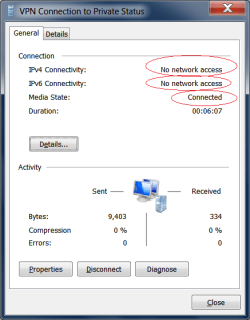
I set up vpn and it appears to be working, but can't access the network. I am getting the notify connected but ipv4/6 "no network access" message. Tried several different settings, fyi PPTP has been opened on the firewall. Any suggestions on how to get network access? Using native (no 3rd party software) ms PPTP to connect a Windows 7 to a vista computer. thanks.

Attached Thumbnails
VPN "No Network Access", ipv4 not connected-vpn2.png  
My System SpecsSystem Spec

19 Jan 2010   #2

win 7 home premium
Maryland, Sir George Calvert founder


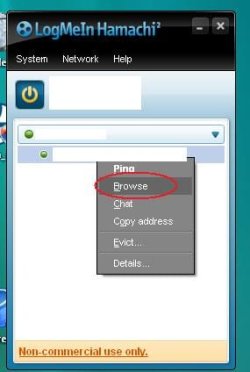
Got vpn working, but not with Microsoft. Went with hamachi vpn free version works on my vista as vpn server (sort of-guess its not a true server program for user since you go thru hamachi's servers) & windows 7 as client (its windows 7 tested). took 2 minutes to set up. Painless, amazing app. Firewall & router and multiple os's proved too much for ms pptp. I can even access my usb hard drive from 2000 miles away!!! So far no problems. Has anyone had any issues with hamachi? little concerned about privacy & security.

so easy to use. It open ports & takes care of all firewall bs. Just right click your vpn computer hit "browse" and you're in from anywhere in the world. (ip adresses whited out) for simplicity even beats anything i've seen on a mac.
Attached Thumbnails
VPN "No Network Access", ipv4 not connected-vpn4.jpg  

Last edited by win7use; 19 Jan 2010 at 02:54 AM.. Reason: add picture
My System SpecsSystem Spec
19 Jan 2010   #3
aem

Windows 7 Ultimate 64Bit


Thanks for the info.
My System SpecsSystem Spec
.


05 Nov 2010   #4

XP 32
 
 
Fixed it, heres how

I had this problem and went out and purchased a new lan card and it didnt work... plus i followed instructions from this site
Quote:
updated vista, now ipv4 and ipv6 not connected - Tech Support Guy Forums

TCP/IP stack repair options for use with Vista or Window 7.

Start, All Programs\Accessories and right click on Command Prompt, select "Run as Administrator" to open a command prompt.

In the command prompt window that opens, type type the following commands:

Reset WINSOCK entries to installation defaults: netsh winsock reset catalog

Reset IPv4 TCP/IP stack to installation defaults. netsh int ipv4 reset reset.log

Reset IPv6 TCP/IP stack to installation defaults. netsh int ipv6 reset reset.log

None of those worked, but heres what did!!! I found this out by myself...

AVG 2011 had a packet filter driver running and this stopped all internet access so showing those two IP4 and IP6 not connected. Once the check box for this filter driver was unticked and apply pressed, hey presto all net activity came back.

So what I would suggest is go into this place and untick any but the most essential drivers for your network card...

Control Panel, network and sharing centre, CHANGE ADAPTER SETTINGS

double click the adapter you appear to be using, ie your LAN card of your WIFI card

A window appears... click properties

A window appears witha tab "networking" and "the connection uses the following items..." Untick them all... and press ok...

Then go back into properties and reselect just these:
CLIENT FOR MICROSOFT NETWORKS - YES
INTERNET PROTOCOL VERSION 4 = YES

PRESS OK

GO AND SEE IF YOU CAN GET NET RUNNING... IT MAY BE A BIT SLOW AT FIRST...

If you net is working... go back in and one by one click on those unticked boxes to renable and work out which ones is making the net go bye bye... and leave that one UNTICKED...

Then tick all of then except that one thats stopping your net.

Thats it. Good luck.

What ever is the one that is unticked still is probably a bad driver. Note its name and which software it seems to be connected to... like mine was AVG packet Filter Driver... and uninstall AVG and reinstall it... or in your case uninstall whatever software that driver came from... may be an antivirus or may be something else... and reinstall it. If it plays up, consider using a different piece of software made by someone else.

truthseekers.... a PC engineer!

My System SpecsSystem Spec
09 May 2011   #5

Windows 7 Home Premium x64
Barksdale AFB


I know this is an old post, but I have this exact same problem. I setup VPN and get no ipv4 or ipv6 connectivity, my dialog box looks exactly like the one pictured in this thread. I tried the above posters solution of disabiling everything except the two services and it still did not work. I also tried it with windows firewall turned off, other than that I have no anti virus currently on the computer. I'm going through a Linksys E4200 router, if it makes a difference. However, the router has PTPP VPN pass through enabled and I port forwarded the 1723 and 47 ports to the correct PC.
My System SpecsSystem Spec
3 Weeks Ago   #6

Windows 8 Professional x64
San Antonio, TX


I'm having similar issues. I'm connected to it from my iPhone, and I have an IP address that I setup (range: 192.168.2.1 - 192.168.2.10). I can ping my iPhone (LTE connection) from my home computer, but no other traffic seems to be going back and forth.

The status window for the remote connection says that IPv4 connectivity is not connected and the duration is always 00:00:00. Send/received packages, compression, and errors are all at 0.

Any ideas?
My System SpecsSystem Spec
Reply

 VPN "No Network Access", ipv4 not connected problems?


Thread Tools


Similar help and support threads for: VPN "No Network Access", ipv4 not connected
Thread Forum
"No Network Access" and "Limited Connection/Connectivity" ? Network & Sharing
Laptop losses internet access, but says "connected" to wireless router Network & Sharing
Settings changed? No IPv4 internet access & "Default Gateway N/A" Network & Sharing
The message: " No internet access" The fact: connected Network & Sharing


All times are GMT -5. The time now is 05:10 PM.


Seven Forums Android App Seven Forums IOS App Follow us on Facebook

Windows 7 Forums is an independent web site and has not been authorized,
sponsored, or otherwise approved by Microsoft Corporation.
"Windows 7" and related materials are trademarks of Microsoft Corp.
© Designer Media Ltd
  

1 2 3 4 5 6 7 8 9 10 11 12 13 14 15 16 17 18 19 20 21 22 23 24 25 26 27 28 29 30 31 32