Windows 7 Forums Search
Welcome to Windows 7 Forums. Our forum is dedicated to helping you find solutions with any problems, errors or issues you are experiencing with Windows 7. The Windows 7 forum also covers news and updates and has an extensive Windows 7 tutorial section that covers a wide range of tips and tricks.


Windows 7 - Incorrect taskbar icon

 
01-24-2010   #1


Windows 7


Incorrect taskbar icon

I have an ethernet cable linked from my PC to my XBOX 360. I bridged my PC connection to the XBOX so that it can share my internet connection to access the console's online features. This is what the network area on my PC looks like:


The problem I'm having is in the taskbar. The internet icon just shows the bars with a red cross through them (as if to signify the internet isn't working), instead of before the bridge where it showed the speed levels of the internet with the coloured bars.


I know this is a minor thing, but is there any way I could get the icon back to its original state while keeping the bridge?

Thanks.

My System SpecsSystem Spec
01-26-2010   #2


Windows 7 Ulti. x64


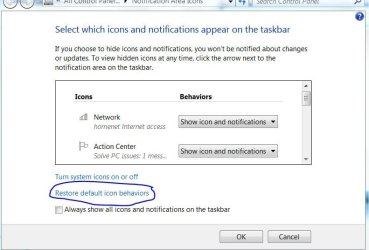
Rayman Welcome to SevenForums. Have you gone to right click start orb/properties/taskbar/notification area costomize/network/ show notifications? Have a play with this may give you a veiw you may prefer.
My System SpecsSystem Spec
01-26-2010   #3


Windows 7


Sadly this doesn't affect the icon picture.
My System SpecsSystem Spec
.


01-26-2010   #4


Windows 7 Ulti. x64


Quote   Quote: Originally Posted by Rayman View Post
Sadly this doesn't affect the icon picture.
Rayman.. Did you give this a try? Sorry I do not have a bridge or a xbox to test with so just not much help to you.
Incorrect taskbar icon-restore-icons.jpg
My System SpecsSystem Spec
01-26-2010   #5


Windows 7


I did, but to no result!
My System SpecsSystem Spec
02-03-2010   #6


Windows7 Ultimate 64bit


Go to the window where you made your screenshot, right click "Local Area Connection", the one with red cross on it, right click, disable. If you want to use wired network, make sure you re-enable it first before plugging.

zzz2496
My System SpecsSystem Spec
02-03-2010   #7


Windows 7


Quote   Quote: Originally Posted by zzz2496 View Post
Go to the window where you made your screenshot, right click "Local Area Connection", the one with red cross on it, right click, disable. If you want to use wired network, make sure you re-enable it first before plugging.

zzz2496
That doesn't seem to do anything. Plus, it's a bit hassly to have to enable it every time I want to use it.
My System SpecsSystem Spec
02-09-2010   #8


Windows 7


I too have the incorrect icon on ask tray. I have a new laptop running windows 7 with a wireless connection. Until today the icon represented bars of signal strength. Today it is different???

Any ideas why it would change all by itself like that?
Attached Images
 
My System SpecsSystem Spec
02-09-2010   #9


Windows 7 Ulti. x64


Quote   Quote: Originally Posted by seawolf541 View Post
I too have the incorrect icon on ask tray. I have a new laptop running windows 7 with a wireless connection. Until today the icon represented bars of signal strength. Today it is different???

Any ideas why it would change all by itself like that?
Welcome to SevenForums seawolf
That is the icon for a wired connection. Are you connecting with a wire now? If you are that will change the icon.
My System SpecsSystem Spec
02-10-2010   #10


Windows 7


No wired connection. I've tried changing the icon as you descibed above. I tried restoring icon defaults as well.
My System SpecsSystem Spec
Reply

 Incorrect taskbar icon problems?


Thread Tools


Similar Threads for: Incorrect taskbar icon
Thread Forum
Solved How to do taskbar icon to open with same icon and not thread Customization
Solved incorrect icons showing when customising taskbar icons General Discussion
WMC icon on taskbar Media Center
MSE taskbar-icon fix #2 ! System Security
Windows 7 use shortcut icon as taskbar icon General Discussion


All times are GMT -5. The time now is 08:50 PM.


Windows 7 Forums is an independent web site and has not been authorized,
sponsored, or otherwise approved by Microsoft Corporation.
"Windows 7" and related materials are trademarks of Microsoft Corp.
© Designer Media Ltd
  

1 2 3 4 5 6 7 8 9 10 11 12 13 14 15 16 17 18 19 20 21 22 23 24 25 26 27 28 29 30