Windows 7 Forums


Windows 7: Wired works. Wireless cannot see other devices.

04 Feb 2010   #1

windows 7
 
 
Wired works. Wireless cannot see other devices.

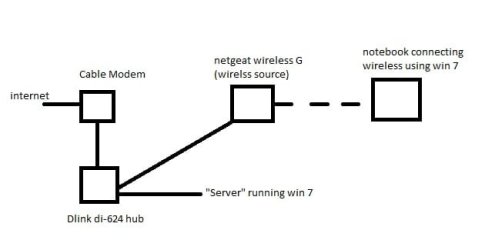
Ok so first here is a diagram of my current network which is attached.


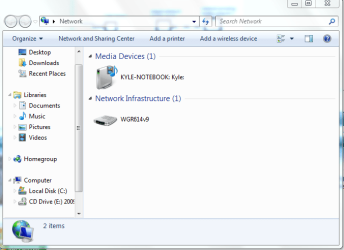
The main problem I am having is being able to view the Server that is on the wired network from the netbook when using a wireless connection.
However, when I plug the notebook into the wired network I can then view the server.

Both machines are running windows 7.

So far I have tried:

unjoining both homegroups and rejoining.
resetting all of my equipment: modem, hub, and wireless router
renaming the SSID of the wireless to be the same name of the network that the server is connected to.

any help would be greatly appreciated!

PS - I call it a server but it is just a computer with lots of media
Attached Thumbnails
Wired works. Wireless cannot see other devices.-network-2.jpg  
My System SpecsSystem Spec

04 Feb 2010   #2
aem

Windows 7 Ultimate 64Bit


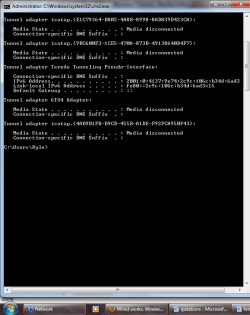
Can you provide ipconfig /all details of the notebook, when it is wired to the Netgear (??) and when it is on wireless. I gather you cannot ping the service when using wireless?
My System SpecsSystem Spec
04 Feb 2010   #3

windows 7


aem,

I plugged the notebook into the D-link just to test if I could see the server. the notebook will always be using wireless otherwise.

the first attachment is the ipconfig when wired to the d-link hub
the second is when wireless to the netgear
Attached Thumbnails
Wired works. Wireless cannot see other devices.-wired-di624.png   Wired works. Wireless cannot see other devices.-wireless-netgear.png  
My System SpecsSystem Spec
.


04 Feb 2010   #4

windows 7


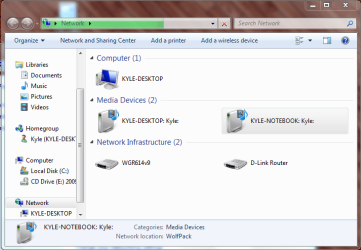
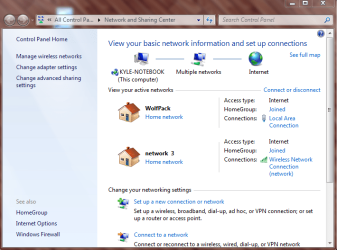
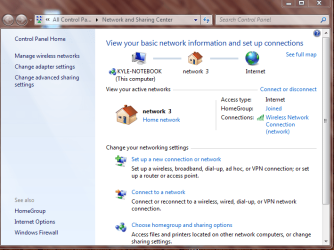
heres some more images that might help a little more.

the first two are wired to the d-link
the second two are while wireless connected to the netgear
Attached Thumbnails
Wired works. Wireless cannot see other devices.-wired.png   Wired works. Wireless cannot see other devices.-wired-status.png   Wired works. Wireless cannot see other devices.-wireless.png   Wired works. Wireless cannot see other devices.-wireless-status.png  
My System SpecsSystem Spec
04 Feb 2010   #5
aem

Windows 7 Ultimate 64Bit


Oh so you are not cabling to the Netgear? As the hub is a dumb device, anything attached to it will almost always connet to each other. The issue here is how the router broadcasts the network given through the hub (why not link the server to the router?) to your notebook.

Anyway can you re-supply the ipconfig tails, important details are chopped off.
My System SpecsSystem Spec
04 Feb 2010   #6

Windows 7 Ult, Windows 8 Pro,
San Diego


Is the Netgear wireless a router or a wireless access point? If it's a router than this configuration won't work, it needs to be a wireless access point "wireless switch".

The D-Link DI-624 isn't a hub it's a router, there can only be one router in this network if you want everything to work correctly.

Last edited by chev65; 04 Feb 2010 at 01:30 PM..
My System SpecsSystem Spec
Reply

 Wired works. Wireless cannot see other devices. problems?


Thread Tools


Similar help and support threads for: Wired works. Wireless cannot see other devices.
Thread Forum
Upgraded to Windows 7 ultimate. Wired works but wireless does not Network & Sharing
Solved Wireless connection works, wired connection does not. Network & Sharing
Wireless Internet Works, Wired Connection Doesn't Work Network & Sharing
Wireless internet works, wired switch doesn't Network & Sharing
Wireless Works, Wired Lan does not Network & Sharing


All times are GMT -5. The time now is 10:27 AM.


Seven Forums Android App Seven Forums IOS App Follow us on Facebook

Windows 7 Forums is an independent web site and has not been authorized,
sponsored, or otherwise approved by Microsoft Corporation.
"Windows 7" and related materials are trademarks of Microsoft Corp.
© Designer Media Ltd
  

1 2 3 4 5 6 7 8 9 10 11 12 13 14 15 16 17 18 19 20 21 22 23 24 25 26 27 28 29 30 31 32