Windows 7 Forums Search
Welcome to Windows 7 Forums. Our forum is dedicated to helping you find solutions with any problems, errors or issues you are experiencing with Windows 7. The Windows 7 forum also covers news and updates and has an extensive Windows 7 tutorial section that covers a wide range of tips and tricks.


Windows 7 - Homegroup troubleshooting

 
02-06-2010   #1


Windows 7


Homegroup troubleshooting

Hi everyone,

I have a Dell desktop with windows 7. and I just bought a new vaio laptop with windows 7 as well.

I did the homegroup sharing. my problem is the laptop doesnot read the desktop but the desktop reads the laptop.

I created the group from the laptop and joined it from the desktop. In this case the desktop reads the laptop files and everything is fine but from the laptop i dont even find the other computer.

I tried to leave the group from both computers and create it from the desktop and then join it from the laptop but when i go in the laptop it does not give the option to join the exisiting one it creates a new group.

I dont know if there anything would fix it

Please help

My System SpecsSystem Spec
02-06-2010   #2


Windows 7 Ultimate 64 bit


I new to 7 so bare with me. When I upgraded the wifes laptop to 7 and set up the network while in the upgrade mode it set up a password and then asked me to write down this password so that when later windows 7 PC's where added I just input the password. During my upgrade of my desktop last night I got the same prompt to input password for my network, I did and I have access to all my PC's in the network. Now I don't know if this will help you in any way but this is what worked for me.
My System SpecsSystem Spec
02-06-2010   #3


Windows 7 RTM X64


This can be a few different problems,

Are you trying to join the Homegroup from the laptop wirelessly or wired? Sometimes it works better if you are wired, switch back to wireless if you are able to join "long shot but worth a try".

If not, it sometimes helps to clear some files from the location below and restarting and see if the issue persits.

Delate this file if present >> C:\Windows\ServiceProfiles\LocalService\AppData\Roaming\PeerNetworking idstore.sst
After that start the Task Manager
Click on the service Tab
Find the "HomeGroupProvider" and stop it then reboot all machines. This will fix Homegroup connection problems in some cases.


Also make extra sure that that time and date are set correctly on both machines and also in bios. This causes all sorts of problems with Homegroups and sharing.

If the problem still remains then use this trouble shooting guide and don't skip the part about the registry adjustment because that fixes problems with Homegroups quite often.

Ultimate Troubleshooting Guide for Windows 7 HomeGroup Connection Issues

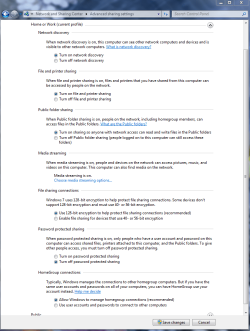
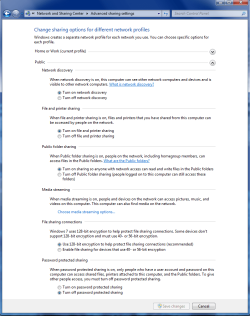
Also make sure that these settings are as shown on both machines under Advanced Sharing settings. There are two different windows here, Work-Home and Public.
Attached Thumbnails
Homegroup troubleshooting-home-work-homegroup-enable.png   Homegroup troubleshooting-public-sharing-enabled-all.png  

Last edited by chev65; 02-06-2010 at 06:47 PM..
My System SpecsSystem Spec
.


Reply

 Homegroup troubleshooting problems?


Thread Tools


Similar Threads for: Homegroup troubleshooting
Thread Forum
Homegroup problems - Homegroup detected, can't join. @wit's end Network & Sharing
Solved Homegroup encountered an error / This computer cannot join a homegroup Network & Sharing
Homegroup Not showing all PC's on one machine in Homegroup icon Network & Sharing
Con't get my wirelss Laptop homegroup to find my pc ethernet homegroup Network & Sharing


All times are GMT -5. The time now is 08:51 PM.


Windows 7 Forums is an independent web site and has not been authorized,
sponsored, or otherwise approved by Microsoft Corporation.
"Windows 7" and related materials are trademarks of Microsoft Corp.
© Designer Media Ltd
  

1 2 3 4 5 6 7 8 9 10 11 12 13 14 15 16 17 18 19 20 21 22 23 24 25 26 27 28 29 30