| Windows 7: Only Firefox can connect to the internet! Quick read |
09 Feb 2010
|
#1 | | |
Only Firefox can connect to the internet! Quick read Hey guys, new to the forum as of today.
Router was acting up in my house so I had to reset it. My roomate has no problems connecting to the internet but I do.
After a router reset, Google Chrome, windows gadgets, iTunes and everything else BUT Firefox cannot connect to the internet. I have tried this on another WIFI system and the same results. I have also tried to connect directly to the router with an ethernet cable but to no avail.
I have tried turning off Windows Firewall (the only firewall program I have) and it didn't work. However, if I go online through tethering my iPhone, all of the above programs can connect.
I am completely stumped. Note: I didn't make any changes (that I know of) to my CPU while reseting the router. | My System Specs |
| |
09 Feb 2010
|
#2 | | Windows 7 Ult, Windows 8 Pro, San Diego |
It may help to reset Winsock for windows 7. This has fixed the same type of no network access only for 'certain' programs problem before. 1. Click start, type cmd in the Start Search box, right-click cmd.exe, click Run as administrator, and then press Continue. 2. Type netsh winsock reset at the command prompt, and then press ENTER. Note If the command is typed incorrectly, you will receive an error message. Type the command again. When the command is completed successfully, a confirmation appears, followed by a new command prompt. Then, go to step 3. 3. Type exit, and then press ENTER. You should be prompted to reboot, if not you should reboot and test. If that doesn't work try typing sfc/scanow into an elevated "admin" command prompt then hit enter, let it complete the scan. If that doesn't work try disabling the Bonjour service which installed with itunes because it can cause all sorts of strange connection problems. To disable the Bonjour service Go too Computer > Manage > Services and Applications > Services => find the bonjour service (sometimes is shown as long numbers), shutdown service, and set to Disabled.
Last edited by chev65; 09 Feb 2010 at 07:56 PM..
| My System Specs | | System Manufacturer/Model Number Home built OS Windows 7 Ult, Windows 8 Pro, CPU Q9650-4.275GHz, E8600 4.5GHz, E6750-3.8GHz Motherboard Evga 780i FTW Memory G.Skill PC2 9600 1200Mhz 5 5 5 15 2T Graphics Card GTX480 Sound Card Asus Xonar D2 Monitor(s) Displays HannsG Screen Resolution 1680X1050 Keyboard Logitech G15 Mouse Logitech G9 PSU ThermalTake Toughpower 1000Watt modular Case ThermalTake XaserV Cooling Xigmatek S1283 Hard Drives GSkill Phoenix Pro 120GB SSD Internet Speed T1 |
09 Feb 2010
|
#3 | | |
Dear Chev,
I tried the winsock reset, got the confirmation, and rebooted but it didn't work.
I am trying the scan currently and will keep you updated.
Thanks for the help. | My System Specs | | |
09 Feb 2010
|
#4 | | |
The scan came back with no results. I said it found no problems.
I am beginning to think that there are some settings that may have changed inside of the network settings that is the problem. However, I have tried this on a different secured wifi system.
So I am stumped. | My System Specs | | |
09 Feb 2010
|
#5 | | |
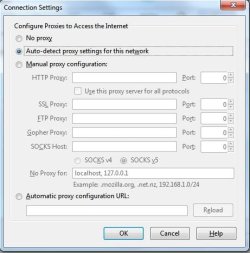
Have you tried and compare your FireFox settings with your mates? It pays to do this just in case something might have changed the settings. Also is the connection set to:
If all fails, you can always re-install Firefox. | My System Specs | | System Manufacturer/Model Number Lenovo ThinkPad T60 OS Windows 7 Ultimate 64Bit CPU GenuineIntel Intel(R) Core(TM) DuoCore T2400 @ 1.83GHz Motherboard Intel(R) 82801G (ICH7 Family) Memory 2.00 GB Graphics Card Mobile Intel(R) 945 Express Chipset Sound Card SoundMAX Integrated Digital HD Audio Monitor(s) Displays ThinkPad Display Screen Resolution 1400x1050 Keyboard Standard Keyboard Mouse HID-compliant Mouse Hard Drives 100Gb SATA Internet Speed Cable Broadband - 54Mbps Other Info Intel(R) PRO/1000 PL Network Connection
11a/b/g Wireless LAN Mini PCI Express Adapter |
09 Feb 2010
|
#6 | | Windows 7 Ult, Windows 8 Pro, San Diego |

Quote: Originally Posted by aem Have you tried and compare your FireFox settings with your mates? It pays to do this just in case something might have changed the settings. Also is the connection set to: Attachment 53176
If all fails, you can always re-install Firefox. Firefox is the only program that can go online, it's not broken. Try disabling the Bonjour service which installed with itunes because it can cause all sorts of strange connection problems. To disable the Bonjour service Go too Computer > Manage > Services and Applications > Services => find the bonjour service (sometimes is shown as long numbers), shutdown service, and set to Disabled. | My System Specs | | System Manufacturer/Model Number Home built OS Windows 7 Ult, Windows 8 Pro, CPU Q9650-4.275GHz, E8600 4.5GHz, E6750-3.8GHz Motherboard Evga 780i FTW Memory G.Skill PC2 9600 1200Mhz 5 5 5 15 2T Graphics Card GTX480 Sound Card Asus Xonar D2 Monitor(s) Displays HannsG Screen Resolution 1680X1050 Keyboard Logitech G15 Mouse Logitech G9 PSU ThermalTake Toughpower 1000Watt modular Case ThermalTake XaserV Cooling Xigmatek S1283 Hard Drives GSkill Phoenix Pro 120GB SSD Internet Speed T1 |
09 Feb 2010
|
#7 | | Windows 7 Ult, Windows 8 Pro, San Diego |
It's writting in a confusing way I think, After a router reset, Google Chrome, windows gadgets, iTunes and everything else BUT Firefox cannot connect to the internet. It it's only firefox then no big deal LOL> | My System Specs | | System Manufacturer/Model Number Home built OS Windows 7 Ult, Windows 8 Pro, CPU Q9650-4.275GHz, E8600 4.5GHz, E6750-3.8GHz Motherboard Evga 780i FTW Memory G.Skill PC2 9600 1200Mhz 5 5 5 15 2T Graphics Card GTX480 Sound Card Asus Xonar D2 Monitor(s) Displays HannsG Screen Resolution 1680X1050 Keyboard Logitech G15 Mouse Logitech G9 PSU ThermalTake Toughpower 1000Watt modular Case ThermalTake XaserV Cooling Xigmatek S1283 Hard Drives GSkill Phoenix Pro 120GB SSD Internet Speed T1 |
09 Feb 2010
|
#8 | | |
English is still my second language. | My System Specs | | System Manufacturer/Model Number Lenovo ThinkPad T60 OS Windows 7 Ultimate 64Bit CPU GenuineIntel Intel(R) Core(TM) DuoCore T2400 @ 1.83GHz Motherboard Intel(R) 82801G (ICH7 Family) Memory 2.00 GB Graphics Card Mobile Intel(R) 945 Express Chipset Sound Card SoundMAX Integrated Digital HD Audio Monitor(s) Displays ThinkPad Display Screen Resolution 1400x1050 Keyboard Standard Keyboard Mouse HID-compliant Mouse Hard Drives 100Gb SATA Internet Speed Cable Broadband - 54Mbps Other Info Intel(R) PRO/1000 PL Network Connection
11a/b/g Wireless LAN Mini PCI Express Adapter |
09 Feb 2010
|
#9 | | Windows 7 Ult, Windows 8 Pro, San Diego |
I still can't tell what it's saying and it's my first language LOL. But if the problem is only with FF then just reinstall or check settings I agree.
In IE it's Tools-Internet Options-Advanced tab then "reset" the browser to default settings. | My System Specs | | System Manufacturer/Model Number Home built OS Windows 7 Ult, Windows 8 Pro, CPU Q9650-4.275GHz, E8600 4.5GHz, E6750-3.8GHz Motherboard Evga 780i FTW Memory G.Skill PC2 9600 1200Mhz 5 5 5 15 2T Graphics Card GTX480 Sound Card Asus Xonar D2 Monitor(s) Displays HannsG Screen Resolution 1680X1050 Keyboard Logitech G15 Mouse Logitech G9 PSU ThermalTake Toughpower 1000Watt modular Case ThermalTake XaserV Cooling Xigmatek S1283 Hard Drives GSkill Phoenix Pro 120GB SSD Internet Speed T1 |
09 Feb 2010
|
#10 | | |

Quote: Originally Posted by chev65 It's writting in a confusing way I think, After a router reset, Google Chrome, windows gadgets, iTunes and everything else BUT Firefox cannot connect to the internet. It it's only firefox then no big deal LOL>
This is correct. I am using FF right now, but nothing else can connect to the internet.
I have also reinstalled chrome, but that didn't help. It is not the settings in any of the programs, because when I tether with my iPhone, everything works perfectly!!!
Very annoying! It has to be some setting in the network control panel. | My System Specs | | Only Firefox can connect to the internet! Quick read problems? All times are GMT -5. The time now is 06:07 AM. | |