
| Windows 7: Unable to see TCP setting in 7068, why? |
01 Apr 2009
|
#1 | | Server 2008 R2 SP1, Win7 x64 Pro SP1 |
Unable to see TCP setting in 7068, why? In the command prompt, type netsh interface tcp show global and press Enter, the current TCP Global Parameters should appear. My 7068 x86
fails to do so , why?
The Vista in the same destop got no such problem (sorry, my Vista is the
Traditional Chinese version):
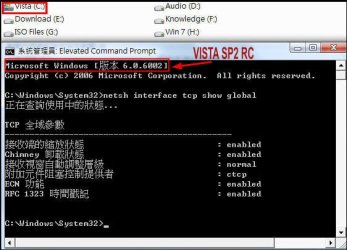
Need your help, and thanks in advanced. | My System Specs |
| OS Server 2008 R2 SP1, Win7 x64 Pro SP1 CPU Intel Core 2 Duo E6700 @3.3GHz Motherboard ASUS P5W DH DELUXE Memory Transcend DDRII 800 4GB (2 x 2GB ) Graphics Card GeForce 7950GX2 Sound Card Realtek ALC882M Integrated on board Monitor(s) Displays ACER AL2723 27" LCD Screen Resolution 1920x1200 Keyboard Standard Mouse Standard PSU Zippy PSL-6720P(G1)720W Case Thermaltake Kandalf VA9000SWA Cooling Zalman CNPS9500 Hard Drives WD 6401 AALS 640G x 1
Seagate 160 GB (Barracuda 7200.7) x 2 Internet Speed 10M, Cable Other Info Above is one of my desktops. |
03 Apr 2009
|
#2 | | |
Type netsh /?, it seems tcp isn't part of the command anymore. | My System Specs | | System Manufacturer/Model Number Dell Laptop Studio 1537 OS Windows 7 x64 7229 CPU Intel Core 2 Duo CPU T6400 Memory 4 GB Graphics Card Mobile Intel 45 Chipset |
03 Apr 2009
|
#3 | | Windows 7 Ultimate x64 SP1 Somewhere on the 3rd rock from the sun. |

Quote: Originally Posted by Copyright Type netsh /?, it seems tcp isn't part of the command anymore. Notice the command again - netshow interface tcp show global - and it *is* still there. 
Quote: Originally Posted by woolswell In the command prompt, type netsh interface tcp show global and press Enter, the current TCP Global Parameters should appear. My 7068 x86
fails to do so , why? Attachment 7034
The Vista in the same destop got no such problem (sorry, my Vista is the
Traditional Chinese version): Attachment 7035
Need your help, and thanks in advanced. As to why it is not working, not sure. I tried both regular CMD as well as CMD with elevated privileges - same error. | My System Specs | | Computer type PC/Desktop System Manufacturer/Model Number The Beast Model V OS Windows 7 Ultimate x64 SP1 CPU Core i7 965 EE @3.6 GHz Motherboard eVGA x58 Classified3 Memory 3 * 4GB Mushkin Enh Redline CL7 DDR3 1600 MHz (PC3-12800) Graphics Card eVGA 560 Ti 448 Core Classified + eVGA GTX260 SSC (PhysX) Sound Card Realtek HD Audio (on-board) Monitor(s) Displays 2 * Acer X213Wbd Screen Resolution 2 * 1680 x 1050 Keyboard Logitech G15 Keyboard Mouse Logitech Performance Mouse MX PSU ThermalTake BlackWidow TX TR2 850 W Case ThermalTake Level 10 GT (Black) Cooling Corsair H100 CPU | 2 * TT 140mm TriLED | 2 * Antec TriCool Hard Drives 1 * Intel Cheryville 520 180 GB SATA III SSD |
1 * Intel X-25M G2 80 GB SATA II SSD |
2 * Seagate 1 TB 32MB Cache 7200.12 SATA II Mech. Internet Speed Cable - 35 Mbit down / 12 Mbit up advertised (30 / 6 act.) Antivirus M$Se / MBAM Pro / WinPatrol Pro Browser Chome(dev) / Canary / Firefox Minefield / Opera Next / IE 10 Other Info Wacom Bamboo Touch |
Hauppauge WinTV-HVR-1850 |
Optimus STAV-3400 AV Receiver |
Bose 301 Series III Speakers (Main channel) |
Bose 161 Speakers (Surround) |
Optimus 3 way 100-W speaker (Center) |
Logitech Clearchat PC Wireless Headset |
Koss ProDJ 100 Headphones |
Microsoft LifeCam Studio |
Motorola Droid BIONIC |
ASUS Transformer Infinity 64GB |
03 Apr 2009
|
#4 | | Server 2008 R2 SP1, Win7 x64 Pro SP1 |
Many thanks to copyright and johngalt.
I installed and re-installed 7057x86, 7068x86, and 7068x64 the past two days and tried to
find what happened to my Windows 7.
The same problem exists in all above mentioned operation systems. Hence, I am almost sure that everyone who uses 7068 would meet the same thing.
Perhaps that's nothing to do with 'bug' and perhaps, I should use new parameters of the tcp/ip in 7068 which I know not right now.......
Anyway, thank copyright and johngalt.
Still waiting for some experts to teach me......
Last edited by woolswell; 03 Apr 2009 at 10:52 PM..
Reason: correct wrong typing
| My System Specs | | OS Server 2008 R2 SP1, Win7 x64 Pro SP1 CPU Intel Core 2 Duo E6700 @3.3GHz Motherboard ASUS P5W DH DELUXE Memory Transcend DDRII 800 4GB (2 x 2GB ) Graphics Card GeForce 7950GX2 Sound Card Realtek ALC882M Integrated on board Monitor(s) Displays ACER AL2723 27" LCD Screen Resolution 1920x1200 Keyboard Standard Mouse Standard PSU Zippy PSL-6720P(G1)720W Case Thermaltake Kandalf VA9000SWA Cooling Zalman CNPS9500 Hard Drives WD 6401 AALS 640G x 1
Seagate 160 GB (Barracuda 7200.7) x 2 Internet Speed 10M, Cable Other Info Above is one of my desktops. |
04 Apr 2009
|
#5 | | Windows 7 Ultimate x64 Service Pack 1 Doncaster, UK |
This would appear to be a bug, as I get the same message. The other options for netsh interface tcp show work correctly, it is only the global option that doesn't. | My System Specs | | System Manufacturer/Model Number Dwarf Dwf/11/2012 OS Windows 7 Ultimate x64 Service Pack 1 CPU Intel Core-i5-3570K 4-core @ 3.4GHz (Ivy Bridge) (OC 4.2GHz) Motherboard ASRock Z77 Extreme4-M Memory 4 x 4GB DDR3-1600 Corsair Vengeance CMZ8GX3M2A1600C9B (16GB) Graphics Card 2 x AMD Radeon HD7770 1GB CrossFired (OC 1100MHz/1250MHz) Sound Card Realtek High Definition on board solution (ALC 898) Monitor(s) Displays ViewSonic VA1912w Widescreen (VGA) Screen Resolution 1440x900 Keyboard Microsoft Comfort Curve Keyboard 3000 (USB) Mouse Microsoft Comfort Mouse 3000 for Business (USB) PSU XFX Pro Series 850W Semi-Modular Case Gigabyte IF233 Cooling 1 x 120mm Front Inlet 1 x 120mm Rear Exhaust Hard Drives OCZ Agility 3 SSD 120GB SATA III x2 (RAID 0)
Samsung HD501LJ 500GB SATA II x2
Hitachi HDS721010CLA332 1TB SATA II
Iomega 1.5TB Ext USB 2.0
WD 2.0TB Ext USB 3.0 Internet Speed NetGear DG834Gv3 ADSL Modem/Router (Ethernet) ~4.0 Mb/s (O2) Antivirus Avast! 7.0.1474 Browser IE 9 Other Info Optical Drive: HL-DT-ST BD-RE BH10LS30 SATA Bluray
Lexmark S305 Printer/Scanner/Copier (USB)
CTF-430 Tablet & Pen
WEI Score: 7.7/7.9/7.4/7.4/7.9
Asus Eee PC 1011PX Netbook (Windows 7 x86 Starter) |
04 Apr 2009
|
#6 | | Server 2008 R2 SP1, Win7 x64 Pro SP1 |

Quote: Originally Posted by Dwarf This would appear to be a bug, as I get the same message. The other options for netsh interface tcp show work correctly, it is only the global option that doesn't. Thanks for your reply. | My System Specs | | OS Server 2008 R2 SP1, Win7 x64 Pro SP1 CPU Intel Core 2 Duo E6700 @3.3GHz Motherboard ASUS P5W DH DELUXE Memory Transcend DDRII 800 4GB (2 x 2GB ) Graphics Card GeForce 7950GX2 Sound Card Realtek ALC882M Integrated on board Monitor(s) Displays ACER AL2723 27" LCD Screen Resolution 1920x1200 Keyboard Standard Mouse Standard PSU Zippy PSL-6720P(G1)720W Case Thermaltake Kandalf VA9000SWA Cooling Zalman CNPS9500 Hard Drives WD 6401 AALS 640G x 1
Seagate 160 GB (Barracuda 7200.7) x 2 Internet Speed 10M, Cable Other Info Above is one of my desktops. |
05 Apr 2009
|
#7 | | Windows 7 Ultimate x64 SP1 Somewhere on the 3rd rock from the sun. |

Quote: Originally Posted by Dwarf This would appear to be a bug, as I get the same message. The other options for netsh interface tcp show work correctly, it is only the global option that doesn't. The chimney* require me to run ad admin, but only chimneyheuristics outputs anything - the rest were blank.
Finally, I found out that you can use netsh int tcp show * instead of having to type out interface (never knew that before, so I don't know if that was available before or not). | My System Specs | | Computer type PC/Desktop System Manufacturer/Model Number The Beast Model V OS Windows 7 Ultimate x64 SP1 CPU Core i7 965 EE @3.6 GHz Motherboard eVGA x58 Classified3 Memory 3 * 4GB Mushkin Enh Redline CL7 DDR3 1600 MHz (PC3-12800) Graphics Card eVGA 560 Ti 448 Core Classified + eVGA GTX260 SSC (PhysX) Sound Card Realtek HD Audio (on-board) Monitor(s) Displays 2 * Acer X213Wbd Screen Resolution 2 * 1680 x 1050 Keyboard Logitech G15 Keyboard Mouse Logitech Performance Mouse MX PSU ThermalTake BlackWidow TX TR2 850 W Case ThermalTake Level 10 GT (Black) Cooling Corsair H100 CPU | 2 * TT 140mm TriLED | 2 * Antec TriCool Hard Drives 1 * Intel Cheryville 520 180 GB SATA III SSD |
1 * Intel X-25M G2 80 GB SATA II SSD |
2 * Seagate 1 TB 32MB Cache 7200.12 SATA II Mech. Internet Speed Cable - 35 Mbit down / 12 Mbit up advertised (30 / 6 act.) Antivirus M$Se / MBAM Pro / WinPatrol Pro Browser Chome(dev) / Canary / Firefox Minefield / Opera Next / IE 10 Other Info Wacom Bamboo Touch |
Hauppauge WinTV-HVR-1850 |
Optimus STAV-3400 AV Receiver |
Bose 301 Series III Speakers (Main channel) |
Bose 161 Speakers (Surround) |
Optimus 3 way 100-W speaker (Center) |
Logitech Clearchat PC Wireless Headset |
Koss ProDJ 100 Headphones |
Microsoft LifeCam Studio |
Motorola Droid BIONIC |
ASUS Transformer Infinity 64GB |
08 Apr 2009
|
#8 | | Server 2008 R2 SP1, Win7 x64 Pro SP1 |
So that's the bug of 7068.
In 7077, it's normal again: | My System Specs | | OS Server 2008 R2 SP1, Win7 x64 Pro SP1 CPU Intel Core 2 Duo E6700 @3.3GHz Motherboard ASUS P5W DH DELUXE Memory Transcend DDRII 800 4GB (2 x 2GB ) Graphics Card GeForce 7950GX2 Sound Card Realtek ALC882M Integrated on board Monitor(s) Displays ACER AL2723 27" LCD Screen Resolution 1920x1200 Keyboard Standard Mouse Standard PSU Zippy PSL-6720P(G1)720W Case Thermaltake Kandalf VA9000SWA Cooling Zalman CNPS9500 Hard Drives WD 6401 AALS 640G x 1
Seagate 160 GB (Barracuda 7200.7) x 2 Internet Speed 10M, Cable Other Info Above is one of my desktops. |
08 Apr 2009
|
#9 | | Windows 7 Ultimate x64 SP1 Somewhere on the 3rd rock from the sun. |
It's a bug in 7068 and before, AFAIK, to 7022....
Last edited by johngalt; 10 Apr 2009 at 12:12 AM..
| My System Specs | | Computer type PC/Desktop System Manufacturer/Model Number The Beast Model V OS Windows 7 Ultimate x64 SP1 CPU Core i7 965 EE @3.6 GHz Motherboard eVGA x58 Classified3 Memory 3 * 4GB Mushkin Enh Redline CL7 DDR3 1600 MHz (PC3-12800) Graphics Card eVGA 560 Ti 448 Core Classified + eVGA GTX260 SSC (PhysX) Sound Card Realtek HD Audio (on-board) Monitor(s) Displays 2 * Acer X213Wbd Screen Resolution 2 * 1680 x 1050 Keyboard Logitech G15 Keyboard Mouse Logitech Performance Mouse MX PSU ThermalTake BlackWidow TX TR2 850 W Case ThermalTake Level 10 GT (Black) Cooling Corsair H100 CPU | 2 * TT 140mm TriLED | 2 * Antec TriCool Hard Drives 1 * Intel Cheryville 520 180 GB SATA III SSD |
1 * Intel X-25M G2 80 GB SATA II SSD |
2 * Seagate 1 TB 32MB Cache 7200.12 SATA II Mech. Internet Speed Cable - 35 Mbit down / 12 Mbit up advertised (30 / 6 act.) Antivirus M$Se / MBAM Pro / WinPatrol Pro Browser Chome(dev) / Canary / Firefox Minefield / Opera Next / IE 10 Other Info Wacom Bamboo Touch |
Hauppauge WinTV-HVR-1850 |
Optimus STAV-3400 AV Receiver |
Bose 301 Series III Speakers (Main channel) |
Bose 161 Speakers (Surround) |
Optimus 3 way 100-W speaker (Center) |
Logitech Clearchat PC Wireless Headset |
Koss ProDJ 100 Headphones |
Microsoft LifeCam Studio |
Motorola Droid BIONIC |
ASUS Transformer Infinity 64GB |
09 Apr 2009
|
#10 | | Server 2008 R2 SP1, Win7 x64 Pro SP1 |

Quote: Originally Posted by johngalt It's a bug in 7068 and before, AFAIK, to 7022.... Hei, johngalt,
Thank you for accompanying me to tell the parameters of tcp/ip of
the Win 7.
In these days, I tried to find your posts and replies here in Seven Forums,
really, I learned a lot though you knowed not.
Thanks again for the useful knowledge.
Last edited by johngalt; 10 Apr 2009 at 12:13 AM..
Reason: correct Seven Forum to be Seven Forums
| My System Specs | | OS Server 2008 R2 SP1, Win7 x64 Pro SP1 CPU Intel Core 2 Duo E6700 @3.3GHz Motherboard ASUS P5W DH DELUXE Memory Transcend DDRII 800 4GB (2 x 2GB ) Graphics Card GeForce 7950GX2 Sound Card Realtek ALC882M Integrated on board Monitor(s) Displays ACER AL2723 27" LCD Screen Resolution 1920x1200 Keyboard Standard Mouse Standard PSU Zippy PSL-6720P(G1)720W Case Thermaltake Kandalf VA9000SWA Cooling Zalman CNPS9500 Hard Drives WD 6401 AALS 640G x 1
Seagate 160 GB (Barracuda 7200.7) x 2 Internet Speed 10M, Cable Other Info Above is one of my desktops. Unable to see TCP setting in 7068, why? problems? All times are GMT -5. The time now is 04:43 AM. | |