
Hiya, i've been doing a bit of investigating into why i can't discover my MyBookWorld Edition 2TB. Hopped into device Manager an ther's a few devices code 10, Unable to start. Heres a Piccy
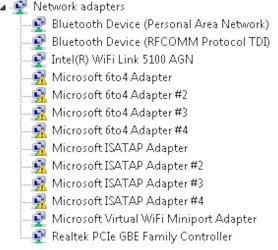
Not sure what the go with it, i was thinking about unistalling some of the network adaptors as some of them are not needed (i think) and maybe reinstalling because of the Code 10. Btw, i just solved some Blue screen Probs, running MSE as Norton Internet Security 2009 Firewall was resulting in one of the Blue screens, Im using latest WD Discovery Software 1.61, Updated All drivers most of them are current im pretty sure. The MyBookWorld device has just had a firmware update 01.01.16.
Is there anyway of figuring out which are out of date? I don't update the Devices through Device Manager or windows Update as i've been told.
Not sure where to go or what do? Im running the external HDD Through an Access Point, where the network is transmitted from. The HDD can be accessed on another laptop on the network wirelessly and by cable. I have tried both with the win& Laptop but not working. Btw, IT WAS WORKING before drivers got updated. Im Hoping the community can help me solve this Prob or at least find whats wrong with the devices. Any help is much appreciated and im sure is gonna be help.
Mike
Not sure what the go with it, i was thinking about unistalling some of the network adaptors as some of them are not needed (i think) and maybe reinstalling because of the Code 10. Btw, i just solved some Blue screen Probs, running MSE as Norton Internet Security 2009 Firewall was resulting in one of the Blue screens, Im using latest WD Discovery Software 1.61, Updated All drivers most of them are current im pretty sure. The MyBookWorld device has just had a firmware update 01.01.16.
Is there anyway of figuring out which are out of date? I don't update the Devices through Device Manager or windows Update as i've been told.
Not sure where to go or what do? Im running the external HDD Through an Access Point, where the network is transmitted from. The HDD can be accessed on another laptop on the network wirelessly and by cable. I have tried both with the win& Laptop but not working. Btw, IT WAS WORKING before drivers got updated. Im Hoping the community can help me solve this Prob or at least find whats wrong with the devices. Any help is much appreciated and im sure is gonna be help.
Mike
My Computer
At a glance
Windows 7 PremIntel Core i7 CPU Q 720 @ 1.60ghz4096MB DDR3 (2 Dimm) 3GB Avail as of 32bit Wi...NVIDIA GeForce GT 230M 1 GB
- Computer Manufacturer/Model Number
- HP Pavillion dv7 Notebook PC
- OS
- Windows 7 Prem
- CPU
- Intel Core i7 CPU Q 720 @ 1.60ghz
- Motherboard
- Intel PM55
- Memory
- 4096MB DDR3 (2 Dimm) 3GB Avail as of 32bit Windows
- Graphics Card(s)
- NVIDIA GeForce GT 230M 1 GB
- Sound Card
- NVIDIA HD Audio
- Monitor(s) Displays
- 17.3 Diagonal HD High-Definition HP BrightView Widescreen
- Hard Drives
- 640GB 7200RPM (Dual HDD - 320GB x 2)


