Packet loss in Win7/vista but not Xp

brokennarrow

New member
Local time
8:45 PM
Messages
3
Hello,

Just curious if anyone has noticed packet loss in Vista/Win7 systems which is not present in WinXp.

I have tested this on both Comcast and Brighthouse residential internet connections. Two different intel i920 based computers, one with onboard Marvell NIC and the other with onboard Realtek 8111C NIC, both with dual boot configuration, and both connecting to the internet via motorola surfboard cable modems and Dlink DGL-4500 or Dir-655 routers. I even added an intel pci express NIC to one of the systems and using the intel (gigabit CT) NIC, the results are the same. I tried doing a safe mode boot with networking and the results are also the same.

Results:
Both computers running under XP experience 0% dropped packets when using ping test easy (Ping Test Easy - Free software downloads and software reviews - CNET Download.com). I ping www.Google.com with default settings (ping rate of 1 ping every 0.6 seconds and time out threshold of 500ms). Even if left to run for hours, there is 0% packet loss, or rarely if left running long enough, a max of 0.2% loss.

Both computers running under Win 7 (64 bit) pinging google with the same parameters will invariably show around 6-8% packet loss. The dropped packets will show up pretty quickly at the default ping rate.

Interestingly though, my brother has a computer with an onboard realtek 8111D NIC running under win7 pro (64 bit) and his system has 0% packet loss when pinging google with the same parameters. He has comcast internet service with a motorola cable/phone modem and a linksys router.

Has anyone else observed this packet loss with Win7/Vista systems? Anyone running Win7 or Vista systems want to do some pinging and report back???

Thanks for any input on these observations.
 

My Computer My Computer

At a glance

Windows 7
OS
Windows 7
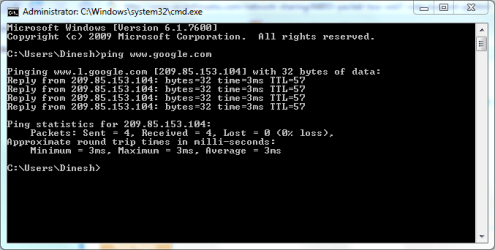
Hi there, Open cmd and type
Code:
ping www.google.com
Check the packets.
 

My Computer My Computer

At a glance

Windows® 8 Pro (64-bit)Intel® Core™ i5 Processor 2467M (1.60GHz, 3MB...6GB DDR3 System Memory at 1,333MHz (on BD 4GB...AMD Radeon™ HD7550M 1GB DDR3 (Ext. Graphic)
Computer Manufacturer/Model Number
Samsung NP530U4B-S02IN
OS
Windows® 8 Pro (64-bit)
CPU
Intel® Core™ i5 Processor 2467M (1.60GHz, 3MB L3 Cache)
Motherboard
Samsung Electronics
Memory
6GB DDR3 System Memory at 1,333MHz (on BD 4GB + 2GB x 1)
Graphics Card(s)
AMD Radeon™ HD7550M 1GB DDR3 (Ext. Graphic)
Sound Card
Realtek High Definition Audio
Monitor(s) Displays
35.56cm (14.0) SuperBright 300nit HD LED Display
Screen Resolution
1366x768
Hard Drives
1TB S-ATA II Hard Drive (5400RPM) with ExpressCache 16GB SSD
Internet Speed
sucks
Antivirus
Microsoft Security Essentials
Browser
Google Chrome (Sync enabled)
Thanks for the quick reply!

OK, I'll try it when I leave work and report back. Just curious- what info will this method of pinging give you?
 

My Computer My Computer

At a glance

Windows 7
OS
Windows 7
It will simply show us if the packets are lost or the ping is successful.

Capture.PNG
 

My Computer My Computer

At a glance

Windows® 8 Pro (64-bit)Intel® Core™ i5 Processor 2467M (1.60GHz, 3MB...6GB DDR3 System Memory at 1,333MHz (on BD 4GB...AMD Radeon™ HD7550M 1GB DDR3 (Ext. Graphic)
Computer Manufacturer/Model Number
Samsung NP530U4B-S02IN
OS
Windows® 8 Pro (64-bit)
CPU
Intel® Core™ i5 Processor 2467M (1.60GHz, 3MB L3 Cache)
Motherboard
Samsung Electronics
Memory
6GB DDR3 System Memory at 1,333MHz (on BD 4GB + 2GB x 1)
Graphics Card(s)
AMD Radeon™ HD7550M 1GB DDR3 (Ext. Graphic)
Sound Card
Realtek High Definition Audio
Monitor(s) Displays
35.56cm (14.0) SuperBright 300nit HD LED Display
Screen Resolution
1366x768
Hard Drives
1TB S-ATA II Hard Drive (5400RPM) with ExpressCache 16GB SSD
Internet Speed
sucks
Antivirus
Microsoft Security Essentials
Browser
Google Chrome (Sync enabled)
Hi Dinesh,

I'm going to be at work for a while, so I had my girlfriend run a few tests on one of the computers with Windows 7.

Using ping tester easy at default settings, there was about a 4% packet loss when pinging google (I had her try a couple of runs of 200 pings).

Under the command prompt, pinging google yielded 0% loss (4 sent, 4 received). But if I had her ping google with a 500ms timeout (duplicating the settings in ping tester), there was about a 2% loss (I had her ping google under the command prompt with a 500ms timeout parameter- several runs of 100 pings each yielded between 1 and 4 packets that were sent but not received). When I had her run a few runs of 100 pings with the default (1 sec) timeout, there was almost always 0% loss (I think one run yielded 1 lost packet out of 100).

I had her try the same tests with a winXp laptop on the same connection, and all the tests mentioned above yielded 0% lost packets.

So is a 500ms time out threshold just too "tight" to be meaningful in real world apps? I discussed this on another forum and the thought was the win7/vista network stack had inherent latency compared to the XP stack, but was of no significant consequence,

However, this doesn't explain why some Win7 systems have no packet loss under the above testing parameters. Are some NIC's (the realtek 8111D for example) just more optimized for win7/vista?

Thanks for your input.
 

My Computer My Computer

At a glance

Windows 7
OS
Windows 7
It looks like the packets in Win7 are lost either due to old network driver not working correctly or due to the firewall.
 

My Computer My Computer

At a glance

Windows® 8 Pro (64-bit)Intel® Core™ i5 Processor 2467M (1.60GHz, 3MB...6GB DDR3 System Memory at 1,333MHz (on BD 4GB...AMD Radeon™ HD7550M 1GB DDR3 (Ext. Graphic)
Computer Manufacturer/Model Number
Samsung NP530U4B-S02IN
OS
Windows® 8 Pro (64-bit)
CPU
Intel® Core™ i5 Processor 2467M (1.60GHz, 3MB L3 Cache)
Motherboard
Samsung Electronics
Memory
6GB DDR3 System Memory at 1,333MHz (on BD 4GB + 2GB x 1)
Graphics Card(s)
AMD Radeon™ HD7550M 1GB DDR3 (Ext. Graphic)
Sound Card
Realtek High Definition Audio
Monitor(s) Displays
35.56cm (14.0) SuperBright 300nit HD LED Display
Screen Resolution
1366x768
Hard Drives
1TB S-ATA II Hard Drive (5400RPM) with ExpressCache 16GB SSD
Internet Speed
sucks
Antivirus
Microsoft Security Essentials
Browser
Google Chrome (Sync enabled)
Suggest you check with the manufacturer of your network card for the very latest driver for your operating system.

If after install of very latest driver the problem still exists, the use MSCONFIG then disable absolutely all programs which you don't really need to start at start time from running at startup time.
 

My Computer My Computer

At a glance

MS Windows 7 Ultimate SP1 64-bitAMD A10-4600M6.00 GB Dual-Channel DDR3 @ 798MHz (11-11-12-28)AMD Radeon HD 7660G
Computer Manufacturer/Model Number
Toshiba Satellite S875D-S7239 laptop
OS
MS Windows 7 Ultimate SP1 64-bit
CPU
AMD A10-4600M
Motherboard
AMD Pumori (Socket FT1)
Memory
6.00 GB Dual-Channel DDR3 @ 798MHz (11-11-12-28)
Graphics Card(s)
AMD Radeon HD 7660G
Sound Card
High Definition Audio Device
Monitor(s) Displays
Generic PnP Monitor (1600x900@60Hz)
Screen Resolution
1600x900@60Hz
Hard Drives
SSD 119GB Corsair CSSD-V128GB2 ATA Device
Keyboard
Standard PS/2 Keyboard
Mouse
HP Wireless Optical Mobile Mouse Model FHA-3410
Internet Speed
What the local pub, local coffee shop offers.
Other Info
Optical Drive:MATSHITA BD-CMB UJ160B ATA Device


Also have an Asus ha1002xp netbook with Win 7 Ultimate installed.
Back
Top