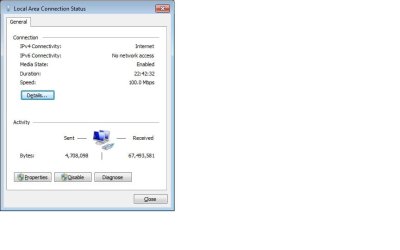
I cant see any of my computers on my LAN. I have tried to use dhcp and static ip's. also have tried unchecking the ipv6 box. no matter what i try still seeing the no network access. any ideas anyone?
Actually the reason it says that is because IPv6 only works on the the LAN not the WAN. It's made that way by design IMO which is why it says "No Internet Access".
You definately do not want to use Homegroups if there are any Op systems in your network other than Windows 7. It will only cause problems for you such as you are seeing now.
There are zero good reasons to disable IPv6 or Homegroups in my opinion. Homegroups are only made to work with Windows 7 machines so you need to remove the Win 7 machine from the Homegroup and then create a Workgroup with the Win 7 machine. After that you will want to join the
new Workgroup from the other XP machines,.

If you are still having problems getting those machines to see each other follow the post linked too below, use the tutorials as a guide for setting up your mixed network. After following the guides, if those machines still do not see each other then do the registry fix which I outlined in the post below.
http://www.sevenforums.com/network-sharing/62116-networking-7-xp-issue.html
After setting that up correctly if IPv6 isn't working right do this in the registry on the Win 7 machine. This is sometimes required after mistakingly disabling IPv6. Although you won't need IPv6 if you are only using Workgroups.
[HKEY_LOCAL_MACHINE\SYSTEM\CurrentControlSet\Services\Tcpip6\Parameters]
HKEY_LOCAL_MACHINE
\SYSTEM
\CurrentControlSet
\Services
\Tcpip6
\Parameters
3. In the right pane, right-click on “
DisabledComponents” and select modify. In the value data field, type
“0″ (without quotations) and press OK.