| Windows 7: Network occasionally fails to be activated on bootup |
08 Mar 2010
|
#1 | | |
Network occasionally fails to be activated on bootup I have a standalone HP Windows 7 computer with internet access provided through an external cable modem via an ethernet connection.
On just a few occasions since getting the computer last month, it has failed to activate the internet connection during the bootup process. The network icon in the bottom right corner continues to show the blue circle indicating "busy" and, in that circumstance, I can't launch the browser. I have to restart the computer and invariably it boots up OK the second time.
In case this is relevant, I should mention that, as the last stage in a successful bootup, a window pops up in the bottom right corner confirming the status of the HP Wireless Assistant (either on or disabled). I obviously don't use a wireless connection but I currently have the wireless button set to "enabled"; however I have also experimented with having it set to "disabled" and the same problem has occurred with that setting, so I don't think this is particularly significant.
When the bootup fails to activate the network, the HP Wireless Assistant popup window does not appear at all. It's as if something happens (or fails to happen) that prevents this last step from being completed.
This seemingly random failure to activate the network connection is obviously irritating and puzzling. Can anyone suggest the cause and what action I should take to avoid this problem? | My System Specs |
| System Manufacturer/Model Number HP Pavilion DV7-2215SA OS Windows 7 Memory 4GB Hard Drives Internal 500GB
External LaCie 160GB |
08 Mar 2010
|
#2 | | W 7 64-bit Ultimate The Lowcountry |
Hello BruceUK, welcome to Seven Forums!
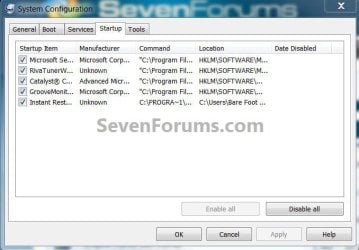
Type "msconfig" without the quotes into the start menu / search box to open the config utility, under the "startup" tab see if you can identify any entry matching "HP Wireless Assistant" and see if disabling it at startup will sort the issue.
Be sure to post back with the outcome. | My System Specs | | System Manufacturer/Model Number * BFK Customs * OS W 7 64-bit Ultimate CPU Intel Q9550 Yorkfield Motherboard ASUS P5Q Pro Memory 8GB Dominator 8500C5D Graphics Card ATI : XFX 5870 Sound Card Realtek HD Audio 7-1 Monitor(s) Displays 1x 47" LCD HDMI & 3x 26" LCD HDMI Screen Resolution 1920x1080P & 1920x1200 Keyboard Microsoft 500 Mouse Razer Diamondback 3G PSU Corsair 620HX Case Cooler Master RC-690 Cooling Tuniq Tower 120, 2x 140mm and 3x 120mm case fans Hard Drives 1x 80GB Intel X25-M G2 SSD : 1x 500GB & 1x 640GB WD Caviar Black(s) Internet Speed 14 Mb/s Other Info 1x Koutech 3Gb/s SATA HDD Hot Swap Rack |
08 Mar 2010
|
#3 | | |

Quote: Originally Posted by Bare Foot Kid Hello BruceUK, welcome to Seven Forums!
Type "msconfig" without the quotes into the start menu / search box to open the config utility, under the "startup" tab see if you can identify any entry matching "HP Wireless Assistant" and see if disabling it at startup will sort the issue.
Be sure to post back with the outcome. Attachment 59482 Hiya,
Thanks very much for your response. Yes there was an entry in the Startup list for the HP Wireless Assistant, which I have now disabled. The executable concerned is HPWAMain.exe. I restarted the computer, it booted up OK and all seems well. Of course I won't really know whether this has solved the problem until I've used the computer for at least a week or two without the problem recurring - but at least the change doesn't appear to have done any harm, so fingers crossed!
Thanks again for your help. | My System Specs | | System Manufacturer/Model Number HP Pavilion DV7-2215SA OS Windows 7 Memory 4GB Hard Drives Internal 500GB
External LaCie 160GB |
08 Mar 2010
|
#4 | | W 7 64-bit Ultimate The Lowcountry |
I'm glad it may solve the issue, please remember to post back with the final outcome. | My System Specs | | System Manufacturer/Model Number * BFK Customs * OS W 7 64-bit Ultimate CPU Intel Q9550 Yorkfield Motherboard ASUS P5Q Pro Memory 8GB Dominator 8500C5D Graphics Card ATI : XFX 5870 Sound Card Realtek HD Audio 7-1 Monitor(s) Displays 1x 47" LCD HDMI & 3x 26" LCD HDMI Screen Resolution 1920x1080P & 1920x1200 Keyboard Microsoft 500 Mouse Razer Diamondback 3G PSU Corsair 620HX Case Cooler Master RC-690 Cooling Tuniq Tower 120, 2x 140mm and 3x 120mm case fans Hard Drives 1x 80GB Intel X25-M G2 SSD : 1x 500GB & 1x 640GB WD Caviar Black(s) Internet Speed 14 Mb/s Other Info 1x Koutech 3Gb/s SATA HDD Hot Swap Rack |
08 Mar 2010
|
#5 | | |
If that does not seem to fix the issue, please check your "system" event log for further details. | My System Specs | | |
08 Mar 2010
|
#6 | | Windows 7 x64 Ultimate A Finnish immigrant in Leipzig, Germany |
Bruce, HP wireless Assistant is, together with HP QuickLaunch Buttons, maybe the most unnecessary of all the HP apps. I have two dv7 series laptops and have never used nor installed them. BFK's advice was perfect, I would take it a step further and uninstall HPWA completely. Wireless on HP laptops works perfectly well without this app.
You know of course that in dv7, turning off the wireless also turns Bluetooth off? You mentioned you use ethernet connection, so if you don't want to connect any Bluetooth devices (mobile phones etc.) to your laptop, you can turn WiFi / Bluetooth off by pressing the WiFi button and keep off until you need WiFi / Bluetooth connection.
Kari | My System Specs | | Computer type Laptop System Manufacturer/Model Number HP ENVY 17-1150eg OS Windows 7 x64 Ultimate CPU 1.6 GHz Intel Core i7-720QM Processor Memory 6 GB Graphics Card ATI Mobility Radeon HD 5850 Graphics Sound Card Beats sound system with integrated subwoofer Monitor(s) Displays 17" laptop display, 22" LCD and 32" Full HD TV through HDMI Screen Resolution 1600*900, 1680*1050 and 1920*1080 Keyboard Logitech diNovo Media Desktop Laser (bluetooth) Mouse Logitech MX1000 Laser (Bluetooth) Hard Drives Internal: 2 x 500 GB SATA Hard Disk Drive 7200 rpm
External: 2TB for backups, 3TB USB3 network drive for media Internet Speed 50/10 Mbps VDSL Antivirus MSE, Windows Defender Browser Maxthon 3.5.2. Other Info Windows 7 Ultimate Retail Full in English, additional Guest-user accounts in Finnish, German and Swedish (Working languages English & Swedish, Family language German, my own language, mother tongue, Finnish. I really need Ultimate to get to use Language Packs!) |
08 Mar 2010
|
#7 | | W 7 64-bit Ultimate The Lowcountry |
Thanks Kari! | My System Specs | | System Manufacturer/Model Number * BFK Customs * OS W 7 64-bit Ultimate CPU Intel Q9550 Yorkfield Motherboard ASUS P5Q Pro Memory 8GB Dominator 8500C5D Graphics Card ATI : XFX 5870 Sound Card Realtek HD Audio 7-1 Monitor(s) Displays 1x 47" LCD HDMI & 3x 26" LCD HDMI Screen Resolution 1920x1080P & 1920x1200 Keyboard Microsoft 500 Mouse Razer Diamondback 3G PSU Corsair 620HX Case Cooler Master RC-690 Cooling Tuniq Tower 120, 2x 140mm and 3x 120mm case fans Hard Drives 1x 80GB Intel X25-M G2 SSD : 1x 500GB & 1x 640GB WD Caviar Black(s) Internet Speed 14 Mb/s Other Info 1x Koutech 3Gb/s SATA HDD Hot Swap Rack |
09 Mar 2010
|
#8 | | |

Quote: Originally Posted by Kari Bruce, HP wireless Assistant is, together with HP QuickLaunch Buttons, maybe the most unnecessary of all the HP apps. I have two dv7 series laptops and have never used nor installed them. BFK's advice was perfect, I would take it a step further and uninstall HPWA completely. Wireless on HP laptops works perfectly well without this app.
You know of course that in dv7, turning off the wireless also turns Bluetooth off? You mentioned you use ethernet connection, so if you don't want to connect any Bluetooth devices (mobile phones etc.) to your laptop, you can turn WiFi / Bluetooth off by pressing the WiFi button and keep off until you need WiFi / Bluetooth connection. Thanks Kari. I may well take your advice eventually about uninstalling the Wireless Assistant - however, for now, I think I'll leave things as they are for a week or two and see whether disabling it in the startup menu has solved the problem. It may be useful for others to know whether this step on its own is sufficient to resolve it. | My System Specs | | System Manufacturer/Model Number HP Pavilion DV7-2215SA OS Windows 7 Memory 4GB Hard Drives Internal 500GB
External LaCie 160GB |
09 Mar 2010
|
#9 | | W 7 64-bit Ultimate The Lowcountry |
Hello again BruceUK.
Yes please do come back to let us know how it sorts out. | My System Specs | | System Manufacturer/Model Number * BFK Customs * OS W 7 64-bit Ultimate CPU Intel Q9550 Yorkfield Motherboard ASUS P5Q Pro Memory 8GB Dominator 8500C5D Graphics Card ATI : XFX 5870 Sound Card Realtek HD Audio 7-1 Monitor(s) Displays 1x 47" LCD HDMI & 3x 26" LCD HDMI Screen Resolution 1920x1080P & 1920x1200 Keyboard Microsoft 500 Mouse Razer Diamondback 3G PSU Corsair 620HX Case Cooler Master RC-690 Cooling Tuniq Tower 120, 2x 140mm and 3x 120mm case fans Hard Drives 1x 80GB Intel X25-M G2 SSD : 1x 500GB & 1x 640GB WD Caviar Black(s) Internet Speed 14 Mb/s Other Info 1x Koutech 3Gb/s SATA HDD Hot Swap Rack |
10 Mar 2010
|
#10 | | |

Quote: Originally Posted by Bare Foot Kid Hello again BruceUK.
Yes please do come back to let us know how it sorts out. Will do. The problem hasn't occurred again so far since making the change. | My System Specs | | System Manufacturer/Model Number HP Pavilion DV7-2215SA OS Windows 7 Memory 4GB Hard Drives Internal 500GB
External LaCie 160GB Network occasionally fails to be activated on bootup problems? All times are GMT -5. The time now is 08:52 PM. | |