

Hi all
Networking seems to be a real pain to get to work 100% ALL the time with W7.
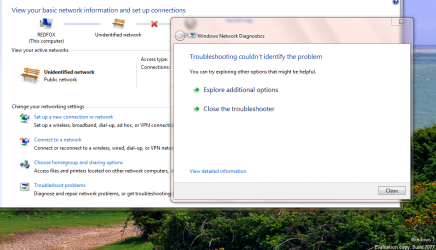
Latest build (7077 x-64) fixes the problem in Network Discovery where Computers on the network are randomly visible - but now I've got that wretched problem again (which was fixed in an earlier release) that my LAN card only has limited connectivity again even though windows reports device as working 100% correctly.
So One step forward and One step backwards ("Doing the Lambeth Walk").
Wireless etc still OK and USB==>LAN adapter (which is what I'm using now) is OK.
C'mon microsoft please FIX Networking issues -- this card works in XP and VISTA (although VISTA drivers won't work in W7.) Card is Via velocity family gigabit ethernet card.
Diagnostics can't find any error either.
What's also bad is that the adapter sort of goes into a loop if you try and do anything like IPCONFIG and you have to Force shutdown.
Cheers
jimbo
Networking seems to be a real pain to get to work 100% ALL the time with W7.
Latest build (7077 x-64) fixes the problem in Network Discovery where Computers on the network are randomly visible - but now I've got that wretched problem again (which was fixed in an earlier release) that my LAN card only has limited connectivity again even though windows reports device as working 100% correctly.
So One step forward and One step backwards ("Doing the Lambeth Walk").
Wireless etc still OK and USB==>LAN adapter (which is what I'm using now) is OK.
C'mon microsoft please FIX Networking issues -- this card works in XP and VISTA (although VISTA drivers won't work in W7.) Card is Via velocity family gigabit ethernet card.
Diagnostics can't find any error either.
What's also bad is that the adapter sort of goes into a loop if you try and do anything like IPCONFIG and you have to Force shutdown.
Cheers
jimbo
Attachments
My Computer
At a glance
Linux CENTOS 7 / various Windows OS'es and se...Intel i7 Intel i58GB, 16GBOn Motherboard
- Computer type
- PC/Desktop
- Computer Manufacturer/Model Number
- Custom built, several laptops HP/ASUS
- OS
- Linux CENTOS 7 / various Windows OS'es and servers
- CPU
- Intel i7 Intel i5
- Memory
- 8GB, 16GB
- Graphics Card(s)
- On Motherboard
- Sound Card
- Realtek HD audio
- Monitor(s) Displays
- Apple Cinema display, Samsung LCD
- Screen Resolution
- 1920 X 1080
- Hard Drives
- 4 X 1TB SATA
- Mouse
- Toshiba wireless laser
- Internet Speed
- > 20MB up


