Windows 7 Forums


Windows 7: Anyone know why I get this FTP error?

19 Apr 2009   #1

Vista Ultimate x64, Windows 7 RC 7100
Raleigh, NC
 
 
Anyone know why I get this FTP error?

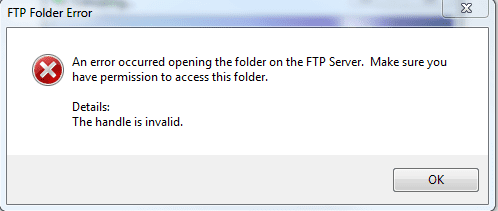
I'm trying to upload files to my FTP server and Windows 7 is complaining about it. I just click the library icon on the taskbar and enter the ftp://xxxx url and can browse it find, but I can't upload to it.


Here's the error I get when I try to upload something.
Attached Thumbnails
Anyone know why I get this FTP error?-capture.png  
My System SpecsSystem Spec

19 Apr 2009   #2

Windows 7 Ultimate x64 SP1
Somewhere on the 3rd rock from the sun.


Try rebooting your computer first - then see if you can open a CMD window (Start --> Run --> "cmd") and and ping your FTP server if it does not work after reboot....
My System SpecsSystem Spec
19 Apr 2009   #3

Vista Ultimate x64, Windows 7 RC 7100
Raleigh, NC


I'll try that. But I can access it as in login to it and browse and download files, it's just uploading that doesn't work. I tested Filezilla and that works perfect, but that's to much to do to upload to my server.
My System SpecsSystem Spec
.


19 Apr 2009   #4

Windows 7 Ultimate x64 SP1
Somewhere on the 3rd rock from the sun.


too much to do?

I us FileZilla all the time - it is dead simple.

However, I think that with Fx you might need to include your user name and PW in the URL, something like
Code:
ftp://username:password@xxxx
IIRC for it to work....
My System SpecsSystem Spec
19 Apr 2009   #5

Vista Ultimate x64, Windows 7 RC 7100
Raleigh, NC


I open Filezilla, and it takes for freaken ever to come up. My CPU jumps to ~30% as well with it. Still don't know why. I might just ditch this and wait til the RC comes out. -_-
My System SpecsSystem Spec
19 Apr 2009   #6

Windows 7 Ultimate Build 7100 RC x86/Windows XP SP3 x86 (Dual Boot)


Quote   Quote: Originally Posted by Bryce View Post
I'll try that. But I can access it as in login to it and browse and download files, it's just uploading that doesn't work. I tested Filezilla and that works perfect, but that's to much to do to upload to my server.

If Filezilla is too much to do then your doing it wrong.I use it on a daily basis and have to click maybe 2 times to upload something.
My System SpecsSystem Spec
19 Apr 2009   #7

Windows 7 Ultimate x64 SP1
Somewhere on the 3rd rock from the sun.


Maka, read his next reply - it is having to do with CPU usage and such.

@Bryce - I suggest that you get a newer version of FZ, or, if you're using a new alpha / beta release, downgrade to the last stable version....
However, did you try the user name:PW method I mentioned above? I think that is Fx specific, IIRC....
My System SpecsSystem Spec
19 Apr 2009   #8

Vista Ultimate x64, Windows 7 RC 7100
Raleigh, NC


I tried the user: pass method, still gives that error. And, yes I've got the latest stable version of Filezilla.

I think I was just to used to 3.8ghz it all seems slow now lols.
My System SpecsSystem Spec
19 Apr 2009   #9

Windows 7 Ultimate Build 7100 RC x86/Windows XP SP3 x86 (Dual Boot)


Quote   Quote: Originally Posted by johngalt View Post
Maka, read his next reply - it is having to do with CPU usage and such.

@Bryce - I suggest that you get a newer version of FZ, or, if you're using a new alpha / beta release, downgrade to the last stable version....
However, did you try the user name:PW method I mentioned above? I think that is Fx specific, IIRC....

Yeah we kinda posted at the same time i think.I've been checking Filezilla though and it doesn't eat up many resources at all and i'm using 3.2.4 RC1.
My System SpecsSystem Spec
19 Apr 2009   #10

Windows 7 Ultimate x64 SP1
Somewhere on the 3rd rock from the sun.


you're also on a newer build of 7 than he is....that could be the mitigating factor since he is not OCing, thus having specs similar to yours.

(His specs say he is OC'd to 3.8, but in reality he currently is not since he had to perform a BIOS upgrade and it reset his settings to default....all this was covered in another thread).
My System SpecsSystem Spec
Reply

 Anyone know why I get this FTP error? problems?


Thread Tools


Similar help and support threads for: Anyone know why I get this FTP error?
Thread Forum
Solved Error: Runtime Error! R6002 - Floating point support not loaded?? BSOD Help and Support
Microsoft Visual C++ Runtime Library error, error message 00289x01849 General Discussion
Solved Error 1935 error occured installation of assembly Microsoft VC90.ATL Windows Updates & Activation
BSOD. error Custom built computer. error unknown between 0 or 1077... BSOD Help and Support
Error Code 0x8007042c, Error 1068 and (-5001 : 0x80070002) after insta Windows Updates & Activation


All times are GMT -5. The time now is 01:10 PM.


Seven Forums Android App Seven Forums IOS App Follow us on Facebook

Windows 7 Forums is an independent web site and has not been authorized,
sponsored, or otherwise approved by Microsoft Corporation.
"Windows 7" and related materials are trademarks of Microsoft Corp.
© Designer Media Ltd
  

1 2 3 4 5 6 7 8 9 10 11 12 13 14 15 16 17 18 19 20 21 22 23 24 25 26 27 28 29 30 31 32