Windows 7 Forums Search
Welcome to Windows 7 Forums. Our forum is dedicated to helping you find solutions with any problems, errors or issues you are experiencing with Windows 7. The Windows 7 forum also covers news and updates and has an extensive Windows 7 tutorial section that covers a wide range of tips and tricks.


Windows 7 - Home Premium - Unidentified Network

 
04-04-2010   #1


Windows 7


Home Premium - Unidentified Network

I have 4 computers on the home network running Windows 7 Home Premium BUT one of them cannot connect to the network via the LAN connection. I get the error message Unidentified Network. It can connect wirelessly. There is an excellent tutorial on this subject but this doesn't work for me. I have also - as suggested in one post - tried changing the Network Address to a random number - this doesn't work either.

This computer was up-graded from Vista - When running Vista the LAN connection worked fine. I have now done a clean install - the LAN connection still gives me - "Unidentified Network"...... The same problem

Please has anyone any ideas as this is driving me mad

Thanks Richard

My System SpecsSystem Spec
04-04-2010   #2


WCP ONLY


Quote   Quote: Originally Posted by Richardxxx View Post
I have 4 computers on the home network running Windows 7 Home Premium BUT one of them cannot connect to the network via the LAN connection. I get the error message Unidentified Network. It can connect wirelessly. There is an excellent tutorial on this subject but this doesn't work for me. I have also - as suggested in one post - tried changing the Network Address to a random number - this doesn't work either.

This computer was up-graded from Vista - When running Vista the LAN connection worked fine. I have now done a clean install - the LAN connection still gives me - "Unidentified Network"...... The same problem

Please has anyone any ideas as this is driving me mad

Thanks Richard
Upload a screenshot of the ipconfig /all output. You can use the built in snipping tool by typing snipping in search.


let us know if you need help

Ken
My System SpecsSystem Spec
04-04-2010   #3


Windows 7


Quote   Quote: Originally Posted by zigzag3143 View Post
Quote   Quote: Originally Posted by Richardxxx View Post
I have 4 computers on the home network running Windows 7 Home Premium BUT one of them cannot connect to the network via the LAN connection. I get the error message Unidentified Network. It can connect wirelessly. There is an excellent tutorial on this subject but this doesn't work for me. I have also - as suggested in one post - tried changing the Network Address to a random number - this doesn't work either.

This computer was up-graded from Vista - When running Vista the LAN connection worked fine. I have now done a clean install - the LAN connection still gives me - "Unidentified Network"...... The same problem

Please has anyone any ideas as this is driving me mad

Thanks Richard
Upload a screenshot of the ipconfig /all output. You can use the built in snipping tool by typing snipping in search.


let us know if you need help

Ken
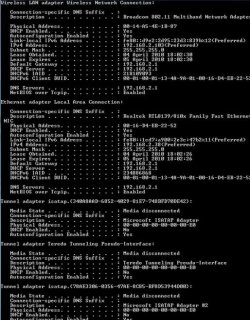
Thank you I hope I have done the right thing here and this is what you wanted.

Regards

Richard
Attached Thumbnails
Home Premium - Unidentified Network-ipconfig-output_resize.jpg  
My System SpecsSystem Spec
.


04-05-2010   #4


Windows 7 Home Premium x64


Hi Richard

This sounds similar to an issue I had. I had this Unidentified Network appearing on Startup and it prevented Internet Access for my PC on the Home Network until I got rid of it.

It took a while to find, but my issue was down to Apple's Bonjour Service, installed by Apple programs such as iTunes or Quicktime.

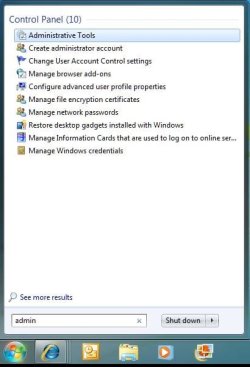
You should type admin into Windows 7's Start Menu "Search programs and files" box. You should see Administrative Tools highlighted somewhere near the top. Double click it:
Home Premium - Unidentified Network-clipboard01.jpg

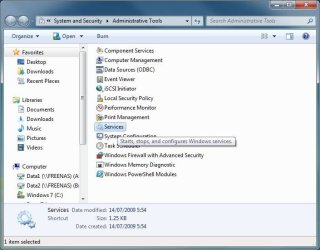
Double click on Services to open the Services list:
Home Premium - Unidentified Network-clipboard02.jpg

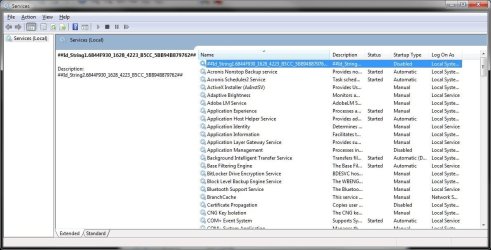
You're looking for a Service called Bonjour. If you can't find it under that name it is likely to be the unidentified ID_String service as in my screenshot near the top of the list:
Home Premium - Unidentified Network-clipboard03.jpg

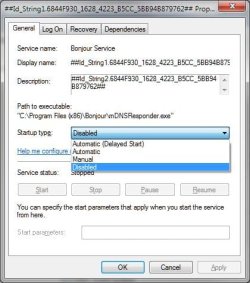
Double click the entry to open the box. On the General tab select the drop down arrow and set the Service to Disabled. If you later find you need the Service running for a program (I didn't) you can set the Automatic (Delayed Start) option instead, as that is also supposed to work.
Home Premium - Unidentified Network-clipboard04.jpg

Apply and OK out of the box and then reboot your PC to see if it solves the problem. You'll know it's the right service as the Path to executable line should read "C:\Program Files (x86)\Bonjour\mDNSResponder.exe" or "C:\Program Files\Bonjour\mDNSResponder.exe" if you're using Windows 7 32bit version.
Home Premium - Unidentified Network-clipboard05.jpg

Hope this helps
My System SpecsSystem Spec
04-05-2010   #5


Windows 7


Thank you Chris - How I wish this was the problem but it isn't! However I have carried out your instructions and the Bonjour service is no longer running - But I still have the same problem - I can connect using a Wireless adaptor but the LAN line connection gives me the error message "Unidentifiable Network"

I have tried plugging in another computer to the LAN line that is used for this computer and it connects OK. I did wonder if perhaps there was a physical problem with the cable!

If anyone has any ideas I would be most grateful.

Thank you again Chris - I wish it had worked

Richard
My System SpecsSystem Spec
04-05-2010   #6


Windows 7 Home Premium x64


Richard....sorry that didn't work.

I did find this on a Google search - Might help you: The Geeks' Den: Unidentified Network Windows 7 - Solved!
My System SpecsSystem Spec
Reply

 Home Premium - Unidentified Network problems?


Thread Tools


Similar Threads for: Home Premium - Unidentified Network
Thread Forum
Solved Work Network Possible on Win7 Home Premium 64bit Network & Sharing
Solved Unidentified Network (No Internet Access) Windows 7 Home Premium Network & Sharing
HELP!! W7 Home Premium and intel network adapter Drivers
Home vs Unidentified Network - but connects OK Network & Sharing
Home Premium Repeated Loss of Network Network & Sharing


All times are GMT -5. The time now is 06:50 PM.


Windows 7 Forums is an independent web site and has not been authorized,
sponsored, or otherwise approved by Microsoft Corporation.
"Windows 7" and related materials are trademarks of Microsoft Corp.
© Designer Media Ltd
  

1 2 3 4 5 6 7 8 9 10 11 12 13 14 15 16 17 18 19 20 21 22 23 24 25 26 27 28 29 30