
Say I wanted to share my internet...

Floopik

New member
Local time
4:51 PM
Messages
3
...wirelessly.

Shortly I am going to be visiting Jamaica and would like to provide internet access to everyone in my family, across 2 hotel rooms. 2 people are staying in each room, and we all have our own laptops.

However, the internet connection we will pay for is wireless, and only one computer can get access to it. (It's some stupid system that has nothing to do with passwords, I don't remember the details).

I know that you can only use your wireless card in your laptop to either send or receive a wireless signal, i.e. getting internet or distributing it. This is why I'm thinking I could receive the wireless on one computer, share the internet over an ethernet cable to another computer which then sends the wireless signal out to the other room, giving everybody internet.

How I'm thinking is illustrated here:
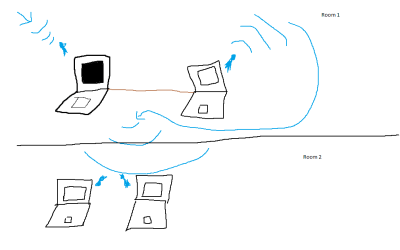
sharing.png

My question is: Will this even work?? I'm leaving in 2 days so I need input! If not I'm just going to wing it! Thanks.
 

My Computer My Computer

At a glance

Windows 7 build 7600 x64
OS
Windows 7 build 7600 x64

My Computer My Computer

At a glance

W7 Ult. x64 | OS XIntel Mobile Core 2 Duo 2.93Ghz [T9800 Penryn]4096MB Samsung DDR3 Dual Channel [PC3-8500F 1...NVIDIA GeForce 9600M GT 512MB [G96M Rev. C1]
Computer Manufacturer/Model Number
Apple Macbook Pro (April 2009)
OS
W7 Ult. x64 | OS X
CPU
Intel Mobile Core 2 Duo 2.93Ghz [T9800 Penryn]
Motherboard
NVIDIA nForce 730i Rev. B1 [Mac-F2268EC8 (U2E1)]
Memory
4096MB Samsung DDR3 Dual Channel [PC3-8500F 1066Mhz]
Graphics Card(s)
NVIDIA GeForce 9600M GT 512MB [G96M Rev. C1]
Sound Card
SB X-Fi Surround 5.1 USB | Onboard Realtek (Disabled)
Monitor(s) Displays
Acer x223wbd 22" | Apple Anti-Glare 17" (Disabled)
Screen Resolution
{Current} 1440x900 {Acer} 1680x1050 {Apple} 1920x1200
Hard Drives
{Internal}
Seagate Momentus 320GB 2.5" 7200RPM [ST9320421AS]

{Externals}
LaCie 320GB USB 2.0 HDD [301284UR]
LaCie 750GB USB 2.0 FW400 eSATA HDD [301314U]
LaCie 1TB USB 2.0 HDD [301304UR]
PSU
Magsafe
Case
Aluminum/Unibody (MBP52)
Cooling
2 x 6000 RPM Fans
Keyboard
Logitech G-15v2 [PN 920-000379]
Mouse
Logitech G-9 [PN 910-000338]
Internet Speed
12Mbps/2.5Mbps w/ 24Mbps Speed Boost [Comcast]
Other Info
Logitech X-540 Speakers [PN 970223-0122]
Sennheiser PC-151 Headset
Haha, already went the Connectify route. Turns out my old-ass laptop's wireless card isn't on the list of supported cards.

Any way I can accomplish this the way I laid out?
 

My Computer My Computer

At a glance

Windows 7 build 7600 x64
OS
Windows 7 build 7600 x64

My Computer My Computer

At a glance

W7 Ult. x64 | OS XIntel Mobile Core 2 Duo 2.93Ghz [T9800 Penryn]4096MB Samsung DDR3 Dual Channel [PC3-8500F 1...NVIDIA GeForce 9600M GT 512MB [G96M Rev. C1]
Computer Manufacturer/Model Number
Apple Macbook Pro (April 2009)
OS
W7 Ult. x64 | OS X
CPU
Intel Mobile Core 2 Duo 2.93Ghz [T9800 Penryn]
Motherboard
NVIDIA nForce 730i Rev. B1 [Mac-F2268EC8 (U2E1)]
Memory
4096MB Samsung DDR3 Dual Channel [PC3-8500F 1066Mhz]
Graphics Card(s)
NVIDIA GeForce 9600M GT 512MB [G96M Rev. C1]
Sound Card
SB X-Fi Surround 5.1 USB | Onboard Realtek (Disabled)
Monitor(s) Displays
Acer x223wbd 22" | Apple Anti-Glare 17" (Disabled)
Screen Resolution
{Current} 1440x900 {Acer} 1680x1050 {Apple} 1920x1200
Hard Drives
{Internal}
Seagate Momentus 320GB 2.5" 7200RPM [ST9320421AS]

{Externals}
LaCie 320GB USB 2.0 HDD [301284UR]
LaCie 750GB USB 2.0 FW400 eSATA HDD [301314U]
LaCie 1TB USB 2.0 HDD [301304UR]
PSU
Magsafe
Case
Aluminum/Unibody (MBP52)
Cooling
2 x 6000 RPM Fans
Keyboard
Logitech G-15v2 [PN 920-000379]
Mouse
Logitech G-9 [PN 910-000338]
Internet Speed
12Mbps/2.5Mbps w/ 24Mbps Speed Boost [Comcast]
Other Info
Logitech X-540 Speakers [PN 970223-0122]
Sennheiser PC-151 Headset
I am having monumental problems accomplishing this.

I set up a computer with wired internet in and ad-hoc sharing out just to test it. I set up ICS on the wireless connection (though I tested it on the wired connection as well and no dice), and connected to the ad-hoc network on the wireless connection that I created.

The computers I have tried to connect with have connected to the network after a while of displaying "Acquiring network address", but I get no internet on any of the computers I've tried. Is there some crucial step I'm missing in all of this? Here's what I did:

Wired connection in -> Wireless ICS enabled -> Ad-hoc network created -> Other computers connect to the network -> No internet!

Please help.
 

My Computer My Computer

At a glance

Windows 7 build 7600 x64
OS
Windows 7 build 7600 x64
Back
Top