
Windows 7 Forums


Windows 7: LAN does not have a valid IP configuration

04 May 2010   #1

Windows 7 Ultimate x64 SP1
Coimbatore/India Doha/Qatar
 
 
Solved - LAN does not have a valid IP configuration

I am not able to connect to the internet using my Windows 7 computer.

It is connected to internet via LAN. So, the router is not directly connected to this PC. The owner of my router is my neighbor.

Internet works for him very well using the same connection. Only my LAN connectivity does not work.


Here is the IPCONFIG info. Any one help me, what can i do to resolve this issue for my client PC.
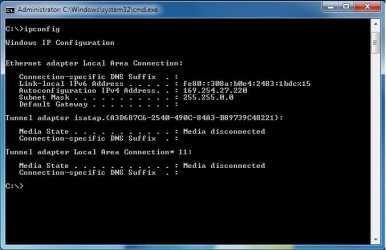
LAN does not have a valid IP configuration-untitled.jpg

Last edited by Venths; 10 May 2010 at 06:43 AM.. Reason: Solved
My System SpecsSystem Spec

04 May 2010   #2

Windows 7 Professional x64
Rednecksville


Did you blank out the default gateway, or is it blank already?

Can you connect to the network at all?
My System SpecsSystem Spec
04 May 2010   #3

Windows 7 Ult, Windows 8 Pro,
San Diego


Quote   Quote: Originally Posted by Venths View Post
I am not able to connect to the internet using my Windows 7 computer.

It is connected to internet via LAN. So, the router is not directly connected to this PC. The owner of my router is my neighbor.

Internet works for him very well using the same connection. Only my LAN connectivity does not work.

Here is the IPCONFIG info. Any one help me, what can i do to resolve this issue for my client PC.

Attachment 70980
You have no default gateway showing in your ipconfig so file sharing can't work the way you have it. I'm not sure why you aren't picking up your neighbors default gateway.

You can find out and then type in which ever default gateway your neighbor is using but you will need a special program in order to share your wireless connection with your other machines.

If you are trying to share the wireless connection from your neighbor through your machine there is a free program for that called connectify.
Connectify - Turn your Windows 7 laptop into a Wi-Fi Hotspot
My System SpecsSystem Spec
.


04 May 2010   #4

Windows 7 Ultimate x64 SP1
Coimbatore/India Doha/Qatar


Its not Wireless. Its Wired LAN. I didnt not remove the gateway

and the Gateway and IP are automatic. Why would i need to assign?

It was working so far with the same settings.
My System SpecsSystem Spec
04 May 2010   #5

Windows 7 Ultimate x64 SP1
Coimbatore/India Doha/Qatar


* I have reset the Winsock
* Tried disabling Ipv6
* Even system restore
* Unplugged and re-connected the LAN cable in both ends.

None of the above worked. Do I have to upgrade Windows installation? or re-install?

Additional Info:

I connected the same LAN cable to my Laptop and the internet worked fine.

Last edited by Venths; 04 May 2010 at 09:50 AM.. Reason: Additional Info
My System SpecsSystem Spec
04 May 2010   #6

Windows 7 Ult, Windows 8 Pro,
San Diego


Quote   Quote: Originally Posted by Venths View Post
* I have reset the Winsock
* Tried disabling Ipv6
* Even system restore
* Unplugged and re-connected the LAN cable in both ends.

None of the above worked. Do I have to upgrade Windows installation? or re-install?
Sorry I just assumed because you were borrowing his connection that you didn't have an eithernet cable running from his house to your own.

I also assumed that when you said this> It is connected to internet via LAN. So, the router is not directly connected to this PC. The owner of my router is my neighbor.

Usually when someone is borrowing a connection from their neighbor it's wireless. I'm not sure how you can pick up the connection if you aren't connected to his router?

In any event if you are using a cable you can just have him reset the router per manufacture instructions for his router and you should be able to pick up the default gateway.
My System SpecsSystem Spec
04 May 2010   #7

Windows 7 Ultimate x64 SP1
Coimbatore/India Doha/Qatar


# Oops am sorry I wasn't clear. Yeah.. I connect to the router via Cable.

# Am the only admin for this connection even if he is owning. How will I reset the router in his Laptop? And it works for him and another computer. Should I really reset the router?

# Guess its a very old router. Hard to get the manual. Any alternative solution? like re-install or upgrade my Windows copy?
My System SpecsSystem Spec
04 May 2010   #8

windows 7 32 and 64 home premium/ultimate
Wirral, UK


This could be a faulty cable - have you tried another and of the correct type. If it's a cross over type and the router is old then it may not be able to auto 'adapt' for this and a standard wired cable will be needed....
My System SpecsSystem Spec
04 May 2010   #9

Windows 7 Ultimate x64 SP1
Coimbatore/India Doha/Qatar


@ Hobbit,

The same cable and connection works with my Laptop. So, I guess the cable is still good

Will over-write windows and see !!
My System SpecsSystem Spec
04 May 2010   #10

windows 7 32 and 64 home premium/ultimate
Wirral, UK


Wot about firewall settings?
My System SpecsSystem Spec
Reply

 LAN does not have a valid IP configuration problems?


Thread Tools


Similar help and support threads for: LAN does not have a valid IP configuration
Thread Forum
LAN doesn't have a valid IP configuration! (ICS prob.) Network & Sharing
<device name> does not have a valid ip configuration Network & Sharing
Solved Wireless doesn't have valid ip configuration Network & Sharing
Ip doesnt have valid configuration, help!?!!? Network & Sharing
MAC, VPN 'not valid IP configuration' Network & Sharing


All times are GMT -5. The time now is 08:11 PM.


Seven Forums Android App Seven Forums IOS App Follow us on Facebook

Windows 7 Forums is an independent web site and has not been authorized,
sponsored, or otherwise approved by Microsoft Corporation.
"Windows 7" and related materials are trademarks of Microsoft Corp.
© Designer Media Ltd
  

1 2 3 4 5 6 7 8 9 10 11 12 13 14 15 16 17 18 19 20 21 22 23 24 25 26 27 28 29 30 31 32