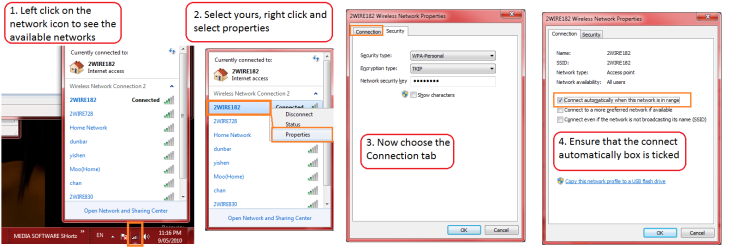
Hi
I'm new to 7 (all my desktops are XP Home).
With XP, the OS just connects automatically to my home wireless network.
However with this netbook, I have to do it manually everytime I reboot - it's a real pain.
Not sure if this OS, hardware or both.
Can anyone advise ?
I've looked at services.msc WiFi service and it's set to automatic already ....
thanks
PS Also, is there a way to get 7 to boot straight to desktop, without having to click on user icon or enter password ?
The reason these 2 are important to me is that this netbook is basically a music server, so when I come in from work etc., I'd like to just power up the netbook then walk off and play stuff via my network (Squeezebox) players
I'm new to 7 (all my desktops are XP Home).
With XP, the OS just connects automatically to my home wireless network.
However with this netbook, I have to do it manually everytime I reboot - it's a real pain.
Not sure if this OS, hardware or both.
Can anyone advise ?
I've looked at services.msc WiFi service and it's set to automatic already ....
thanks
PS Also, is there a way to get 7 to boot straight to desktop, without having to click on user icon or enter password ?
The reason these 2 are important to me is that this netbook is basically a music server, so when I come in from work etc., I'd like to just power up the netbook then walk off and play stuff via my network (Squeezebox) players
My Computer
At a glance
Windows 7 Starter
- Computer Manufacturer/Model Number
- Medion E1222 Netbook
- OS
- Windows 7 Starter