I know this problem has been discussed on this forum before, but none of the solutions worked for me.
I just reformatted my hard drive about 3 days ago after it refused to boot up. I reinstalled Windows 7 and everything was working just fine for about 2 hours, then for no apparent reason my internet connection dropped while I was browsing the internet. That was 3 days ago. My connection is still down.
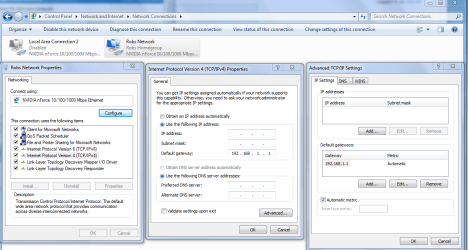
My wireless card is picking up the signal from my router, but when I try to connect to the network it tells me I am connected to an "Unidentified network" and have no internet access. I tried uninstalling and reinstalling the network drivers, system restore, as well as "netsh winsock reset" "netsh int ip reset reset.log" and "netsh winsock reset catalog".
The "ipconfig /renew" command gives me the following message: "An error occurred while renewing interface Wireless Network Connection : unable to contact your DHCP server. Request has timed out."
Windows Network Diagnostics says I have two problems.
1) "Problem with wireless adapter or access point."
2) "Wireless Network Connection doesn't have a valid IP configuration."
I have never encountered this problem before, and I have been using this same PC and wireless card for 6 months. I would really appreciate some help with this because recently my PC has just been having one problem after the next.
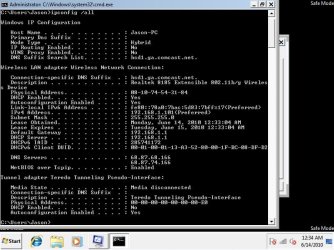
Here is my "ipconfig /all" information as well as the messages I get when using the /renew command. I noticed I don't have a default gateway listed, which I'm hoping might be a clue to my problem:
C:\Users\Jason>ipconfig /all
Windows IP Configuration
Host Name . . . . . . . . . . . . : Jason-PC
Primary Dns Suffix . . . . . . . :
Node Type . . . . . . . . . . . . : Hybrid
IP Routing Enabled. . . . . . . . : No
WINS Proxy Enabled. . . . . . . . : No
Wireless LAN adapter Wireless Network Connection:
Connection-specific DNS Suffix . :
Description . . . . . . . . . . . : Realtek 8185 Extensible 802.11b/g Wireles
s Device
Physical Address. . . . . . . . . : 08-10-74-54-31-84
DHCP Enabled. . . . . . . . . . . : Yes
Autoconfiguration Enabled . . . . : Yes
Link-local IPv6 Address . . . . . : fe80::91ee:a82e:d02d:296e%20(Preferred)
Autoconfiguration IPv4 Address. . : 169.254.41.110(Preferred)
Subnet Mask . . . . . . . . . . . : 255.255.0.0
Default Gateway . . . . . . . . . :
DHCPv6 IAID . . . . . . . . . . . : 336072820
DHCPv6 Client DUID. . . . . . . . : 00-01-00-01-13-A3-52-80-00-1F-BC-08-DF-D2
DNS Servers . . . . . . . . . . . : fec0:0:0:ffff::1%1
fec0:0:0:ffff::2%1
fec0:0:0:ffff::3%1
NetBIOS over Tcpip. . . . . . . . : Enabled
Ethernet adapter Local Area Connection:
Media State . . . . . . . . . . . : Media disconnected
Connection-specific DNS Suffix . :
Description . . . . . . . . . . . : Realtek RTL8168D/8111D Family PCI-E Gigab
it Ethernet NIC (NDIS 6.20)
Physical Address. . . . . . . . . : 00-1F-BC-08-DF-D2
DHCP Enabled. . . . . . . . . . . : Yes
Autoconfiguration Enabled . . . . : Yes
Tunnel adapter isatap.{2A0C0216-94EF-4A16-BD52-AA9E46DC508E}:
Media State . . . . . . . . . . . : Media disconnected
Connection-specific DNS Suffix . :
Description . . . . . . . . . . . : Microsoft ISATAP Adapter
Physical Address. . . . . . . . . : 00-00-00-00-00-00-00-E0
DHCP Enabled. . . . . . . . . . . : No
Autoconfiguration Enabled . . . . : Yes
Tunnel adapter Teredo Tunneling Pseudo-Interface:
Media State . . . . . . . . . . . : Media disconnected
Connection-specific DNS Suffix . :
Description . . . . . . . . . . . : Teredo Tunneling Pseudo-Interface
Physical Address. . . . . . . . . : 00-00-00-00-00-00-00-E0
DHCP Enabled. . . . . . . . . . . : No
Autoconfiguration Enabled . . . . : Yes
Tunnel adapter isatap.{0C2D1EDC-BC22-471D-BEF0-0CB4943FB217}:
Media State . . . . . . . . . . . : Media disconnected
Connection-specific DNS Suffix . :
Description . . . . . . . . . . . : Microsoft ISATAP Adapter #2
Physical Address. . . . . . . . . : 00-00-00-00-00-00-00-E0
DHCP Enabled. . . . . . . . . . . : No
Autoconfiguration Enabled . . . . : Yes
C:\Users\Jason>ipconfig /renew
Windows IP Configuration
An error occurred while renewing interface Wireless Network Connection : unable
to contact your DHCP server. Request has timed out.
No operation can be performed on Local Area Connection while it has its media di
sconnected.
An error occurred while releasing interface Loopback Pseudo-Interface 1 : The sy
stem cannot find the file specified.
I just reformatted my hard drive about 3 days ago after it refused to boot up. I reinstalled Windows 7 and everything was working just fine for about 2 hours, then for no apparent reason my internet connection dropped while I was browsing the internet. That was 3 days ago. My connection is still down.
My wireless card is picking up the signal from my router, but when I try to connect to the network it tells me I am connected to an "Unidentified network" and have no internet access. I tried uninstalling and reinstalling the network drivers, system restore, as well as "netsh winsock reset" "netsh int ip reset reset.log" and "netsh winsock reset catalog".
The "ipconfig /renew" command gives me the following message: "An error occurred while renewing interface Wireless Network Connection : unable to contact your DHCP server. Request has timed out."
Windows Network Diagnostics says I have two problems.
1) "Problem with wireless adapter or access point."
2) "Wireless Network Connection doesn't have a valid IP configuration."
I have never encountered this problem before, and I have been using this same PC and wireless card for 6 months. I would really appreciate some help with this because recently my PC has just been having one problem after the next.
Here is my "ipconfig /all" information as well as the messages I get when using the /renew command. I noticed I don't have a default gateway listed, which I'm hoping might be a clue to my problem:
C:\Users\Jason>ipconfig /all
Windows IP Configuration
Host Name . . . . . . . . . . . . : Jason-PC
Primary Dns Suffix . . . . . . . :
Node Type . . . . . . . . . . . . : Hybrid
IP Routing Enabled. . . . . . . . : No
WINS Proxy Enabled. . . . . . . . : No
Wireless LAN adapter Wireless Network Connection:
Connection-specific DNS Suffix . :
Description . . . . . . . . . . . : Realtek 8185 Extensible 802.11b/g Wireles
s Device
Physical Address. . . . . . . . . : 08-10-74-54-31-84
DHCP Enabled. . . . . . . . . . . : Yes
Autoconfiguration Enabled . . . . : Yes
Link-local IPv6 Address . . . . . : fe80::91ee:a82e:d02d:296e%20(Preferred)
Autoconfiguration IPv4 Address. . : 169.254.41.110(Preferred)
Subnet Mask . . . . . . . . . . . : 255.255.0.0
Default Gateway . . . . . . . . . :
DHCPv6 IAID . . . . . . . . . . . : 336072820
DHCPv6 Client DUID. . . . . . . . : 00-01-00-01-13-A3-52-80-00-1F-BC-08-DF-D2
DNS Servers . . . . . . . . . . . : fec0:0:0:ffff::1%1
fec0:0:0:ffff::2%1
fec0:0:0:ffff::3%1
NetBIOS over Tcpip. . . . . . . . : Enabled
Ethernet adapter Local Area Connection:
Media State . . . . . . . . . . . : Media disconnected
Connection-specific DNS Suffix . :
Description . . . . . . . . . . . : Realtek RTL8168D/8111D Family PCI-E Gigab
it Ethernet NIC (NDIS 6.20)
Physical Address. . . . . . . . . : 00-1F-BC-08-DF-D2
DHCP Enabled. . . . . . . . . . . : Yes
Autoconfiguration Enabled . . . . : Yes
Tunnel adapter isatap.{2A0C0216-94EF-4A16-BD52-AA9E46DC508E}:
Media State . . . . . . . . . . . : Media disconnected
Connection-specific DNS Suffix . :
Description . . . . . . . . . . . : Microsoft ISATAP Adapter
Physical Address. . . . . . . . . : 00-00-00-00-00-00-00-E0
DHCP Enabled. . . . . . . . . . . : No
Autoconfiguration Enabled . . . . : Yes
Tunnel adapter Teredo Tunneling Pseudo-Interface:
Media State . . . . . . . . . . . : Media disconnected
Connection-specific DNS Suffix . :
Description . . . . . . . . . . . : Teredo Tunneling Pseudo-Interface
Physical Address. . . . . . . . . : 00-00-00-00-00-00-00-E0
DHCP Enabled. . . . . . . . . . . : No
Autoconfiguration Enabled . . . . : Yes
Tunnel adapter isatap.{0C2D1EDC-BC22-471D-BEF0-0CB4943FB217}:
Media State . . . . . . . . . . . : Media disconnected
Connection-specific DNS Suffix . :
Description . . . . . . . . . . . : Microsoft ISATAP Adapter #2
Physical Address. . . . . . . . . : 00-00-00-00-00-00-00-E0
DHCP Enabled. . . . . . . . . . . : No
Autoconfiguration Enabled . . . . : Yes
C:\Users\Jason>ipconfig /renew
Windows IP Configuration
An error occurred while renewing interface Wireless Network Connection : unable
to contact your DHCP server. Request has timed out.
No operation can be performed on Local Area Connection while it has its media di
sconnected.
An error occurred while releasing interface Loopback Pseudo-Interface 1 : The sy
stem cannot find the file specified.
My Computer
At a glance
Windows 7 Home PremiumIntel Core i7 920Corsair XMS3 12GB HX3X12G1333C9ATI Radeon HD 4870
- Computer Manufacturer/Model Number
- Self-built
- OS
- Windows 7 Home Premium
- CPU
- Intel Core i7 920
- Motherboard
- EVGA X58 SLI LE 141-BL-E757-TR
- Memory
- Corsair XMS3 12GB HX3X12G1333C9
- Graphics Card(s)
- ATI Radeon HD 4870
- Monitor(s) Displays
- ASUS VW198T
- Hard Drives
- Western Digital 640GB WD6400AAKS
- PSU
- Ultra LSP750 750w
- Case
- Antec Three Hundred
- Cooling
- Cooler Master Hyper 212 Plus