interesting discussion, guys... i came across it while investigating this same problem.
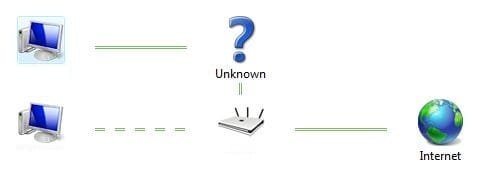
i can say, it could be no coincidence that i also have a D-Link DIR-655 router with up to date firmware. the tip about disabling the LLTD responder in the adapter was a good one, i wouldn't have thought to do that, personally. i tried it though, and what happens? the network map comes up -- albeit a bit... strange. basically i have two peer computers going into the router (right now), then the router to the internet. i only notice one oddity. not sure if this thing will let me upload my screenshot or not, but *my* computer goes through an "Unknown" intermediary device, then the router. i am assuming this is the D-Link screwing stuff up, since as it says right from the help file:
The device doesn't support the required protocols for Windows 7, which can cause some devices to appear on the network map, but not as you'd expect to see them. For example, a router could be shown as three things: a router, a switch, and an access point.
i don't know if that actually means
simultaneously or as one of the three. if the former were true, then that could easily explain this "Unknown" device between me and my router. Just FYI, the computer is wired directly into the router port.
just thought i would throw my experience in here in case someone stumbles upon this later on down the road like i did...

and btw, it did let me attach my screenshot. names of the computers and my ssid have been removed to protect the innocent. the top computer on the left is mine, the bottom on the left is my brother's (also win7 x64 ultimate). i notice that all connections through the map are two solid green lines, except his connection line is sort of "dashed". i'm not quite sure what that means.
i didn't even need a network map really, it just bothered me that it didn't work, haha...